curl发送get和post请求

curl可以在命令行下请求http请求,上传下载文件
一、发送get或post请求
1、curl发送get请求:curl http://baidu.com效果如下:
 2、curl发送post请求
curl -d "pagenum=1&pagesize=2" http://localhost:8080/zz/transfer/getNearInfoList -X POST说明: -X 指定请求的方法,POST外还可以指定PUT等请求方法 -d 请求携带的参数,多个参数使用&分隔
二、请求携带header请求头
有些请求需要携带请求头,例如指定Content-type=application/json -H 指定请求头,例如 -H "Content-type:application/json" 多个请求头传递多-H即可 借助charles获得包含请求头的请求信息的方法(请求上右键->Copy cURL Request)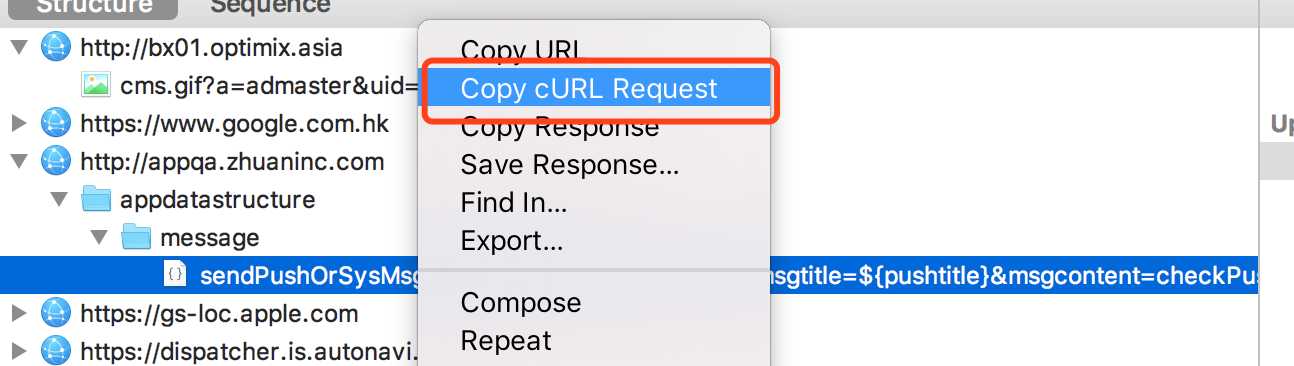 例如结果如下:
curl -H ‘Host: appqa.zhuaninc.com‘ -H ‘Upgrade-Insecure-Requests: 1‘ -H ‘Accept: text/html,application/xhtml+xml,application/xml;q=0.9,*/*;q=0.8‘ -H ‘User-Agent: Mozilla/5.0 (Macintosh; Intel Mac OS X 10_12_6) AppleWebKit/605.1.15 (KHTML, like Gecko) Version/11.1 Safari/605.1.15‘ -H ‘Accept-Language: zh-cn‘ --compressed ‘http://appqa.zhuaninc.com/appdatastructure/message/sendPushOrSysMsg?uid=71779969887312512&msgtitle=${pushtitle}&msgcontent=checkPushContent&pushimg=https://img.58cdn.com.cn/zhuanzhuan/images/iwantBuyTitle2x.png&msgprotocol=&envtype=0&msgtype=0&luodiye=%E6%99%AE%E9%80%9A%E7%B3%BB%E7%BB%9F%E6%B6%88%E6%81%AF‘
三、其他注意点
1、传递json格式的入参 -d可以指定入参为json格式,此时需要-H指定application/json的请求头 json格式入参:使用单引号‘‘括起json格式的入参,单引号中的内容是可以json解析的内容curl -i -X POST -H "Content-type:application/json"-d ‘{"to_user”:"meitian","msg":"‘${errorMsg}‘"}‘ http://wxmsg.zhuaninc.com/api/message/send2、使用变量替换curl请求中的部分内容 ‘"${var}"‘ 在双引号之外使用单引号,变量放在双引号内 例子如下:
curl -H ‘Host: appqa.zhuaninc.com‘ -H ‘Upgrade-Insecure-Requests: 1‘ -H ‘Accept: text/html,application/xhtml+xml,application/xml;q=0.9,*/*;q=0.8‘ -H ‘User-Agent: Mozilla/5.0 (Macintosh; Intel Mac OS X 10_12_6) AppleWebKit/605.1.15 (KHTML, like Gecko) Version/11.1 Safari/605.1.15‘ -H ‘Accept-Language: zh-cn‘ --compressed ‘http://appqa.zhuaninc.com/appdatastructure/message/sendPushOrSysMsg?uid=‘"$uid"‘&msgtitle=‘"$pushtitle"‘&msgcontent=checkPushContent‘




最新文章
-

QQ隐私保护设置技巧
2026-11-15 -
QQ账号隐私设置方法
2026-11-15 -
QQ密码修改教程
2026-11-15 -
QQ密码找回方法
2026-11-15 -
QQ账号安全防护技巧
2026-11-15 -
QQ账号防盗保护设置,筑牢账号安全的实用操作指南
2026-11-15 -
QQ登录保护开启方法
2026-11-15 -
QQ设备锁设置技巧
2026-11-15
热门文章
-
ios微信分享的兼容性问题
2026-07-04 -

微信浏览器中禁止app下载链接的两种处理方法
2026-07-04 -

微信小程序 - 事件绑定bind和catch 区别
2026-07-04 -

7-STM32物联网开发WIFI(ESP8266)+GPRS(Air202)系统方案微信小程序篇(微信配网_申请微信公众号)
2026-07-04 -

从微信中跳到外部浏览器
2026-07-04 -
9-STM32物联网开发WIFI(ESP8266)+GPRS(Air202)系统方案微信小程序篇(微信配网配置_开发者基本配置_2)
2026-07-04 -

【php】PHP制作QQ微信支付宝三合一收款码
2026-07-04 -

10-STM32物联网开发WIFI(ESP8266)+GPRS(Air202)系统方案微信小程序篇(微信配网配置_Airkiss步骤_1)
2026-07-04