
一、CommonJS
1,CommonJS 基本介绍
(1)CommonJS 是一种思想,它是为 JS 的表现来制定规范。由于 JS 没有模块系统、标准库较少、缺乏包管理工具,因此 CommonJS 应运而生。 (2)CommonJS 的目标是希望 JS 可以在任何地方运行,不只是浏览器中。只要我们的 JavaScript 是根据 CommonJS API 编写的,那么就可以在与 CommonJS 兼容的系统上运行。 (3)根据 CommonJS API 编写的 JavaScript 可以做下面这些事情:
- 编写服务端应用
- 编写命令行工具
- 编写基于 GUI 的桌面应用
(4)CommonJS 规范有很多实现,最有名要数 NodeJS 了。
2,CommonJS 的模块规范
一个文件就是一个模块,拥有单独的作用域。普通方式定义的变量、函数、对象都属于该模块内。
- 通过 require 来加载模块。
- 通过 exports 和 modul.exports 来暴露模块中的内容。
3,使用样例1:使用 exports 暴露模块接口
(1)下面我们在 Node.js 中创建一个模块,文件名为:hangge.js
| 1 2 3 | exports.hello = function () { console.log( ‘Hello hangge.com‘ ); } |
(2)创建一个 main.js 文件,引入这个模块并调用。
| 1 2 | var hangge = require( ‘./hangge‘ ); hangge.hello(); |
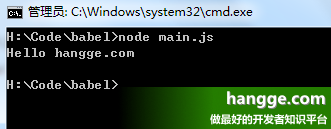
(3)运行结果如下:

4,使用样例2:使用 modul.exports 暴露模块对象
(1)下面我们把一个对象封装到模块中,文件名为:hangge.js
| 1 2 3 4 5 6 7 8 9 10 11 12 13 14 15 | //私有变量 var test = 110; //公开方法 function Hangge() { var name; this .setName = function (thyName) { name = thyName; }; this .hello = function () { console.log( ‘Hello ‘ + name); }; }; module.exports = Hangge; |
(2)创建一个 main.js 文件,引入这个模块并调用。
| 1 2 3 4 | var Hangge = require( ‘./hangge‘ ); var hello = new Hangge(); hello.setName( ‘hangge.com‘ ); hello.hello(); |
(3)运行结果如下:
二、ES2015
1,ES2015 基本介绍
2015 年 6 月, ES2015(即 ECMAScript 6、ES6) 正式发布。ES2015 是该语言的一个显著更新,也是自 2009 年 ES5 标准确定后的第一个重大更新。 虽然 ES2015 提出了许多令人激动的新特性,但由于目前 JavaScript 的运行环境众多,对 ECMAScript 标准的支持程度也不一样。
2,ES2015 的模块规范
- 一个模块就是一个独立的文件。该文件内部的所有变量,外部无法获取。
- export 命令用于规定模块的对外接口。
- import 命令用于输入其他模块提供的功能。
- ES6 模块的设计思想是尽量的静态化,使得编译时就能确定模块的依赖关系,以及输入和输出的变量。
3,使用样例1:使用 export 命令规定对外接口
(1)下面我们在 Node.js 中创建一个模块,文件名为:hangge.js
| 1 2 3 4 5 6 7 8 9 | //圆面积计算 export function area(radius) { return Math.PI * radius * radius; } //圆周长计算 export function circumference(radius) { return 2 * Math.PI * radius; } |
(2)创建一个 main.js 文件,引入这个模块并调用。这里 import 命令使用大括号的形式加载模块对外的接口。
| 1 2 3 | import {area,circumference} from ‘./hangge‘ ; console.log( ‘圆面积:‘ + area(10)); console.log( ‘圆周长:‘ + circumference(11)); |
当然也可以使用星号(*)指定一个对象,实现模块的整体加载。
| 1 2 3 | import * as circle from ‘./hangge‘ ; console.log( ‘圆面积:‘ + circle.area(10)); console.log( ‘圆周长:‘ + circle.circumference(11)); |
(3)由于 NodeJS 目前还不支持 ES2015 的 Module,这里我们借助 babel-node 来执行,运行结果如下:

4,使用样例2:使用 export default 命令来输出模块
(1)下面我们使用 export default 命令用于指定模块的默认输出。模块文件名为:hangge.js
| 1 2 3 4 5 6 7 8 9 | //圆面积计算(作为默认接口) export default function (radius) { return Math.PI * radius * radius; } //圆周长计算 export function circumference(radius) { return 2 * Math.PI * radius; } |
(2)创建一个 main.js 文件,引入这个模块并调用。注意:对于 export default 指定模块的默认输出,import 语句不需要使用大括号。
| 1 2 3 | import area, {circumference} from ‘./hangge‘ ; console.log( ‘圆面积:‘ + area(10)); console.log( ‘圆周长:‘ + circumference(11)); |
(3)同样借助 babel-node 来执行,运行结果如下:
三、AMD
1,AMD 基本介绍
- AMD 全称为 Asynchromous Module Definition(异步模块定义)
- AMD 是 RequireJS 在推广过程中对模块定义的规范化产出,它是一个在浏览器端模块化开发的规范。
- AMD 模式可以用于浏览器环境并且允许非同步加载模块,也可以按需动态加载模块。
2,AMD 的模块规范
- AMD 通过异步加载模块。模块加载不影响后面语句的运行。所有依赖某些模块的语句均放置在回调函数中。
- AMD 规范只定义了一个函数 define,通过 define 方法定义模块。该函数的描述如下:
define(id?, dependencies?, factory)
- id:指定义中模块的名字(可选)。如果没有提供该参数,模块的名字应该默认为模块加载器请求的指定脚本的名字。如果提供了该参数,模块名必须是“顶级”的和绝对的(不允许相对名字)。
- dependencies:当前模块依赖的,已被模块定义的模块标识的数组字面量(可选)。
- factory:一个需要进行实例化的函数或者一个对象。
- AMD 规范允许输出模块兼容 CommonJS 规范,这时 define 方法如下:
| 1 2 3 4 5 6 7 8 | define( function (require, exports, module) { var reqModule = require( "./someModule" ); requModule.test(); exports.asplode = function () { //someing } }); |
3,使用样例1:独立模块
(1)我们使用 RequireJS 定义一个不依赖其他模块得独立模块,文件名:hangge.js
| 1 2 3 4 5 6 7 8 | define( function (){ var add = function (x,y) { return x + y; }; return { add : add } }); |
(2)接着创建一个 html 页面,其内部加载并调用这个模块。
| 1 2 3 4 5 6 7 8 9 10 11 12 13 | <!DOCTYPE html> <html> <head> <script type= "text/javascript" src= "require.js" ></script> <script type= "text/javascript" > require([ ‘hangge‘ ], function (m){ console.log(m.add(2,3)); }); </script> </head> <body> </body> </html> |
(3)控制台输出如下:

4,使用样例2:存在依赖的函数式定义
下面定义的模块又依赖于 cart 和 inventory 这两个模块(它们都处在同一个文件夹下)
| 1 2 3 4 5 6 7 8 9 10 11 12 | define([ "./cart" , "./inventory" ], function (cart, inventory) { //return an object to define the "my/shirt" module. return { color: "blue" , size: "large" , addToCart: function () { inventory.decrement( this ); cart.add( this ); } } } ); |
四、CMD
1,CMD 基本介绍
(1)CMD 全称为 Common Module Definition,它是国内玉伯大神在开发 SeaJS 的时候提出来的。 (2)CMD 与 AMD 挺相近,二者区别如下:
- 对于依赖的模块 CMD 是延迟执行,而 AMD 是提前执行(不过 RequireJS 从 2.0 开始,也改成可以延迟执行。 )
- CMD 推崇依赖就近,AMD 推崇依赖前置。
- AMD 的 api 默认是一个当多个用,CMD 严格的区分推崇职责单一,其每个 API 都简单纯粹。例如:AMD 里 require 分全局的和局部的。CMD 里面没有全局的 require,提供 seajs.use() 来实现模块系统的加载启动。
2,使用样例1:使用 exports 暴露模块接口
(1)下面使用 sea.js 创建一个模块,文件名为:hangge.js
| 1 2 3 4 5 6 7 8 | define(function(require, exports) { // 对外提供name属性 exports.name = ‘hangge‘ ; // 对外提供hello方法 exports.hello = function() { console.log( ‘Hello hangge.com‘ ); }; }); |
(2)接着创建一个 html 页面,其内部加载并调用这个模块。
| 1 2 3 4 5 6 7 8 9 10 11 12 13 14 | <!DOCTYPE html> <html> <head> <script type= "text/javascript" src= "sea.js" ></script> <script type= "text/javascript" > //加载一个模块,在加载完成时,执行回调 seajs.use( ‘hangge‘ , function (a) { a.hello(); }); </script> </head> <body> </body> </html> |
(3)控制台输出如下:

3,使用样例2:使用 modul.exports 暴露模块对象
(1)下面我们把一个对象封装到模块中,文件名为:hangge.js
| 1 2 3 4 5 6 7 8 9 | define( function (require, exports, module) { // 对外提供接口 module.exports = { name: ‘hangge‘ , hello: function () { console.log( ‘Hello hangge.com‘ ); } }; }); |
(2)接着创建一个 html 页面,其内部加载并调用这个模块。
| 1 2 3 4 5 6 7 8 9 10 11 12 13 14 | <!DOCTYPE html> <html> <head> <script type= "text/javascript" src= "sea.js" ></script> <script type= "text/javascript" > //加载一个模块,在加载完成时,执行回调 seajs.use( ‘hangge‘ , function (a) { a.hello(); }); </script> </head> <body> </body> </html> |
(3)控制台输出如下:
原文出自:www.hangge.com 转载请保留原文链接:https://www.hangge.com/blog/cache/detail_1686.html