
原文:
ASP.NET Core技术研究-探秘Host主机启动过程
当我们将原有ASP.NET 应用程序升级迁移到ASP.NET Core之后,我们发现代码工程中多了两个类Program类和Startup类。
接下来我们详细探秘一下通用主机Host的启动过程。
一、Program类的Main函数入口
Program类最重要的功能就是启动主机,这里有一个主机的概念,是ASP.NET Core全新引入的。
主机负责应用程序启动和生存期管理。 同时,主机也是封装应用程序资源的对象:
- 依赖注入 (DI)
- Logging
- Configuration
- IHostedService 实现
启动主机时,它在 DI 容器中找到 IHostedService 的每个实现,然后调用 IHostedService.StartAsync。 在 web 应用中,其中一个 IHostedService 的实现是启动 HTTP 服务器实现的 web 服务。这里的HTTP服务器默认是Kestrel。
即:ASP.NET Core主机启动时,会启动一个HTTP服务器,默认是Kestrel。启动后监听并响应某个端口的HTTP请求。
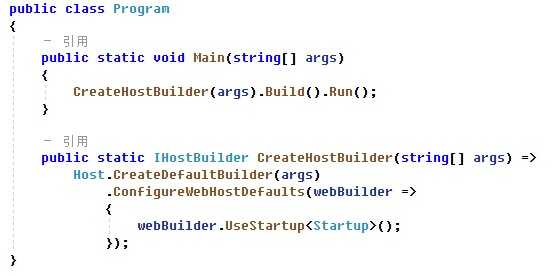
我们继续看Program类的代码:
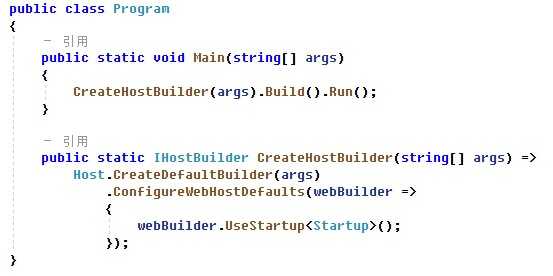
从上述代码可以看到,Main函数中首先调用CreateHostBuilder方法,返回一个IHostBuilder。然后调用IHostBuilder.Build()方法完成
二、Host.CreateDefaultBuilder(args): 构造IHostBuilder的默认实现HostBuilder
在CreateHostBuilder方法内部,首先调用了Host.CreateDefaultBuilder构造了一个HostBuilder,这个我们先看下源码,看看到底Host类内部做了什么操作:
https://github.com/dotnet/extensions/blob/release/3.1/src/Hosting/Hosting/src/Host.cs
| 1 2 3 4 5 6 7 8 9 10 11 12 13 14 15 16 17 18 19 20 21 22 23 24 25 26 27 28 29 30 31 32 33 34 35 36 37 38 39 40 41 42 43 44 45 46 47 48 49 50 51 52 53 54 55 56 57 58 59 60 61 62 63 64 65 66 67 68 69 | public static IHostBuilder CreateDefaultBuilder( string [] args) { var builder = new HostBuilder(); builder.UseContentRoot(Directory.GetCurrentDirectory()); builder.ConfigureHostConfiguration(config => { config.AddEnvironmentVariables(prefix: "DOTNET_" ); if (args != null ) { config.AddCommandLine(args); } }); builder.ConfigureAppConfiguration((hostingContext, config) => { var env = hostingContext.HostingEnvironment; config.AddJsonFile( "appsettings.json" , optional: true , reloadOnChange: true ) .AddJsonFile($ "appsettings.{env.EnvironmentName}.json" , optional: true , reloadOnChange: true ); if (env.IsDevelopment() && ! string .IsNullOrEmpty(env.ApplicationName)) { var appAssembly = Assembly.Load( new AssemblyName(env.ApplicationName)); if (appAssembly != null ) { config.AddUserSecrets(appAssembly, optional: true ); } } config.AddEnvironmentVariables(); if (args != null ) { config.AddCommandLine(args); } }) .ConfigureLogging((hostingContext, logging) => { var isWindows = RuntimeInformation.IsOSPlatform(OSPlatform.Windows); // IMPORTANT: This needs to be added *before* configuration is loaded, this lets // the defaults be overridden by the configuration. if (isWindows) { // Default the EventLogLoggerProvider to warning or above logging.AddFilter<EventLogLoggerProvider>(level => level >= LogLevel.Warning); } logging.AddConfiguration(hostingContext.Configuration.GetSection( "Logging" )); logging.AddConsole(); logging.AddDebug(); logging.AddEventSourceLogger(); if (isWindows) { // Add the EventLogLoggerProvider on windows machines logging.AddEventLog(); } }) .UseDefaultServiceProvider((context, options) => { var isDevelopment = context.HostingEnvironment.IsDevelopment(); options.ValidateScopes = isDevelopment; options.ValidateOnBuild = isDevelopment; }); return builder; } |
从上述代码中,可以看到CreateDefaultBuilder内部构造了一个HostBuilder,同时设置了:
- 将内容根目录(contentRootPath)设置为由 GetCurrentDirectory 返回的路径。
- 通过以下源加载主机配置
- 环境变量(DOTNET_前缀)配置
- 命令行参数配置
- 通过以下对象加载应用配置
- appsettings.json
- appsettings.{Environment}.json
- 密钥管理器 当应用在 Development 环境中运行时
- 环境变量
- 命令行参数
- 添加日志记录提供程序
-
- 控制台
- 调试
- EventSource
- EventLog( Windows环境下)
- 当环境为“开发”时,启用范围验证和依赖关系验证。
以上构造完成了HostBuilder,针对ASP.NET Core应用,代码继续调用了HostBuilder.ConfigureWebHostDefaults方法。
三、IHostBuilder.ConfigureWebHostDefaults:通过GenericWebHostBuilder对HostBuilder增加ASP.NET Core的运行时设置
构造完成HostBuilder之后,针对ASP.NET Core应用,继续调用了HostBuilder.ConfigureWebHostDefaults方法。这是一个ASP.NET Core的一个扩展方法:

我们继续看ConfigureWebHostDefaults扩展方法内部做了哪些事情:
| 1 2 3 4 5 6 7 8 9 10 11 12 13 14 15 16 17 18 19 20 21 22 23 24 25 26 27 28 29 30 31 32 33 34 35 36 | using System; using Microsoft.AspNetCore.Hosting; using Microsoft.AspNetCore; namespace Microsoft.Extensions.Hosting { /// <summary> /// Extension methods for configuring the IWebHostBuilder. /// </summary> public static class GenericHostBuilderExtensions { /// <summary> /// Initializes a new instance of the <see cref="IWebHostBuilder"/> class with pre-configured defaults. /// </summary> /// <remarks> /// The following defaults are applied to the <see cref="IWebHostBuilder"/>: /// use Kestrel as the web server and configure it using the application‘s configuration providers, /// adds the HostFiltering middleware, /// adds the ForwardedHeaders middleware if ASPNETCORE_FORWARDEDHEADERS_ENABLED=true, /// and enable IIS integration. /// </remarks> /// <param name="builder">The <see cref="IHostBuilder" /> instance to configure</param> /// <param name="configure">The configure callback</param> /// <returns>The <see cref="IHostBuilder"/> for chaining.</returns> public static IHostBuilder ConfigureWebHostDefaults( this IHostBuilder builder, Action<IWebHostBuilder> configure) { return builder.ConfigureWebHost(webHostBuilder => { WebHost.ConfigureWebDefaults(webHostBuilder); configure(webHostBuilder); }); } } } ? 2020 GitHub, Inc. |
首先,通过类GenericHostWebHostBuilderExtensions,对IHostBuilder扩展一个方法:ConfigureWebHost:builder.ConfigureWebHost
在这个扩展方法中实现了对IWebHostBuilder的依赖注入:即将GenericWebHostBuilder实例传入方法ConfigureWebHostDefaults内部
| 1 2 3 4 5 6 7 8 9 10 11 12 13 14 15 16 17 | using System; using Microsoft.AspNetCore.Hosting; using Microsoft.Extensions.DependencyInjection; namespace Microsoft.Extensions.Hosting { public static class GenericHostWebHostBuilderExtensions { public static IHostBuilder ConfigureWebHost( this IHostBuilder builder, Action<IWebHostBuilder> configure) { var webhostBuilder = new GenericWebHostBuilder(builder); configure(webhostBuilder); builder.ConfigureServices((context, services) => services.AddHostedService<GenericWebHostService>()); return builder; } } } |
通过GenericWebHostBuilder的构造函数GenericWebHostBuilder(buillder),将已有的HostBuilder增加了ASP.NET Core运行时设置。
。。。
先看到这,让我们回到ConfigureWebHostDefaults:
将上面两段代码合并一下进行理解:ConfigureWebHostDefaults做了两件事情:
1. 扩展IHostBuilder增加ConfigureWebHost,引入IWebHostBuilder的实现GenericWebHostBuilder,将已有的HostBuilder增加ASP.NET Core运行时的设置。
2. ConfigureWebHost代码中的configure(webhostBuilder):对注入的IWebHostBuilder,调用 WebHost.ConfigureWebDefaults(webHostBuilder),启用各类设置,如下代码解读:
| 1 2 3 4 5 6 7 8 9 10 11 12 13 14 15 16 17 18 19 20 21 22 23 24 25 26 27 28 29 30 31 32 33 34 35 36 37 38 39 40 41 42 43 44 45 46 47 48 49 50 51 | internal static void ConfigureWebDefaults(IWebHostBuilder builder) { builder.ConfigureAppConfiguration((ctx, cb) => { if (ctx.HostingEnvironment.IsDevelopment()) { StaticWebAssetsLoader.UseStaticWebAssets(ctx.HostingEnvironment, ctx.Configuration); } }); builder.UseKestrel((builderContext, options) => { options.Configure(builderContext.Configuration.GetSection( "Kestrel" )); }) .ConfigureServices((hostingContext, services) => { // Fallback services.PostConfigure<HostFilteringOptions>(options => { if (options.AllowedHosts == null || options.AllowedHosts.Count == 0) { // "AllowedHosts": "localhost;127.0.0.1;[::1]" var hosts = hostingContext.Configuration[ "AllowedHosts" ]?.Split( new [] { ‘;‘ }, StringSplitOptions.RemoveEmptyEntries); // Fall back to "*" to disable. options.AllowedHosts = (hosts?.Length > 0 ? hosts : new [] { "*" }); } }); // Change notification services.AddSingleton<IOptionsChangeTokenSource<HostFilteringOptions>>( new ConfigurationChangeTokenSource<HostFilteringOptions>(hostingContext.Configuration)); services.AddTransient<IStartupFilter, HostFilteringStartupFilter>(); if ( string .Equals( "true" , hostingContext.Configuration[ "ForwardedHeaders_Enabled" ], StringComparison.OrdinalIgnoreCase)) { services.Configure<ForwardedHeadersOptions>(options => { options.ForwardedHeaders = ForwardedHeaders.XForwardedFor | ForwardedHeaders.XForwardedProto; // Only loopback proxies are allowed by default. Clear that restriction because forwarders are // being enabled by explicit configuration. options.KnownNetworks.Clear(); options.KnownProxies.Clear(); }); services.AddTransient<IStartupFilter, ForwardedHeadersStartupFilter>(); } services.AddRouting(); }) .UseIIS() .UseIISIntegration(); } |
内部实现了:
- 前缀为 ASPNETCORE_ 的环境变量加载主机配置。
- 将 Kestrel作为默认的Web服务器
- 添加HostFiltering中间件(主机筛选中间件)
- 如果ASPNETCORE_FORWARDEDHEADERS_ENABLED=true,添加转接头中间件ForwardedHeaders
- 启用IIS集成
3. 返回ConfigureWebHostDefaults代码中的configure(webHostBuilder):执行Program类中的webBuilder.UseStartup<Startup>();
第三章节中,以上过程完成了IHostBuilder.ConfigureWebHostDefaults,通过GenericWebHostBuilder对HostBuilder增加ASP.NET Core的运行时设置。
接下来继续Build和Run的过程。
四、CreateHostBuilder(args).Build().Run();
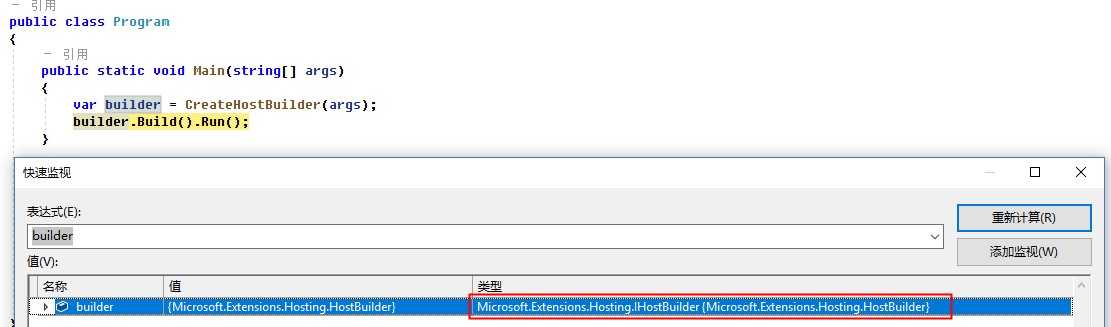
CreateHostBuilder返回的IHostBuilder,我们通过代码Debug,看一下具体的类型:Microsoft.Extensions.Hosting.HostBuilder,这样进一步验证了前三个章节的代码。
1. Build的过程
先看下Build的源码:https://github.com/dotnet/extensions/blob/release/3.1/src/Hosting/Hosting/src/HostBuilder.cs
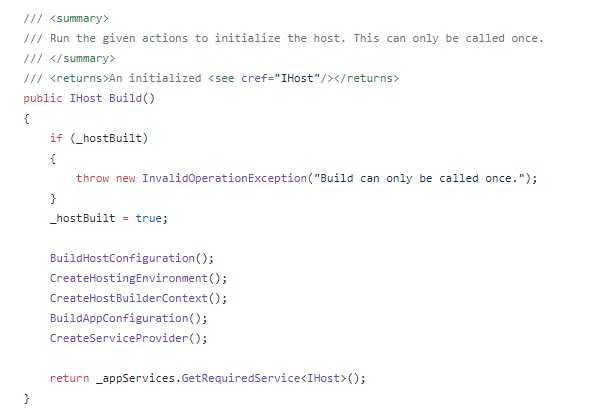
Build的过程主要完成了:
- BuildHostConfiguration: 构造配置系统,初始化 IConfiguration _hostConfiguration;
- CreateHostingEnvironment:构建主机HostingEnvironment环境信息,包含ApplicationName、EnvironmentName、ContentRootPath等
- CreateHostBuilderContext:创建主机Build上下文HostBuilderContext,上下文中包含:HostingEnvironment和Configuration
- BuildAppConfiguration:构建应用程序配置
- CreateServiceProvider:创建依赖注入服务提供程序, 即依赖注入容器
2. Run的过程
我们先通过Debug,看一下Host的信息:Microsoft.Extensions.Hosting.Internal.Host
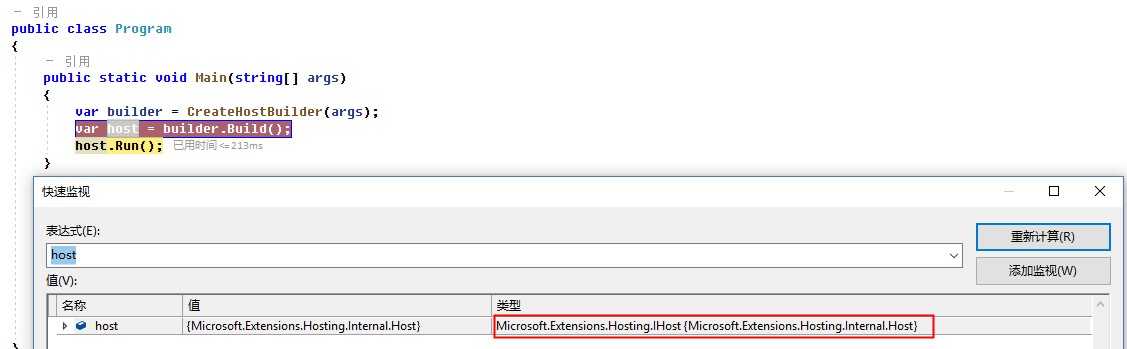
这个Run方法也是一个扩展方法:HostingAbstractionsHostExtensions.Run
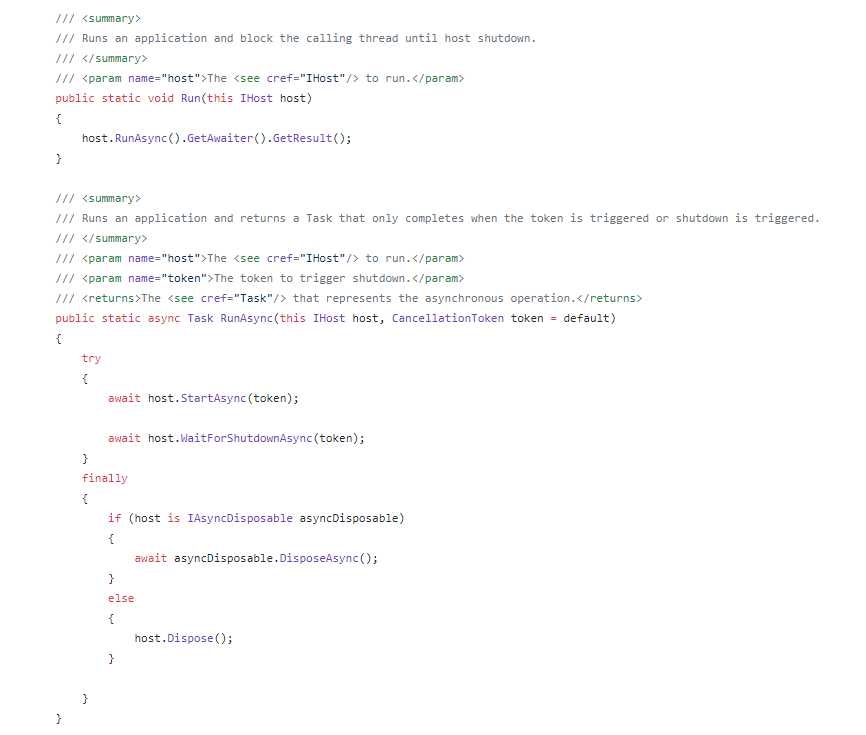
其实内部转调的还是Host.StartAsync方法,在内部启动了DI依赖注入容器中所有注册的服务。
代码链接:https://github.com/dotnet/extensions/blob/release/3.1/src/Hosting/Hosting/src/Internal/Host.cs
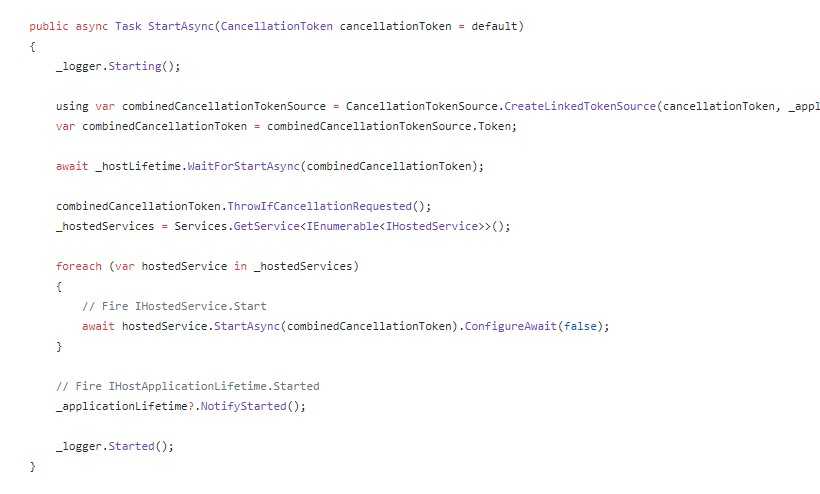
整个Host主机的启动过程还是非常复杂的,我们只是简单的在代码层面研究了一遍,感觉只是有了个大致的轮廓,具体怎么执行的,是不是如上面代码的解释,还需要深入继续研究。
接下来下一篇文章准备把源码单步调试看看。加深对ASP.NET Core底层技术原理的理解,只有理解了底层技术实现,我们在应用层才能更好、正确的使用。
周国庆
2020/4/6