
z-index属性介绍#
- 只有设置了定位我们才会使用到该
z-index属性,如:固定定位、相对定位、绝对定位。 - 定位元素默认的
z-index属性值是0。 - 如果
2个定位的元素都没有设置z-index属性,后者会覆盖到前者。 - 如果
2个定位的元素都设置了z-index属性,并且数值一样大还是后者会覆盖到前者。 z-index属性的属性值大的就会覆盖小,就是设置元素的层级。
z-index属性实践#
-
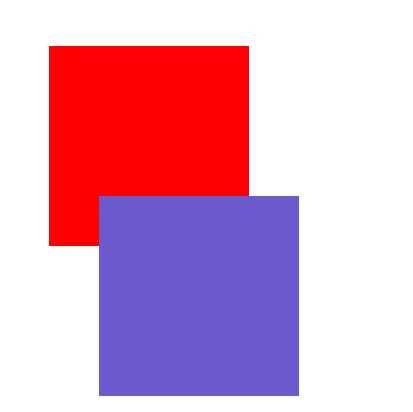
用实践证明这句话,如果
2个定位的元素都没有设置z-index属性,后者会覆盖到前者。 -
代码块
  Copy
 <!DOCTYPE html>
<html lang="en">

<head>
  <meta charset="UTF-8">
  <meta name="viewport" content="width=device-width, initial-scale=1.0">
  <meta http-equiv="X-UA-Compatible" content="ie=edge">
  <title>z-index属性</title>
  <style> div{ width: 200px; height: 200px; } .div1{ background-color: red; position: relative; top: 50px; left: 50px; } .div2{ background-color: slateblue; position: relative; left: 100px; } </style>
</head>

<body>
    <div class="div1"></div>
    <div class="div2"></div>
</body>

</html>
-
结果图

- 用实践来证明这句话,如果
2个定位的元素都设置了z-index属性,并且数值一样大还是后者会覆盖到前者。 -
代码块
  Copy
 <!DOCTYPE html>
<html lang="en">

<head>
  <meta charset="UTF-8">
  <meta name="viewport" content="width=device-width, initial-scale=1.0">
  <meta http-equiv="X-UA-Compatible" content="ie=edge">
  <title>z-index属性</title>
  <style> div{ width: 200px; height: 200px; } .div1{ background-color: red; position: relative; top: 50px; left: 50px; z-index: 2; } .div2{ background-color: slateblue; position: relative; left: 100px; z-index: 2; } </style>
</head>

<body>
    <div class="div1"></div>
    <div class="div2"></div>
</body>

</html>
-
结果图
-
用实践来证明这句话,
z-index属性的属性值大的就会覆盖小,就是设置元素的层级。 -
代码块
  Copy
 <!DOCTYPE html>
<html lang="en">

<head>
  <meta charset="UTF-8">
  <meta name="viewport" content="width=device-width, initial-scale=1.0">
  <meta http-equiv="X-UA-Compatible" content="ie=edge">
  <title>z-index属性</title>
  <style> div{ width: 200px; height: 200px; } .div1{ background-color: red; position: relative; top: 50px; left: 50px; z-index: 3; } .div2{ background-color: slateblue; position: relative; left: 100px; z-index: 2; } </style>
</head>

<body>
    <div class="div1"></div>
    <div class="div2"></div>
</body>

</html>
-
结果图
