
PHP实现QQ快速登录,罗列了三种方法
方法一:面向过程,回调地址和首次触发登录写到了一个方法页面【因为有了if做判断】,
方法二,三:面向对象
1.先调用登录方法,向腾讯发送请求,
2.腾讯携带本网站唯一对应参数OPENID,ACCESSTOKEN,返回到对应回调页面,
3.回调页面接受到腾讯的参数后,通过这个两个参数,再发出对应的请求,如查询用户的数据。
4.腾讯做出对应的操作,如返回这个用户的数据给你
即使你没看懂,也没关系,按照我下面的流程来,保证你可以实现。
前期准备:
使用人家腾讯的功能,总得和人家打招呼吧!
QQ互联首页:http://connect.qq.com/
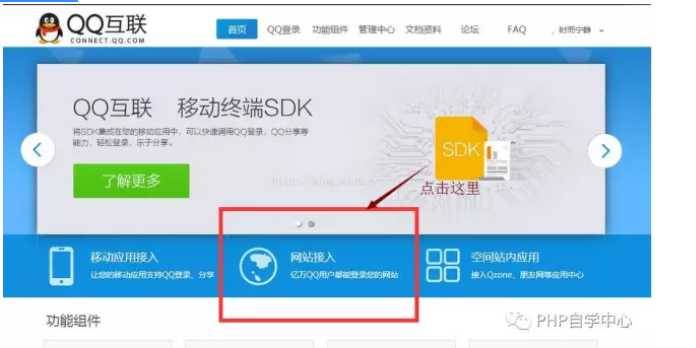
进入网址后,按如下操作来:
一.进入官网
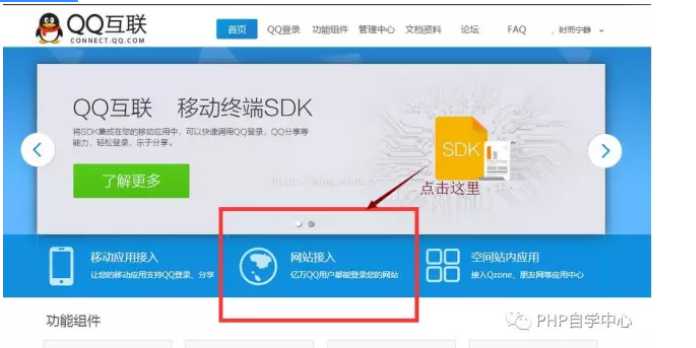
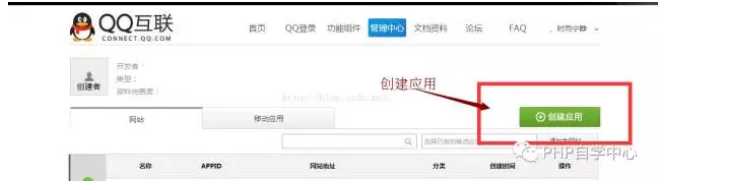
二.申请创建【网站】应用
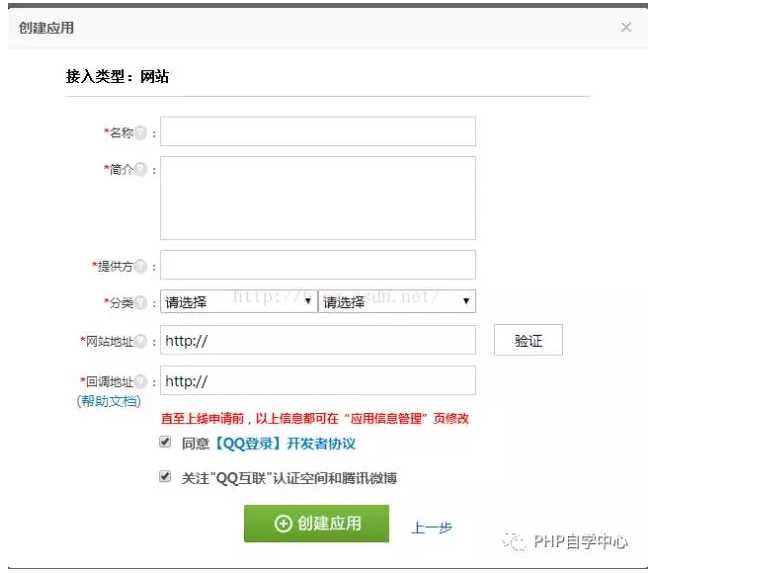
三.按要求填写资料
注意网站地址:填写你要设置快速登录的网址,eg:http://www.test.com;
回调地址:填写你发送QQ快速登陆后,腾讯得给你信息,这个信息往此页面接受。eg:http://www.test.com/accept_info.php
【详细的申请填写,请见官方提示,这里不做赘述】
四.申请成功后,完善信息
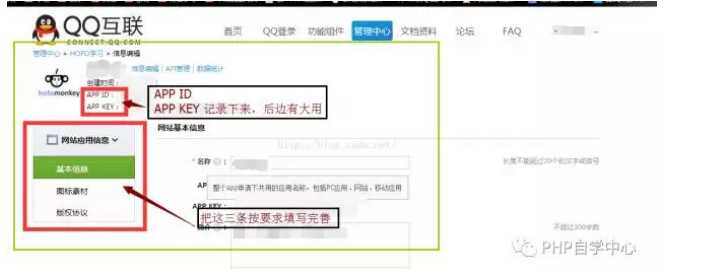
最终要求,获得APP_ID ,APP_KEY
五.代码部分:
在你对应的PHP文件内写入,如下
方法一,面向过程法
使用方法:配置$app_id,$app_secret,$my_url后,其他原封复制即可,$user_data为返回的登录信息
代码:
———————————————————————————————————————————————————-
//应用的APPID
$app_id
=
"你的APPID"
;
//应用的APPKEY
$app_secret
=
"你的APPKEY"
;
//【成功授权】后的回调地址,即此地址在腾讯的信息中有储存
$my_url
=
"你的回调网址"
;
//Step1:获取Authorization Code
session_start();
$code
=
$_REQUEST
[
"code"
];
//存放Authorization Code
if
(
empty
(
$code
))
{
//state参数用于防止CSRF攻击,成功授权后回调时会原样带回
$_SESSION
[
‘state‘
] = md5(uniqid(rand(), TRUE));
//拼接URL
$dialog_url
=
"https://graph.qq.com/oauth2.0/authorize?response_type=code&client_id="
.
$app_id
.
"&redirect_uri="
. urlencode(
$my_url
) .
"&state="
.
$_SESSION
[
‘state‘
];
echo
(
"<script> top.location.href=‘"
.
$dialog_url
.
"‘</script>"
);
}
//Step2:通过Authorization Code获取Access Token
if
(
$_REQUEST
[
‘state‘
] ==
$_SESSION
[
‘state‘
] || 1)
{
//拼接URL
$token_url
=
"https://graph.qq.com/oauth2.0/token?grant_type=authorization_code&"
.
"client_id="
.
$app_id
.
"&redirect_uri="
. urlencode(
$my_url
)
.
"&client_secret="
.
$app_secret
.
"&code="
.
$code
;
$response
=
file_get_contents
(
$token_url
);
if
(
strpos
(
$response
,
"callback"
) !== false)
//如果登录用户临时改变主意取消了,返回true!==false,否则执行step3
{
$lpos
=
strpos
(
$response
,
"("
);
$rpos
=
strrpos
(
$response
,
")"
);
$response
=
substr
(
$response
,
$lpos
+ 1,
$rpos
-
$lpos
-1);
$msg
= json_decode(
$response
);
if
(isset(
$msg
->error))
{
echo
"<h3>error:</h3>"
.
$msg
->error;
echo
"<h3>msg :</h3>"
.
$msg
->error_description;
exit
;
}
}
//Step3:使用Access Token来获取用户的OpenID
$params
=
array
();
parse_str
(
$response
,
$params
);
//把传回来的数据参数变量化
$graph_url
=
"https://graph.qq.com/oauth2.0/me?access_token="
.
$params
[
‘access_token‘
];
$str
=
file_get_contents
(
$graph_url
);
if
(
strpos
(
$str
,
"callback"
) !== false)
{
$lpos
=
strpos
(
$str
,
"("
);
$rpos
=
strrpos
(
$str
,
")"
);
$str
=
substr
(
$str
,
$lpos
+ 1,
$rpos
-
$lpos
-1);
}
$user
= json_decode(
$str
);
//存放返回的数据 client_id ,openid
if
(isset(
$user
->error))
{
echo
"<h3>error:</h3>"
.
$user
->error;
echo
"<h3>msg :</h3>"
.
$user
->error_description;
exit
;
}
//echo("Hello " . $user->openid);
//echo("Hello " . $params[‘access_token‘]);
//Step4:使用<span >openid,</span><span >access_token来获取所接受的用户信息。</span>
$user_data_url
=
"https://graph.qq.com/user/get_user_info?access_token={$params[‘access_token‘]}&oauth_consumer_key={$app_id}&openid={$user->openid}&format=json"
;
$user_data
=
file_get_contents
(
$user_data_url
);
//此为获取到的user信息
}
else
{
echo
(
"The state does not match. You may be a victim of CSRF."
);
}
———————————————————————————————————————————————————-
方法二,面向对象 使用类QQ_LoginAction.class
使用方法:
1.在QQ_LoginAction.class中正确配置 APPID,APPKEY CALLBACK(回调网址)
2.在调用方法中,代码:
$qq_login = new \Component\QQ_LoginAction(); //引入此类文件即可
$qq_login
->qq_login();
3.在回调页面中,代码:
$qc = new \Component\QQ_LoginAction();
$acs
=
$qc
->qq_callback();<span style=
"white-space:pre"
>
//access_token
$oid
=
$qc
->get_openid();<span style=
"white-space:pre"
>
//openid
$user_data
=
$qc
->get_user_info();<span style=
"white-space:pre"
>
//get_user_info()为获得该用户的信息,其他操作方法见API文档
4.$user_data即为返回的用户数据。
5.QQ_LoginAction.class.php 文件代码:【用的ThinkPHP3.2】
———————————————————————————————————————-
<?php
namespace
Component;
session_start();
define(
‘APPID‘
,
‘XXXX‘
);
//appid
define(
‘APPKEY‘
,
‘XXXX‘
);
//appkey
define(
‘CALLBACK‘
,
‘XXXX‘
);
//回调地址
define(
‘SCOPE‘
,
‘get_user_info,list_album,add_album,upload_pic,add_topic,add_weibo‘
);
//授权接口列表
class
QQ_LoginAction {
const
GET_AUTH_CODE_URL =
"https://graph.qq.com/oauth2.0/authorize"
;
const
GET_ACCESS_TOKEN_URL =
"https://graph.qq.com/oauth2.0/token"
;
const
GET_OPENID_URL =
"https://graph.qq.com/oauth2.0/me"
;
private
$APIMap
=
array
(
"get_user_info"
=>
array
(
//获取用户资料
"https://graph.qq.com/user/get_user_info"
,
array
(
"format"
=>
"json"
),
),
"add_t"
=>
array
(
//发布一条普通微博
"https://graph.qq.com/t/add_t"
,
array
(
"format"
=>
"json"
,
"content"
,
"#clientip"
,
"#longitude"
,
"#latitude"
,
"#compatibleflag"
),
"POST"
),
"add_pic_t"
=>
array
(
//发布一条图片微博
"https://graph.qq.com/t/add_pic_t"
,
array
(
"content"
,
"pic"
,
"format"
=>
"json"
,
"#clientip"
,
"#longitude"
,
"#latitude"
,
"#syncflag"
,
"#compatiblefalg"
),
"POST"
),
"del_t"
=>
array
(
//删除一条微博
"https://graph.qq.com/t/del_t"
,
array
(
"id"
,
"format"
=>
"json"
),
"POST"
),
"get_repost_list"
=>
array
(
//获取单条微博的转发或点评列表
"https://graph.qq.com/t/get_repost_list"
,
array
(
"flag"
,
"rootid"
,
"pageflag"
,
"pagetime"
,
"reqnum"
,
"twitterid"
,
"format"
=>
"json"
)
),
"get_info"
=>
array
(
//获取当前用户资料
"https://graph.qq.com/user/get_info"
,
array
(
"format"
=>
"json"
)
),
"get_other_info"
=>
array
(
//获取其他用户资料
"https://graph.qq.com/user/get_other_info"
,
array
(
"format"
=>
"json"
,
"#name-1"
,
"#fopenid-1"
)
),
"get_fanslist"
=>
array
(
"https://graph.qq.com/relation/get_fanslist"
, //我的微博粉丝列表
array
(
"format"
=>
"json"
,
"reqnum"
,
"startindex"
,
"#mode"
,
"#install"
,
"#sex"
)
),
"get_idollist"
=>
array
(
"https://graph.qq.com/relation/get_idollist"
, //我的微博收听列表
array
(
"format"
=>
"json"
,
"reqnum"
,
"startindex"
,
"#mode"
,
"#install"
)
),
"add_idol"
=>
array
(
"https://graph.qq.com/relation/add_idol"
, //微博收听某用户
array
(
"format"
=>
"json"
,
"#name-1"
,
"#fopenids-1"
),
"POST"
),
"del_idol"
=>
array
(
//微博取消收听某用户
"https://graph.qq.com/relation/del_idol"
,
array
(
"format"
=>
"json"
,
"#name-1"
,
"#fopenid-1"
),
"POST"
)
);
private
$keysArr
;
function
__construct(){
if
(
$_SESSION
[
"openid"
]){
$this
->keysArr =
array
(
"oauth_consumer_key"
=> APPID,
"access_token"
=>
$_SESSION
[
‘access_token‘
],
"openid"
=>
$_SESSION
[
"openid"
]
);
}
else
{
$this
->keysArr =
array
(
"oauth_consumer_key"
=> APPID
);
}
}
public
function
qq_login(){
//-------生成唯一随机串防CSRF攻击
$_SESSION
[
‘state‘
] = md5(uniqid(rand(), TRUE));
$keysArr
=
array
(
"response_type"
=>
"code"
,
"client_id"
=> APPID,
"redirect_uri"
=> CALLBACK,
"state"
=>
$_SESSION
[
‘state‘
],
"scope"
=> SCOPE
);
$login_url
= self::GET_AUTH_CODE_URL.
‘?‘
.http_build_query(
$keysArr
);
header(
"Location:$login_url"
);
}
public
function
qq_callback(){
//--------验证state防止CSRF攻击
if
(
$_GET
[
‘state‘
] !=
$_SESSION
[
‘state‘
]){
return
false;
}
//-------请求参数列表
$keysArr
=
array
(
"grant_type"
=>
"authorization_code"
,
"client_id"
=> APPID,
"redirect_uri"
=> CALLBACK,
"client_secret"
=> APPKEY,
"code"
=>
$_GET
[
‘code‘
]
);
//------构造请求access_token的url
$token_url
= self::GET_ACCESS_TOKEN_URL.
‘?‘
.http_build_query(
$keysArr
);
$response
=
$this
->get_contents(
$token_url
);
if
(
strpos
(
$response
,
"callback"
) !== false){
$lpos
=
strpos
(
$response
,
"("
);
$rpos
=
strrpos
(
$response
,
")"
);
$response
=
substr
(
$response
,
$lpos
+ 1,
$rpos
-
$lpos
-1);
$msg
= json_decode(
$response
);
if
(isset(
$msg
->error)){
$this
->showError(
$msg
->error,
$msg
->error_description);
}
}
$params
=
array
();
parse_str
(
$response
,
$params
);
$_SESSION
[
"access_token"
]=
$params
[
"access_token"
];
$this
->keysArr[
‘access_token‘
]=
$params
[
‘access_token‘
];
return
$params
[
"access_token"
];
}
public
function
get_contents(
$url
){
if
(
ini_get
(
"allow_url_fopen"
) ==
"1"
) {
$response
=
file_get_contents
(
$url
);
}
else
{
$ch
= curl_init();
curl_setopt(
$ch
, CURLOPT_SSL_VERIFYPEER, FALSE);
curl_setopt(
$ch
, CURLOPT_RETURNTRANSFER, TRUE);
curl_setopt(
$ch
, CURLOPT_URL,
$url
);
$response
= curl_exec(
$ch
);
curl_close(
$ch
);
}
if
(
empty
(
$response
)){
return
false;
}
return
$response
;
}
public
function
get_openid(){
//-------请求参数列表
$keysArr
=
array
(
"access_token"
=>
$_SESSION
[
"access_token"
]
);
$graph_url
= self::GET_OPENID_URL.
‘?‘
.http_build_query(
$keysArr
);
$response
=
$this
->get_contents(
$graph_url
);
//--------检测错误是否发生
if
(
strpos
(
$response
,
"callback"
) !== false){
$lpos
=
strpos
(
$response
,
"("
);
$rpos
=
strrpos
(
$response
,
")"
);
$response
=
substr
(
$response
,
$lpos
+ 1,
$rpos
-
$lpos
-1);
}
$user
= json_decode(
$response
);
if
(isset(
$user
->error)){
$this
->showError(
$user
->error,
$user
->error_description);
}
//------记录openid
$_SESSION
[
‘openid‘
]=
$user
->openid;
$this
->keysArr[
‘openid‘
]=
$user
->openid;
return
$user
->openid;
}
/**
* showError
* 显示错误信息
* @param int $code 错误代码
* @param string $description 描述信息(可选)
*/
public
function
showError(
$code
,
$description
=
‘$‘
){
echo
"<meta charset=\"UTF-8\">"
;
echo
"<h3>error:</h3>$code"
;
echo
"<h3>msg :</h3>$description"
;
exit
();
}
/**
* _call
* 魔术方法,做api调用转发
* @param string $name 调用的方法名称
* @param array $arg 参数列表数组
* @since 5.0
* @return array 返加调用结果数组
*/
public
function
__call(
$name
,
$arg
){
//如果APIMap不存在相应的api
if
(
empty
(
$this
->APIMap[
$name
])){
$this
->showError(
"api调用名称错误"
,
"不存在的API: <span style=‘color:red;‘>$name</span>"
);
}
//从APIMap获取api相应参数
$baseUrl
=
$this
->APIMap[
$name
][0];
$argsList
=
$this
->APIMap[
$name
][1];
$method
= isset(
$this
->APIMap[
$name
][2]) ?
$this
->APIMap[
$name
][2] :
"GET"
;
if
(
empty
(
$arg
)){
$arg
[0] = null;
}
$responseArr
= json_decode(
$this
->_applyAPI(
$arg
[0],
$argsList
,
$baseUrl
,
$method
),true);
//检查返回ret判断api是否成功调用
if
(
$responseArr
[
‘ret‘
] == 0){
return
$responseArr
;
}
else
{
$this
->showError(
$responseArr
[
‘ret‘
],
$responseArr
[
‘msg‘
]);
}
}
//调用相应api
private
function
_applyAPI(
$arr
,
$argsList
,
$baseUrl
,
$method
){
$pre
=
"#"
;
$keysArr
=
$this
->keysArr;
$optionArgList
=
array
();
//一些多项选填参数必选一的情形
foreach
(
$argsList
as
$key
=>
$val
){
$tmpKey
=
$key
;
$tmpVal
=
$val
;
if
(!
is_string
(
$key
)){
$tmpKey
=
$val
;
if
(
strpos
(
$val
,
$pre
) === 0){
$tmpVal
=
$pre
;
$tmpKey
=
substr
(
$tmpKey
,1);
if
(preg_match(
"/-(\d$)/"
,
$tmpKey
,
$res
)){
$tmpKey
=
str_replace
(
$res
[0],
""
,
$tmpKey
);
$optionArgList
[]=
$tmpKey
;
}
}
else
{
$tmpVal
= null;
}
}
//-----如果没有设置相应的参数
if
(!isset(
$arr
[
$tmpKey
]) ||
$arr
[
$tmpKey
] ===
""
){
if
(
$tmpVal
==
$pre
){
continue
;
}
else
if
(
$tmpVal
){
//则使用默认的值
$arr
[
$tmpKey
] =
$tmpVal
;
}
else
{
$this
->showError(
"api调用参数错误"
,
"未传入参数$tmpKey"
);
}
}
$keysArr
[
$tmpKey
] =
$arr
[
$tmpKey
];
}
//检查选填参数必填一的情形
if
(
count
(
$optionArgList
)!=0){
$n
= 0;
foreach
(
$optionArgList
as
$val
){
if
(in_array(
$val
,
array_keys
(
$keysArr
))){
$n
++;
}
}
if
(!
$n
){
$str
= implode(
","
,
$optionArgList
);
$this
->showError(
"api调用参数错误"
,
$str
.
"必填一个"
);
}
}
if
(
$method
==
"POST"
){
$response
=
$this
->post(
$baseUrl
,
$keysArr
, 0);
}
else
if
(
$method
==
"GET"
){
$baseUrl
=
$baseUrl
.
‘?‘
.http_build_query(
$keysArr
);
$response
=
$this
->get_contents(
$baseUrl
);
}
return
$response
;
}
public
function
post(
$url
,
$keysArr
,
$flag
= 0){
$ch
= curl_init();
if
(!
$flag
) curl_setopt(
$ch
, CURLOPT_SSL_VERIFYPEER, FALSE);
curl_setopt(
$ch
, CURLOPT_RETURNTRANSFER, TRUE);
curl_setopt(
$ch
, CURLOPT_POST, TRUE);
curl_setopt(
$ch
, CURLOPT_POSTFIELDS,
$keysArr
);
curl_setopt(
$ch
, CURLOPT_URL,
$url
);
$ret
= curl_exec(
$ch
);
curl_close(
$ch
);
return
$ret
;
}
} ——————————————————————————————————————————-
方法三,面向对象 使用腾讯给的SDK
使用方法:腾讯SDK,API写的很详细,不做赘述
地址:http://wiki.connect.qq.com/%E7%BD%91%E7%AB%99%E6%8E%A5%E5%85%A5%E6%A6%82%E8%BF%B0
这样就实现了QQ快捷登录,其实很简单的,大家可以试一试。
还有什么不清楚的,可以看看官方介绍,更详细,
Tips:如何在本地测试QQ快速登录
方法:修改HOST配置文件
1. 打开C:\Windows\System32\drivers\etc\host
2. 添加127.0.0.1 www.test.com
然后操作就可以了。