<!DOCTYPE html>
<html ng-app=‘myApp‘>
<head>
<meta charset="utf-8">
<script src="https://cdn.staticfile.org/angular.js/1.4.6/angular.min.js"></script>
</head>
<body>

<div ng-controller="listCtrl">
    <input type="text"  ng-model="t" />
     <test title="{{t}}" >
        <span>我的angularjs</span>
    </test>
</div>
</body>

    <script>
    var myApp=angular.module(‘myApp‘,[]);
myApp.controller(‘listCtrl‘,function($scope){
   $scope.logchore="motorola";
});


myApp.directive(‘test‘,function(){
    return {
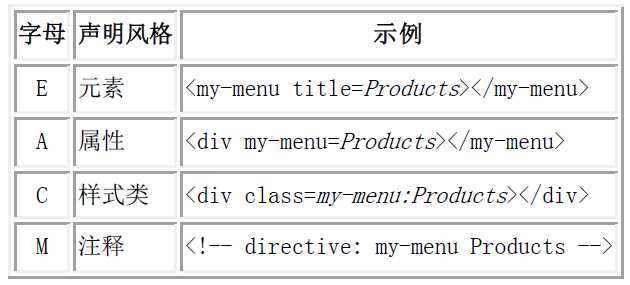
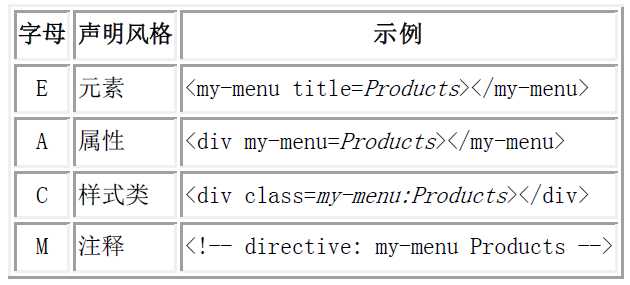
        ‘restrict‘:‘E‘,
        scope:{
            title:"@"
        },
        template:‘<div >{{title}}+内部</div>‘

    }
});
</script>
</html>
<!DOCTYPE html>
<html ng-app=‘myApp‘>
<head>
<meta charset="utf-8">
<script src="https://cdn.staticfile.org/angular.js/1.4.6/angular.min.js"></script>
</head>
<body>

 <div ng-controller="listCtrl">
    <input type="text"  ng-model="t" />
     <test title="t" >
        <p>{{title}}</p>
        <span>我的angularjs</span>
    </test>
</div>

</body>

    <script>
    var myApp=angular.module(‘myApp‘,[]);
myApp.controller(‘listCtrl‘,function($scope){
   $scope.logchore="motorola";
});


myApp.directive(‘test‘,function(){
    return {
        ‘restrict‘:‘E‘,
        scope:{
            title:"="
        },
        template:‘<div >{{title}}+内部</div>‘

    }
});

</script>
</html>
<!DOCTYPE html>
<html ng-app=‘myApp‘>
<head>
<meta charset="utf-8">
<script src="https://cdn.staticfile.org/angular.js/1.4.6/angular.min.js"></script>
</head>
<body>

 <div ng-controller="listCtrl">
      <test flavor="logchore()" ></test>
</div>

</body>

    <script>
var myApp=angular.module(‘myApp‘,[]);
myApp.controller(‘listCtrl‘,function($scope){
   $scope.logchore=function(){
        alert(‘ok‘);
   };
});


myApp.directive(‘test‘,function(){
    return {
        ‘restrict‘:‘E‘,
        scope:{
            flavor:"&"
        },
        template:‘<div ><button ng-click="flavor()"></button></div>‘

    }
});


</script>
</html>
<!DOCTYPE html>
<html ng-app=‘myApp‘>

<head>
  <meta charset="utf-8">
  <script src="https://cdn.staticfile.org/angular.js/1.4.6/angular.min.js"></script>
</head>

<body>

  @father:
  <input type="text" ng-model="data" />
  <me title="{{data}}">@</me>

  =father:
  <input type="text" ng-model="msg" />
  <you title="msg">=</you>
  <div ng-controller="listCtrl">
    <test flavor="logchore(str)"></test>
  </div>
</body>

<script>
  var app = angular.module("myApp", []);
  app.controller(‘listCtrl‘, function ($scope) {
    $scope.logchore = function (str) {
      alert(str);
    };
  });

  app.directive(‘me‘, function () {
    return {
      restrict: "E", //单向绑定,父元素可以改变子元素的model,子元素不能改变父元素的model
      scope: {
        title: ‘@‘
      },
      template: "<div>{{title}}@:<input type=‘text‘ ng-model=‘title‘/></div>"
    }
  });


  app.directive(‘you‘, function () {
    return {
      restrict: "E",
      scope: {
        title: "=" //双向绑定,父元素可以改变子元素的model,子元素可以改变父元素的model
      },
      template: "<div>{{title}}=:<input type=‘text‘ ng-model=‘title‘/></div>"
    }
  })

  app.directive(‘test‘, function () {
    return {
      ‘restrict‘: ‘E‘,
      scope: {
        flavor: "&"
      },
      //&是负责方法调用的,其中可以添加参数
      template: ‘<div><input ng-model="v"/><button ng-click="flavor({str:v})">点击</button></div>‘
    }
  });
</script>

</html>
@ 当指令编译到模板的name时,就会到scope中寻找是否含有name的键值对,如果存在,就像上面那样,看到@就知道这是一个单向的数据绑定,然后寻找原来的那个使用指令的元素上(或者是指令元素本身)含有这个值的属性即my-name={{name}},然后在父作用域查找{{name}}的值,得到之后传递给模板中的name。????=和&与@差不多,只不过=进行的是双向的数据绑定,不论模板还是父作用域上的属性的值发生改变都会使另一个值发生改变,而&是绑定函数而已