
| jquery简介 |
- jQuery是一个轻量级的、兼容多浏览器的JavaScript库。
- jQuery使用户能够更方便地处理HTML Document、Events、实现动画效果、方便地进行Ajax交互,能够极大地简化JavaScript编程。它的宗旨就是:“Write less, do more.“
注意事项:
一定要先导入后使用。
基础语法:
$(selector).action()
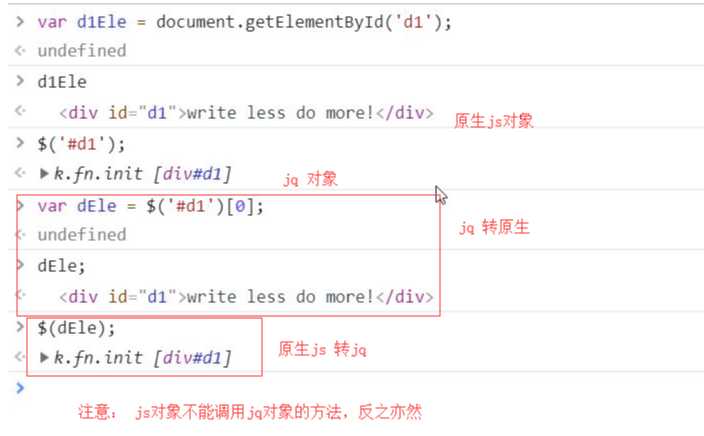
jQuery对象与JS原生对象:

| 查找标签 |
基本选择器
id选择器:
$("#id")
标签选择器:
$("tagName")
class选择器:
$(".className")
配合使用:
$("div.c1") // 找到有c1 class类的div标签
所有元素选择器:
$("*")
组合选择器:
$("#id, .className, tagName")
层级选择器:
x和y可以为任意选择器
$("x y");// x的所有后代y(子子孙孙) $("x > y");// x的所有儿子y(儿子) $("x + y")// 找到所有紧挨在x后面的y $("x ~ y")// x之后所有的兄弟y
基本筛选器:
:first // 第一个 :last // 最后一个 :eq(index)// 索引等于index的那个元素 :even // 匹配所有索引值为偶数的元素,从 0 开始计数 :odd // 匹配所有索引值为奇数的元素,从 0 开始计数 :gt(index)// 匹配所有大于给定索引值的元素 :lt(index)// 匹配所有小于给定索引值的元素 :not(元素选择器)// 移除所有满足not条件的标签 :has(元素选择器)// 选取所有包含一个或多个标签在其内的标签(指的是从后代元素找)
例子:
$("div:has(h1)")// 找到所有后代中有h1标签的div标签 $("div:has(.c1)")// 找到所有后代中有c1样式类的div标签 $("li:not(.c1)")// 找到所有不包含c1样式类的li标签 $("li:not(:has(a))")// 找到所有后代中不含a标签的li标签
练习:
自定义模态框,使用jQuery实现弹出和隐藏功能。

jQuery版自定义模态框
属性选择器:
[attribute]
[attribute=value]// 属性等于 [attribute!=value]// 属性不等于
例子:
// 示例 <input type="text"> <input type="password"> <input type="checkbox"> $("input[type=‘checkbox‘]");// 取到checkbox类型的input标签 $("input[type!=‘text‘]");// 取到类型不是text的input标签
表单筛选器:
:text
:password
:file
:radio
:checkbox

:submit
:reset
:button

例子:
$(":checkbox") // 找到所有的checkbox
表单对象属性:
:enabled
:disabled
:checked
:selected
例子:
找到可用的input标签
<form>
  <input name="email" disabled="disabled" />
  <input name="id" />
</form>

$("input:enabled")  // 找到可用的input标签
找到被选中的option:
<select id="s1">
  <option value="beijing">北京市</option>
  <option value="shanghai">上海市</option>
  <option selected value="guangzhou">广州市</option>
  <option value="shenzhen">深圳市</option>
</select>

$(":selected")  // 找到所有被选中的option
小BUG

下一个元素:
$("#id").next()
$("#id").nextAll() $("#id").nextUntil("#i2"
链式查找

上一个元素:
$("#id").prev()
$("#id").prevAll() $("#id").prevUntil("#i2")
父亲元素:
$("#id").parent()
$("#id").parents() // 查找当前元素的所有的父辈元素
$("#id").parentsUntil() // 查找当前元素的所有的父辈元素,直到遇到匹配的那个元素为止。
儿子和兄弟元素:
$("#id").children();// 儿子们 $("#id").siblings();// 兄弟们
查找
搜索所有与指定表达式匹配的元素。这个函数是找出正在处理的元素的后代元素的好方法。
$("div").find("p")
等价于$(“div p”)
筛选
筛选出与指定表达式匹配的元素集合。这个方法用于缩小匹配的范围。用逗号分隔多个表达式。
$("div").filter(".c1") // 从结果集中过滤出有c1样式类的
等价于 $(“div.c1”)
补充:
.first() // 获取匹配的第一个元素 .last() // 获取匹配的最后一个元素 .not() // 从匹配元素的集合中删除与指定表达式匹配的元素 .has() // 保留包含特定后代的元素,去掉那些不含有指定后代的元素。 .eq() // 索引值等于指定值的元素
示例:左侧菜单
左侧菜单栏
| 操作属性样式 |

模态框

<!DOCTYPE html>
<html lang="en">
<head>
    <meta charset="UTF-8">
    <title>Title</title>
    <script src="jquery%20v3.41.js"></script>
    <style>
        .cover  {
            position: fixed;
            top: 0;
            left: 0;
            right: 0;
            bottom: 0;
            background-color: rgba(128,128,128,0.4);
            z-index: 1;
        }
        .model {
            position: fixed;
            top: 50%;
            left: 50%;
            width: 400px;
            height: 200px;
            margin-left: -200px;
            margin-top: -100px;
            background-color: white;
            z-index: 2;
        }
        .hide {
            display: none;
        }
    </style>
</head>
<body>
<button id="show">出来吧模态框</button>

<div class="cover hide"></div>
<div class="model hide">
    <p>username: <input type="text"></p>
    <p>passwod: <input type="password"></p>
    <button id="cancal"> 代表人类消灭你</button>
</div>
<script>
    let b1Ele=$(‘#show‘)[0];
    let d2Ele=$(‘.cover‘);
    let d3Ele=$(‘.model‘);
    let b2Ele=$(‘#cancal‘)[0];

    b1Ele.onclick=function () {
        d2Ele.removeClass(‘hide‘);
        d3Ele.removeClass(‘hide‘);
    };
    b2Ele.onclick=function () {
        d2Ele.addClass(‘hide‘);
        d3Ele.addClass(‘hide‘);
    }
</script>
</body>
</html>
View Code