
index.wxml
<!--地图容器-->
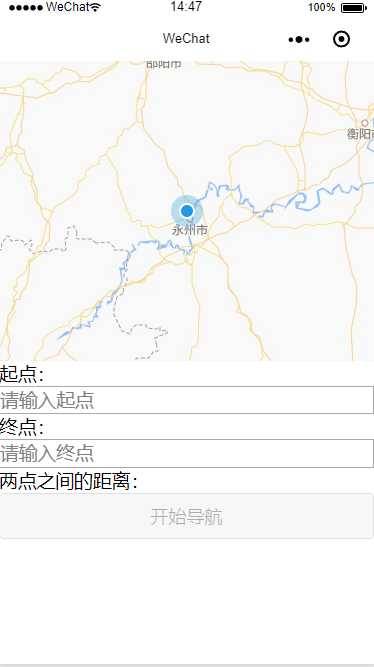
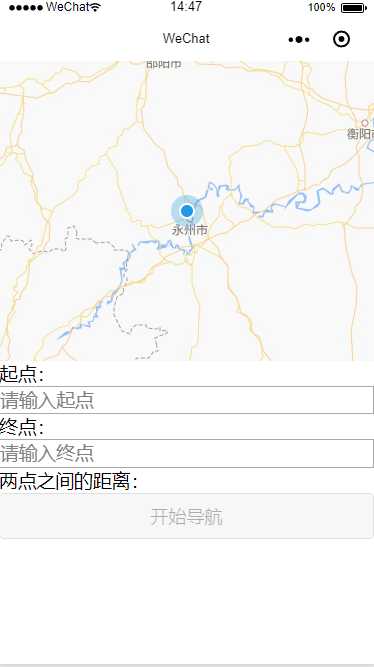
<map id="myMap" style="width: 100%; height: 300px;" longitude="{{longitude}}" latitude="{{latitude}}" scale=‘{{scale}}‘ polyline="{{polyline}}" markers="{{markers}}" covers="{{covers}}" show-location></map> 起点:<input placeholder=‘请输入起点‘ bindinput=‘getStart‘></input> 终点:<input placeholder=‘请输入终点‘ bindinput=‘getEnd‘></input> 两点之间的距离:{{resultDistance}} <!--绑定点击事件-->
<button bindtap="driving" disabled=‘{{openNav}}‘>开始导航</button>
index.wxss
input{ border: 1px solid #aaa;
}
index.js
 1 // let coors;
 2 // // 引入SDK核心类
 3 let QQMapWX = require(‘./qqmap-wx-jssdk.min.js‘);  4
 5 // 实例化API核心类
 6 let qqmapsdk = new QQMapWX({  7   key: ‘填写地图key‘
 8 });  9
 10 Page({  11
 12   /**  13  * 页面的初始数据  14    */
 15  data: {  16     openNav: true
 17  },  18
 19   /**  20  * 生命周期函数--监听页面加载  21    */
 22   onLoad: function(options) {  23     let _page = this;  24
 25  wx.getLocation({  26       type: ‘gcj02‘, //返回可以用于wx.openLocation的经纬度
 27       success: function(res) {  28  _page.setData({  29  latitude: res.latitude,  30  longitude: res.longitude,  31           scale: 10
 32  });  33  }  34  })  35     wx.clearStorageSync(‘latlngstart‘);  36     wx.clearStorageSync(‘latlngend‘);  37  },  38
 39   /**  40  * 生命周期函数--监听页面初次渲染完成  41    */
 42   onReady: function() {  43
 44  },  45
 46   /**  47  * 起点  48    */
 49  getStart(e) {  50     let _page = this;  51     // 关键字补全以及获取经纬度
 52  qqmapsdk.getSuggestion({  53  keyword: e.detail.value,  54       success: function(res) {  55         let lat = res.data[0].location.lat;  56         let lng = res.data[0].location.lng;  57
 58         wx.setStorageSync(‘latlngstart‘, {  59           lat: res.data[0].location.lat,  60           lng: res.data[0].location.lng  61  });  62  },  63       fail: function(res) {  64  console.log(res);  65  },  66       complete: function(res) {  67  console.log(res);  68  }  69  });  70
 71     // 如果输入地点为空:则不规划路线
 72     if (e.detail.value == ‘‘) {  73  _page.setData({  74         openNav: true,  75         resultDistance: ‘‘
 76  });  77     } else {  78  _page.setData({  79         openNav: false
 80  });  81  }  82  },  83
 84   /**  85  * 终点  86    */
 87  getEnd(e) {  88     let _page = this;  89     // 输入地点获取经纬度,我取得是数据的第一条数据.
 90  qqmapsdk.getSuggestion({  91  keyword: e.detail.value,  92       success: function(res) {  93         let lat = res.data[0].location.lat;  94         let lng = res.data[0].location.lng;  95
 96         wx.setStorageSync(‘latlngend‘, {  97           lat: res.data[0].location.lat,  98           lng: res.data[0].location.lng  99  }); 100  }, 101       fail: function(res) { 102  console.log(res); 103  }, 104       complete: function(res) { 105  console.log(res); 106  } 107  }); 108     // 如果输入地点为空:则不规划路线
109     if (e.detail.value == ‘‘) { 110  _page.setData({ 111         openNav: true, 112         resultDistance:‘‘
113  }); 114     } else { 115  _page.setData({ 116         openNav: false
117  }); 118  } 119  }, 120   //事件回调函数
121   driving: function() { 122
123     let _page = this; 124
125     // 起点经纬度
126     let latStart = wx.getStorageSync(‘latlngstart‘).lat; 127     let lngStart = wx.getStorageSync(‘latlngstart‘).lng; 128
129     // 终点经纬度
130     let latEnd = wx.getStorageSync(‘latlngend‘).lat; 131     let lngEnd = wx.getStorageSync(‘latlngend‘).lng; 132
133
134  _page.setData({ 135  latitude: latStart, 136  longitude: lngStart, 137       scale: 16, 138  markers: [{ 139           id: 0, 140  latitude: latStart, 141  longitude: lngStart, 142           // 起点图标
143           iconPath: ‘../image/location.png‘
144  }, 145  { 146           id: 1, 147  latitude: latEnd, 148  longitude: lngEnd, 149           // 终点图标
150           iconPath: ‘../image/location.png‘
151  }, 152  ] 153  }); 154  `` 155
156     /** 157  * 获取两点的距离 158      */
159  qqmapsdk.calculateDistance({ 160  to: [{ 161  latitude: latStart, 162  longitude: lngStart 163  }, { 164  latitude: latEnd, 165  longitude: lngEnd 166  }], 167       success: function(res) { 168         console.log(res, ‘两点之间的距离:‘, res.result.elements[1].distance); 169  _page.setData({ 170           resultDistance: res.result.elements[1].distance + ‘米‘
171  }); 172  }, 173       fail: function(res) { 174  console.log(res); 175  }, 176       complete: function(res) { 177  console.log(res); 178  } 179  }); 180
181     //网络请求设置
182     let opt = { 183       //WebService请求地址,from为起点坐标,to为终点坐标,开发key为必填
184       url: `https://apis.map.qq.com/ws/direction/v1/driving/?from=${latStart},${lngStart}&to=${latEnd},${lngEnd}&key=${qqmapsdk.key}`,
185       method: ‘GET‘, 186       dataType: ‘json‘, 187       //请求成功回调
188       success: function(res) { 189         let ret = res.data 190         if (ret.status != 0) return; //服务异常处理
191         let coors = ret.result.routes[0].polyline, 192           pl = []; 193         //坐标解压(返回的点串坐标,通过前向差分进行压缩)
194         let kr = 1000000; 195         for (let i = 2; i < coors.length; i++) { 196           coors[i] = Number(coors[i - 2]) + Number(coors[i]) / kr; 197  } 198         //将解压后的坐标放入点串数组pl中
199         for (let i = 0; i < coors.length; i += 2) { 200  pl.push({ 201  latitude: coors[i], 202             longitude: coors[i + 1] 203  }) 204  } 205         //设置polyline属性,将路线显示出来
206  _page.setData({ 207  polyline: [{ 208  points: pl, 209             color: ‘#FF0000DD‘, 210             width: 4
211  }] 212  }) 213  } 214  }; 215  wx.request(opt); 216  } 217 })
示例下载:点击下载