windows 显示桌面.scf

windows 显示桌面.scf
CreationTime--2018年7月26日11点44分
Author:Marydon
1.情景展示
将显示桌面这个功能迁移到桌面上
2.实现方式
方式一
win+r-->输入:C:/Documents and Settings/你的用户名/Application Data/Microsoft/Internet Explorer/Quick Launch
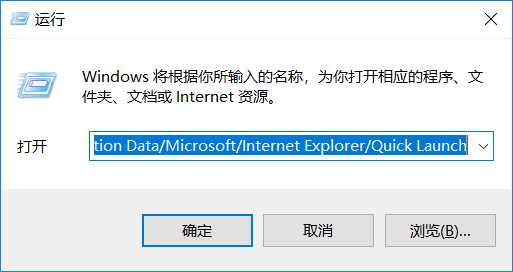
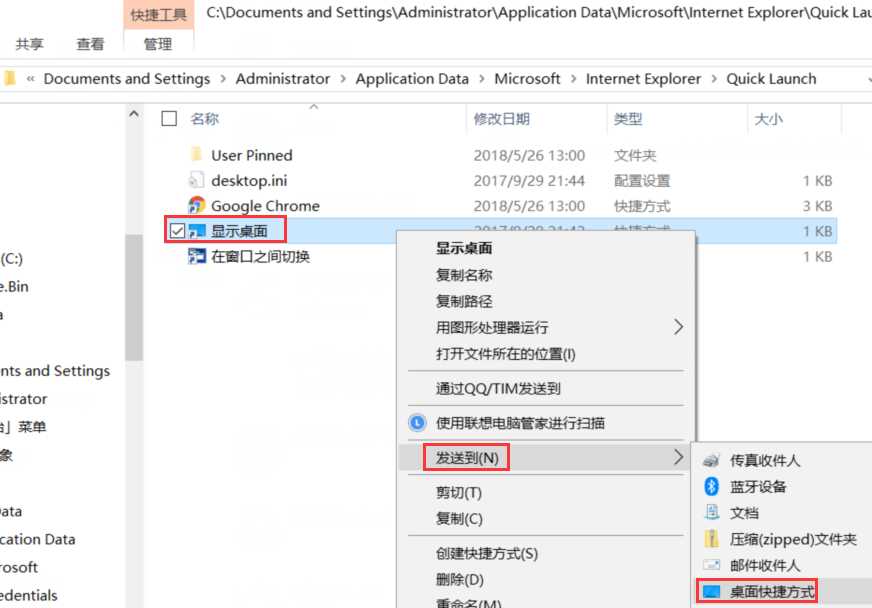
回车-->选中"显示桌面"-->右键-->发送到桌面快捷方式 即可。
方式二
第一步:新建一个文本文件
桌面-->右键-->新建-->文本文档-->双击打开
第二步:编辑命令
[Shell]
Command=2
IconFile=explorer.exe,3
[Taskbar]
Command=ToggleDesktop
将上面代码拷贝到这个文件中
第三步:文件-->另存为-->scf文件
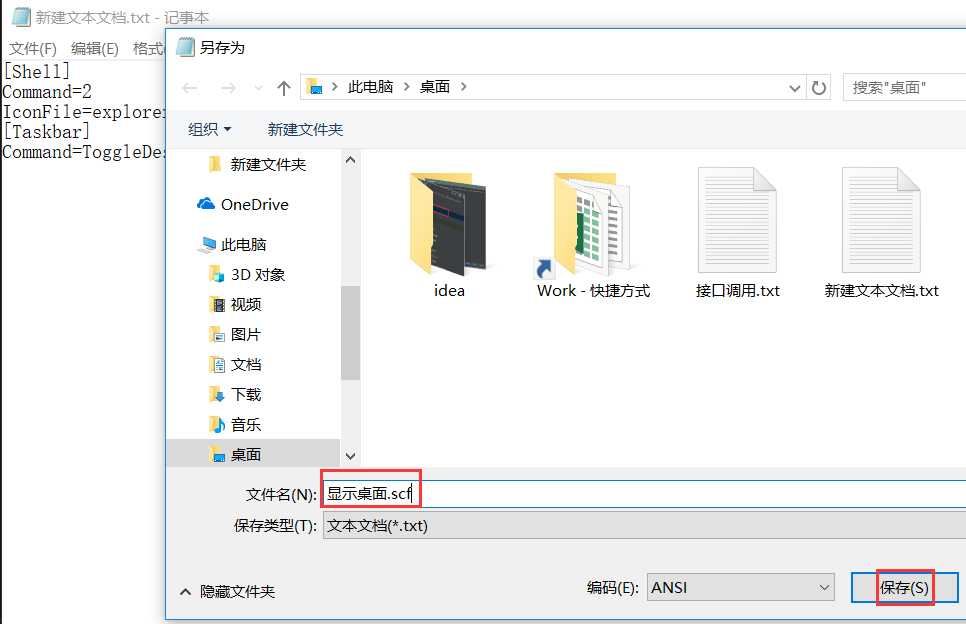
第四步:删除刚才新建的txt文件
以后直接双击运行这个文件即可
相关推荐:



最新文章
-

QQ美颜相机拍照技巧
2026-10-25 -
QQ滤镜一键美化功能
2026-10-25 -
QQ直播观看小技巧
2026-10-25 -
QQ直播送礼互动玩法
2026-10-25 -
QQ直播弹幕设置方法,分场景操作指南一文讲清
2026-10-25 -
QQ日历行程管理技巧
2026-10-25 -
QQ语音速记功能使用
2026-10-25 -
QQ拍照翻译功能使用
2026-10-25
热门文章
-

ios微信分享的兼容性问题
2026-07-04 -

微信小程序 - 事件绑定bind和catch 区别
2026-07-04 -

7-STM32物联网开发WIFI(ESP8266)+GPRS(Air202)系统方案微信小程序篇(微信配网_申请微信公众号)
2026-07-04 -

微信浏览器中禁止app下载链接的两种处理方法
2026-07-04 -

【php】PHP制作QQ微信支付宝三合一收款码
2026-07-04 -

从微信中跳到外部浏览器
2026-07-04 -
SQL SERVER 还原误操作导致还原无法停止,处理办法
2026-08-27 -

10-STM32物联网开发WIFI(ESP8266)+GPRS(Air202)系统方案微信小程序篇(微信配网配置_Airkiss步骤_1)
2026-07-04