
checked 和 unchecked关键字用来限定检查或者不检查数学运算溢出的;如果使用了checked发生数学运算溢出时会抛出OverflowException;如果使用了unchecked则不会检查溢出,算错了也不会报错。
1. 一段编译没通过的代码
| 1 | int a = int .MaxValue * 2; |
以上代码段编译没有通过,在VS2010中会有一条红色的波浪线指出这段代码有问题:”The operation overflows at compile time in checked mode”。这说明了编译器会在编译时检查数学运算是否溢出。但是编译时能检查出溢出的情况仅限于使用常量的运算。2中的代码编译器就不报不出错误来了。
2. 一段编译通过但是不能得到正确结果的代码
| 1 2 3 | int temp = int .MaxValue; int a = temp * 2; Console.Write(a); |
我先把常量int.MaxValue的值给了临时变量temp,然后使用临时变量乘以2计算结果赋值给a;这段代码是可以正常执行的,执行结果将输出 -2。
这说明在运行时默认情况程序是不会检查算术运算是否溢出的,cpu只管算,对于它来讲按规则算就是了,结果对不对不是他的错。
正常执行了,而结果是错误的,这是非常危险的情况,该如何避免这种危险呢?请看3
3. 使用checked关键字,溢出时报警
| 1 2 3 4 5 6 7 8 9 10 | int temp = int .MaxValue; try { int a = checked (temp * 2); Console.WriteLine(a); } catch (OverflowException) { Console.WriteLine( "溢出了,要处理哟" ); } |
使用checked关键字修饰temp*2的计算结果,并使用try catch在发生溢出时做处理。以上代码将输出:“溢出了,要处理哟”
问题是如果一段代码中有很多算术运算都需要做溢出检查,那会有很多checked修饰的表达式,怎么办呢?请看4
4. checked关键字可以修饰一个语句块,请看下面代码
| 1 2 3 4 5 6 7 8 9 10 11 12 13 14 | int temp = int .MaxValue; try { checked { int num = temp / 20; int a = temp * 2; int c = temp * 1000; } } catch (OverflowException) { Console.WriteLine( "溢出了,要处理哟" ); } |
以上程序输出结果和3一样
5. checked在避免算术溢出方面很有用,那么unchecked呢,它有用吗?答案是肯定的,有时候我们不需要准确的计算结果,我们只是需要那么一个数而已,至于溢出不溢出的关系不大,比如说生成一个对象的HashCode,比如说根据一个算法计算出一个相对随机数,这都是不需要准确结果的。如下代码片段
| 1 2 3 4 5 6 7 8 9 10 11 12 | class Person { public string Name { get ; set ; } public string Title { get ; set ; } public override int GetHashCode() { return unchecked (Name.GetHashCode() + Title.GetHashCode()); } } |
unchecked也可以修饰语句块,其用法和checked完全一样。
6. checked和unchecked是可以嵌套使用的,虽然没啥意义。语句是否是checked以最近嵌套的checked或者unchecked决定
7. 从IL中看checked关键字
C#代码:
static void Main( string [] args) { int a = int .MaxValue; int b = a * 2; int c = checked (a * 2); int d = unchecked (a + 3); Console.Read(); } |
对应IL
.method private hidebysig static void Main(string[] args) cil managed
{
.entrypoint
// Code size 26 (0x1a)
.maxstack 2
.locals init ([0] int32 a,
[1] int32 b,
[2] int32 c,
[3] int32 d)
IL_0000: nop
IL_0001: ldc.i4 0x7fffffff
IL_0006: stloc.0
IL_0007: ldloc.0
IL_0008: ldc.i4.2
IL_0009: mul
IL_000a: stloc.1
IL_000b: ldloc.0
IL_000c: ldc.i4.2
IL_000d: mul.ovf
IL_000e: stloc.2
IL_000f: ldloc.0
IL_0010: ldc.i4.3
IL_0011: add
IL_0012: stloc.3
IL_0013: call int32 [mscorlib]System.Console::Read()
IL_0018: pop
IL_0019: ret
} // end of method Program::Main
请看IL中的红色和绿色加重显示代码,可以看出使用checked时,IL的运算是mul.ovf;不使用checked或者使用unchecked时的IL运算函数是mul或者add,不带.ovf。
8. checked或者unchecked只影响其包围的语句,不会影响到包围的语句内调用函数的代码块,如下示例:
| 1 2 3 4 5 6 7 8 9 10 11 12 13 14 15 | static void Main( string [] args) { int a = int .MaxValue; int b = 20; checked { int c = TestMethod(a, b); Console.WriteLine(c); } } static int TestMethod( int a, int b) { return a * b; } |
上面代码将会正常执行,checked语句块并未起到应有的作用。
9. 全局开启或者关闭checked编译选项
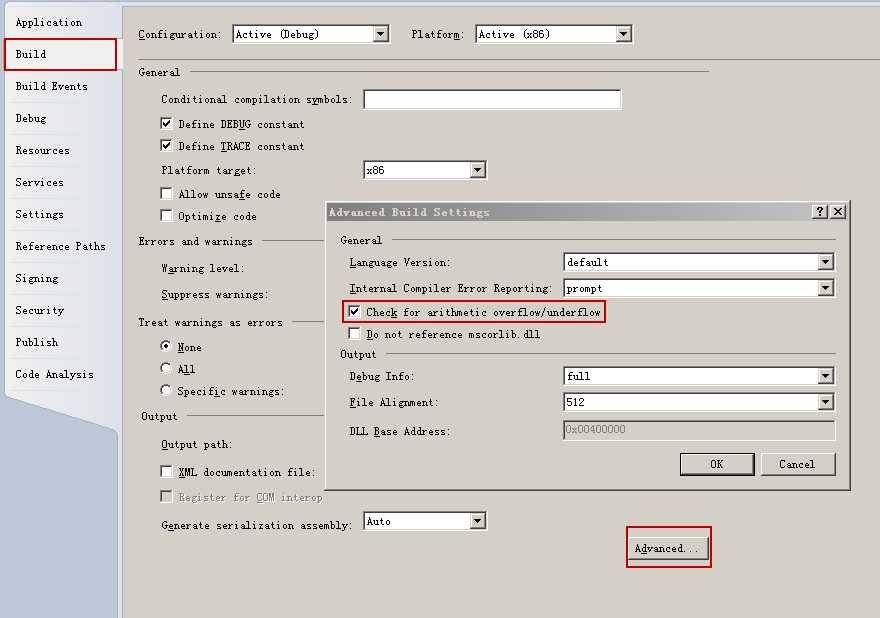
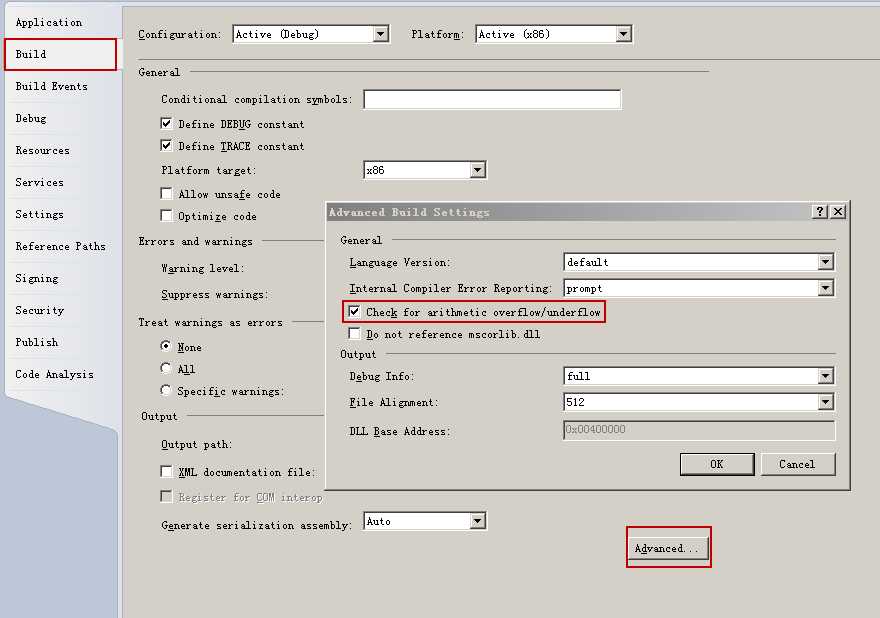
在项目属性页上选择“生成”选项卡,然后点击“高级”按钮,选中“检查数学运算溢出”选项,如下示意图
总结:
checked和unchecked是两个不常用的关键字,但是他们俩是有用的,在需要的时候请记得用他们两位,另外建议测试时开启全局checked编译器选项。
转自:https://www.cnblogs.com/yukaizhao/archive/2011/08/09/csharp-checked-unchecked-keywords.html