
首先一段php代码判断是否为手机浏览:
|
1
2
3
4
5
6
7
8
9
10
11
12
13
14
15
16
17
18
19
20
21
22
23
24
25
26
27
28
29
30
31
32
33
34
35
36
37
38
39
40
41
42
43
44
45
46
47
48
49
50
51
52
53
54
55
56
57
58
59
60
61
62
63
64
65
66
67
|
function isMobile()
{
// 如果有HTTP_X_WAP_PROFILE则一定是移动设备
if (isset ($_SERVER[‘HTTP_X_WAP_PROFILE‘]))
{
return true;
}
// 如果via信息含有wap则一定是移动设备,部分服务商会屏蔽该信息
if (isset ($_SERVER[‘HTTP_VIA‘]))
{
// 找不到为flase,否则为true
return stristr($_SERVER[‘HTTP_VIA‘], "wap") ? true : false;
}
// 脑残法,判断手机发送的客户端标志,兼容性有待提高
if (isset ($_SERVER[‘HTTP_USER_AGENT‘]))
{
$clientkeywords = array (‘nokia‘,
‘sony‘,
‘ericsson‘,
‘mot‘,
‘samsung‘,
‘htc‘,
‘sgh‘,
‘lg‘,
‘sharp‘,
‘sie-‘,
‘philips‘,
‘panasonic‘,
‘alcatel‘,
‘lenovo‘,
‘iphone‘,
‘ipod‘,
‘blackberry‘,
‘meizu‘,
‘android‘,
‘netfront‘,
‘symbian‘,
‘ucweb‘,
‘windowsce‘,
‘palm‘,
‘operamini‘,
‘operamobi‘,
‘openwave‘,
‘nexusone‘,
‘cldc‘,
‘midp‘,
‘wap‘,
‘mobile‘
);
// 从HTTP_USER_AGENT中查找手机浏览器的关键字
if (preg_match("/(" . implode(‘|‘, $clientkeywords) . ")/i", strtolower($_SERVER[‘HTTP_USER_AGENT‘])))
{
return true;
}
}
// 协议法,因为有可能不准确,放到最后判断
if (isset ($_SERVER[‘HTTP_ACCEPT‘]))
{
// 如果只支持wml并且不支持html那一定是移动设备
// 如果支持wml和html但是wml在html之前则是移动设备
if ((strpos($_SERVER[‘HTTP_ACCEPT‘], ‘vnd.wap.wml‘) !== false) && (strpos($_SERVER[‘HTTP_ACCEPT‘], ‘text/html‘) === false || (strpos($_SERVER[‘HTTP_ACCEPT‘], ‘vnd.wap.wml‘) < strpos($_SERVER[‘HTTP_ACCEPT‘], ‘text/html‘))))
{
return true;
}
}
return false;
}
|
phpcms 模板文件中创建两个模板:
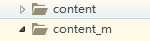
其中 content中的文件是PC端模板,content_m中的文件是手机端模板。
其次在pgpcms中 编辑 phpcms/modules/content/index.php
讲以上php代码 放到index的class类中。
找到所有的:
|
1
|
include template(‘content‘,$template);
|
替换为:
|
1
2
3
4
|
if($this->isMobile()){
include template(‘content_m‘,$template);
}else{
include template(‘content‘,$template);
|
最后将:
|
1
|
include template(‘content‘,‘index‘,$default_style);
|
替换为:
|
1
2
3
4
5
|
if($this->isMobile()){
include template(‘content_m‘,‘index‘,$default_style);
}else{
include template(‘content‘,‘index‘,$default_style);
}
|
到现在为止基本上就设置好了当运行phpcms中的index.php文件是,会根据是否为手机端调用不同的模板,实现了手机端和PC端数据库的同步。
转发自http://www.cnblogs.com/cyrfr/p/7194152.html