
Form1.CS
using System;
using System.Collections.Generic;
using System.ComponentModel;
using System.Data;
using System.Drawing;
using System.Linq;
using System.Security.Cryptography;
using System.Text;
using System.Threading.Tasks;
using System.Windows.Forms;
using System.Collections.Generic;
using System.ComponentModel;
using System.Data;
using System.Drawing;
using System.Linq;
using System.Security.Cryptography;
using System.Text;
using System.Threading.Tasks;
using System.Windows.Forms;
namespace 阳阳
{
public partial class Form1 : Form
{
public Form1()
{
InitializeComponent();
textBox1.Focus();
}
{
public partial class Form1 : Form
{
public Form1()
{
InitializeComponent();
textBox1.Focus();
}
private void textBox1_TextChanged(object sender, EventArgs e)
{
textBox1.Clear();
int b = groupBox1.Controls.Count;
var radom = new Random();
int s = radom.Next(1, b);
{
textBox1.Clear();
int b = groupBox1.Controls.Count;
var radom = new Random();
int s = radom.Next(1, b);
}
private void groupBox1_Enter(object sender, EventArgs e)
{
}
{
}
private void textBox1_KeyPress(object sender, KeyPressEventArgs e)
{
string inputLetter = e.KeyChar.ToString();
RandomLetter rl = new RandomLetter();
int a =int.Parse(label9.Text);
if (inputLetter==label8.Text)
{
{
string inputLetter = e.KeyChar.ToString();
RandomLetter rl = new RandomLetter();
int a =int.Parse(label9.Text);
if (inputLetter==label8.Text)
{
a = a + 1;
}
label9.Text = a.ToString();
}
label9.Text = a.ToString();
}
private void Form1_Load(object sender, EventArgs e)
{
{
}
private void button1_Click(object sender, EventArgs e)
{
textBox1.Focus();
timer1.Stop();
}
{
textBox1.Focus();
timer1.Stop();
}
private void timer1_Tick(object sender, EventArgs e)
{
timer1.Enabled = true;
timer1.Interval = 1000; //定时器时间间隔
timer1.Start();
int b = groupBox1.Controls.Count;
for (int i = 0; i < b; i++)
{
groupBox1.Controls[i].Text = “”;
}
{
timer1.Enabled = true;
timer1.Interval = 1000; //定时器时间间隔
timer1.Start();
int b = groupBox1.Controls.Count;
for (int i = 0; i < b; i++)
{
groupBox1.Controls[i].Text = “”;
}
RandomLetter rl = new RandomLetter();
var radom = new Random();
int s = radom.Next(0, b);
var radom = new Random();
int s = radom.Next(0, b);
label8.Text = groupBox1.Controls[s].Text = rl.GetRandomLetter();
textBox1.Focus();
}
textBox1.Focus();
}
private void label2_Click(object sender, EventArgs e)
{
{
}
private void button2_Click(object sender, EventArgs e)
{
timer1.Start();
textBox1.Focus();
}
{
timer1.Start();
textBox1.Focus();
}
}
}
——————————–
Program.cs.
using System;
using System.Collections.Generic;
using System.Diagnostics;
using System.Linq;
using System.Threading.Tasks;
using System.Windows.Forms;
using System.Collections.Generic;
using System.Diagnostics;
using System.Linq;
using System.Threading.Tasks;
using System.Windows.Forms;
namespace 阳阳
{
class RandomLetter
{
public string GetRandomLetter()
{
Random ran = new Random();
int r = ran.Next(0, 25);
string[] letterRoom = { “a”, “b”, “c”, “d”, “e”, “f”, “g”, “h”, “i”, “j”, “k”, “l”, “m”, “n”, “o”, “p”, “q”, “r”, “s”, “t”, “u”, “v”, “w”, “x”, “y”, “z” };
string randomLetter = letterRoom[r];
return randomLetter;
}
{
class RandomLetter
{
public string GetRandomLetter()
{
Random ran = new Random();
int r = ran.Next(0, 25);
string[] letterRoom = { “a”, “b”, “c”, “d”, “e”, “f”, “g”, “h”, “i”, “j”, “k”, “l”, “m”, “n”, “o”, “p”, “q”, “r”, “s”, “t”, “u”, “v”, “w”, “x”, “y”, “z” };
string randomLetter = letterRoom[r];
return randomLetter;
}
public void TimerRun()
{
}
{
}
public int sum(ref int a)
{
return a + 1;
}
{
return a + 1;
}
}
static class Program
{
{
/// <summary>
/// 应用程序的主入口点。
/// </summary>
[STAThread]
static void Main()
{
Application.EnableVisualStyles();
Application.SetCompatibleTextRenderingDefault(false);
Application.Run(new Form1());
}
}
}
/// 应用程序的主入口点。
/// </summary>
[STAThread]
static void Main()
{
Application.EnableVisualStyles();
Application.SetCompatibleTextRenderingDefault(false);
Application.Run(new Form1());
}
}
}
—————————-
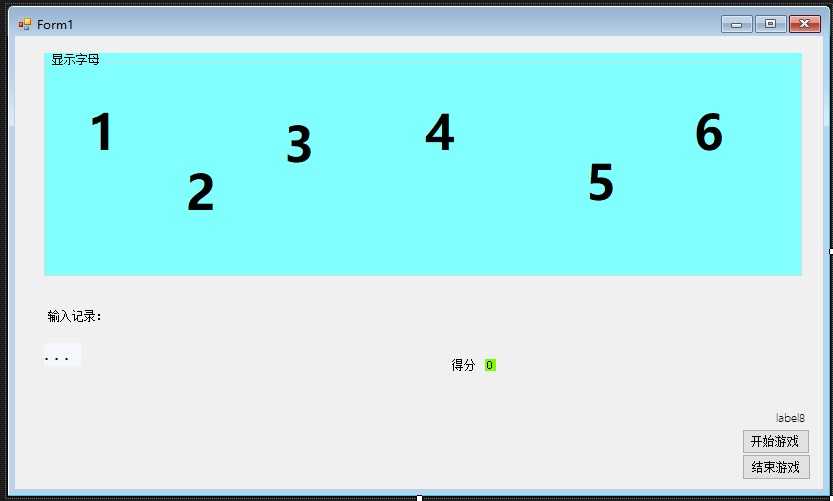
打字小游戏界面设计