iOS开发类似于呱呱卡效果,手指划过的区域形成画笔。适用于取出部分图片(截图),如截取出图片中带文字的区域部分。

HKBrushShots
Demo下载地址:
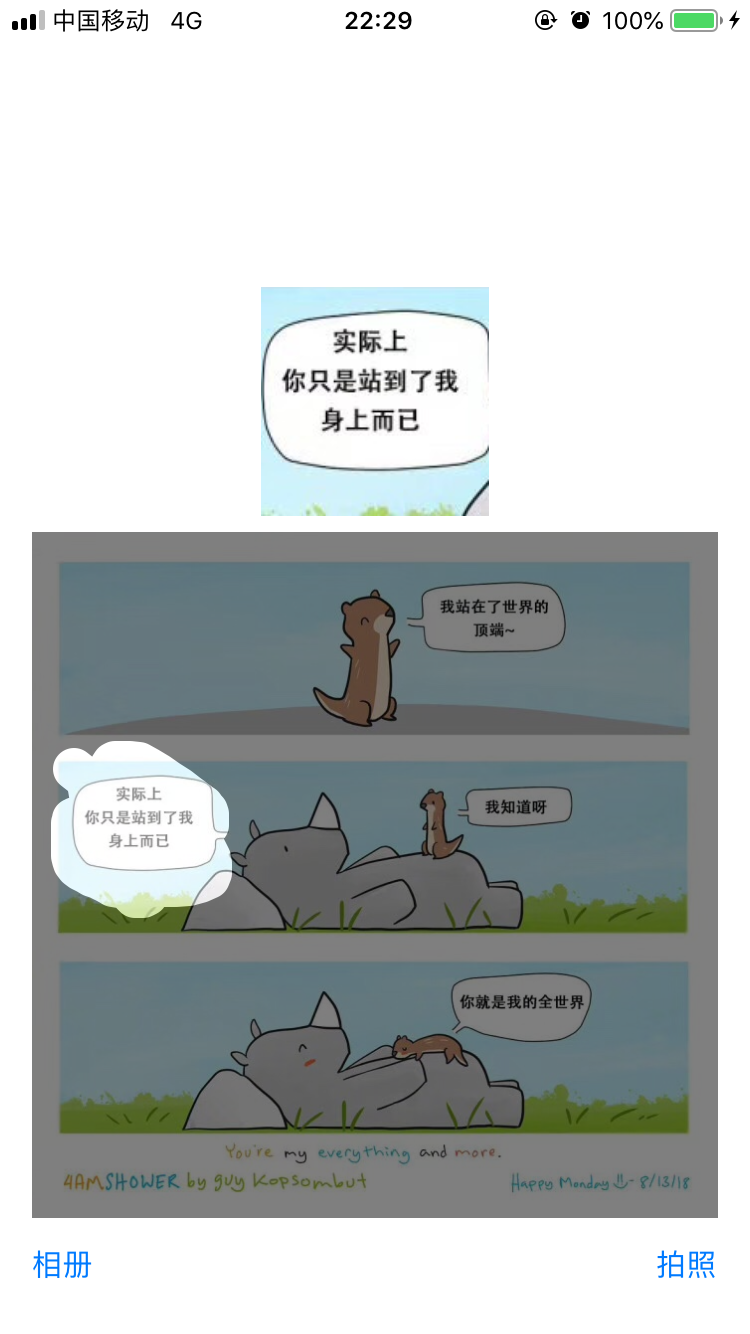
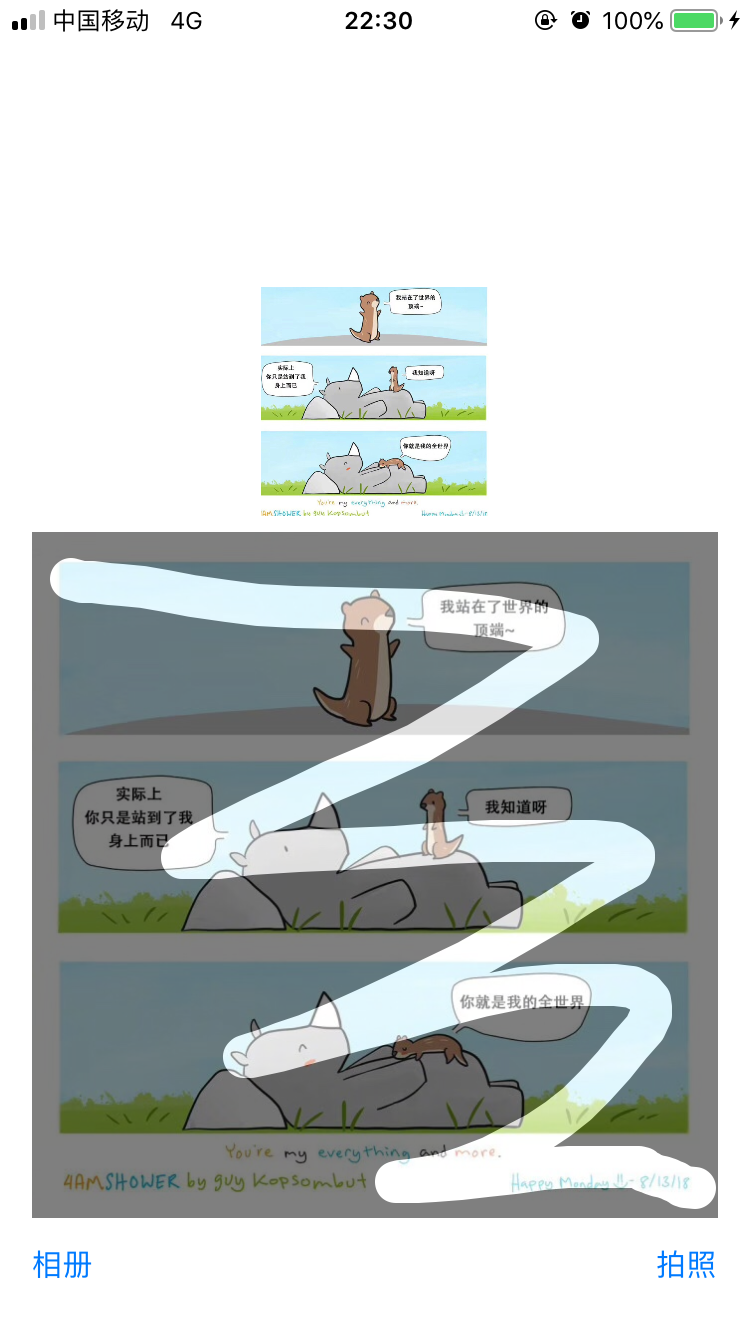
类似于呱呱卡效果,手指划过的路线可以刮出痕迹。
??功能:
用于取出部分图片(截图),如截取出图片中带文字的区域部分。
??效果:
截取出图片中的“你就是我的全世界”文字区域的图片:
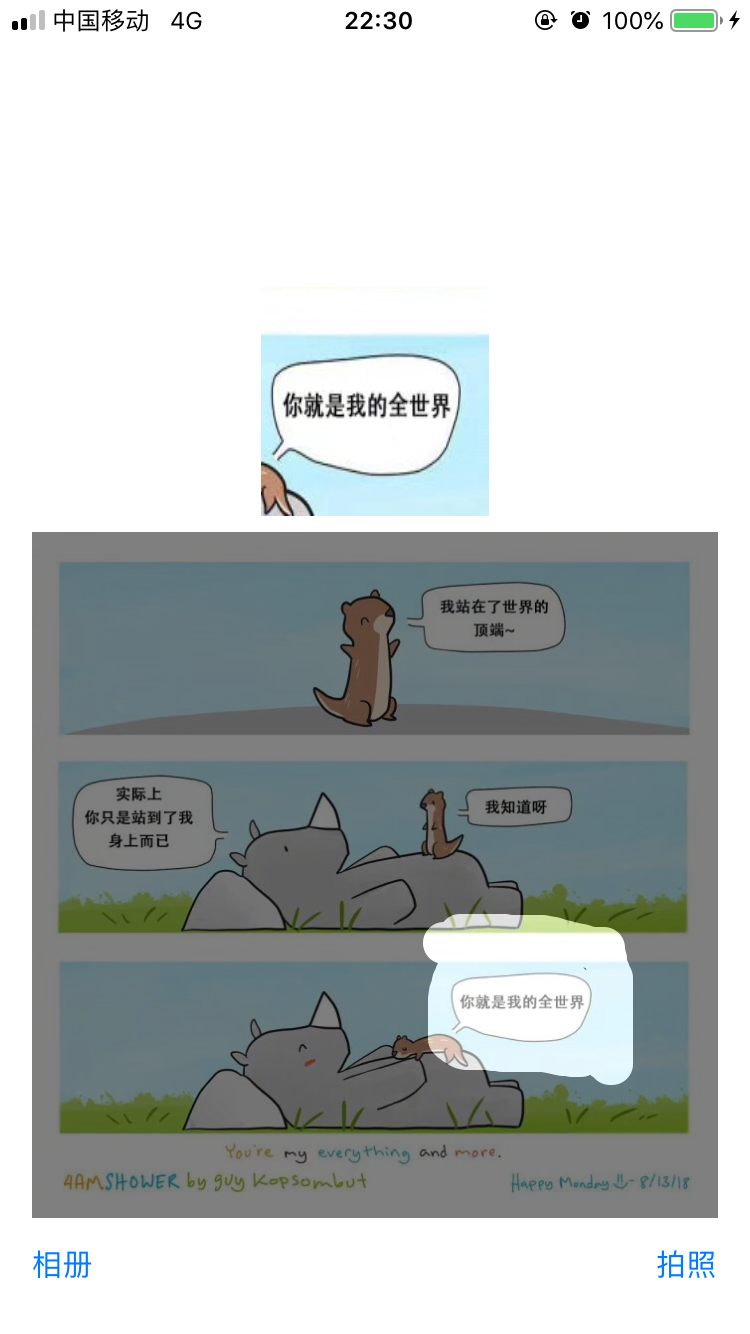
截取出图片中那只呆萌的小犀牛??:

更多截图效果:
??使用:
1 - 首先将工程中的“HKScreenShot”文件夹拷贝至项目中。
2 - 在需要使用的类中引入头文件:
#import "HKCropView.h" #import "HKLineView.h"
3 - 创建2个自定义view的对象:
@property (nonatomic, strong) HKCropView *cropView;
@property (nonatomic, strong) HKLineView *lineView;
4 - lineView作为覆盖view,用以下方式创建、并设置代理,view的frame需要根据具体的image调整暂时不定义:
// 画笔的属性在这里修改 - (HKLineView *)lineView { if (!_lineView) { _lineView = [[HKLineView alloc] init]; _lineView.backgroundColor = [UIColor blackColor]; _lineView.alpha = 0.5; _lineView.delegate = self; _lineView.currentLineColor = [UIColor whiteColor]; _lineView.currentLineWidth = 20.0; } return _lineView; }
5 - 遵守HKScreenShotImageViewRectDelegate代理:
<HKScreenShotImageViewRectDelegate>
6 - 接着获取图片,如果图片来源为系统相册,需要对图片方向做调整:
使用Demo中ViewController.m中的"fixOrientation:"方法修复。
// 修复照片的方向问题 - (UIImage *)fixOrientation:(UIImage *)aImage
7 - 在获取到图片image后,此时在显示这个image的imageView上将lineView覆盖上去:
// 在原始图片上蒙上一层半透黑底背景 // originalImageView为显示选取image的imageView self.lineView.frame = self.originalImageView.frame; [self.view addSubview:self.lineView];
8 - 上几步操作完成后就可以在图片上刮出痕迹了。当结束刮图后、代理会返回刮出的区域rect:
// 代理回调手指划出图片的区域rect - (void)getScreenShotImageViewRect:(CGRect)rect { // 获取到需要截取图片的区域rect }
9 - 拿到从上一步获取的rect与选取的原始图片imageView后调用截图view的方法,就可以获取到所需要的图片了:
- (UIImage *)clipWithImageRect:(CGRect)clipRect clipImage:(UIImageView *)orgiImageView {
    if (!_cropView) {
        // 初始化
        _cropView = [[HKCropView alloc] initWithImageView:orgiImageView];
    }

    UIImage *newImage = [_cropView getClipImageRect:clipRect];
    [_cropView removeFromSuperview];
    _cropView = nil;
    return newImage;
}
??接口:
1 - HKCropView 裁剪图片类:
/** 初始化剪切视图 @param imageView 原始图片imageView @return self */ - (id)initWithImageView:(UIImageView *)imageView; /** 获取剪切图片 传入一个rect @param newRect 需要截图的区域rect @return 截取出来的图片image */ - (UIImage *)getClipImageRect:(CGRect)newRect;
2 - HKLineManager 画笔属性类:
@property (nonatomic,assign) float lineWidth;//线宽 @property (nonatomic,strong) UIColor *lineColor;//线颜色 @property (nonatomic,strong) NSMutableArray *linePointsMArr;//线点数组
3 - HKLineView.h 画笔(手指)划动效果类:
/**  清空所有的线  */ -(void)cleanAllLine; /**  撤销上一条线  */ -(void)cleanBeforeLine;

??注意:
本demo为了简洁明了,直接选取的是正方形的图片。如果选择非正方形图片会导致变形,这样截图区域会不准确。
正确做法:应该在展示image时,根据image具体的比例调整“orgiImageView”的frame,这样截取出来的图片才是正确的。

最新文章
-

QQ美颜相机拍照技巧
2026-10-25 -
QQ滤镜一键美化功能
2026-10-25 -
QQ直播观看小技巧
2026-10-25 -
QQ直播送礼互动玩法
2026-10-25 -
QQ直播弹幕设置方法,分场景操作指南一文讲清
2026-10-25 -
QQ日历行程管理技巧
2026-10-25 -
QQ语音速记功能使用
2026-10-25 -
QQ拍照翻译功能使用
2026-10-25
热门文章
-

ios微信分享的兼容性问题
2026-07-04 -

微信小程序 - 事件绑定bind和catch 区别
2026-07-04 -

7-STM32物联网开发WIFI(ESP8266)+GPRS(Air202)系统方案微信小程序篇(微信配网_申请微信公众号)
2026-07-04 -

微信浏览器中禁止app下载链接的两种处理方法
2026-07-04 -

【php】PHP制作QQ微信支付宝三合一收款码
2026-07-04 -

从微信中跳到外部浏览器
2026-07-04 -
SQL SERVER 还原误操作导致还原无法停止,处理办法
2026-08-27 -

10-STM32物联网开发WIFI(ESP8266)+GPRS(Air202)系统方案微信小程序篇(微信配网配置_Airkiss步骤_1)
2026-07-04