8分钟学会使用AutoMapper

一.什么是AutoMapper与为什么用它。
它是一种对象与对象之间的映射器,让AutoMapper有意思的就是在于它提供了一些将类型A映射到类型B这种无聊的实例,只要B遵循AutoMapper已经建立的惯例,那么大多数情况下就可以进行相互映射了。
二.如何使用?
直接nuget install-package automapper 简单到不能再简单了。
三.入门
定义了连个简单的Model:
|
1
2
3
4
5
6
7
8
9
10
11
|
static
void
Main(
string
[] args)
{
Destination des =
new
Destination()
{
InfoUrl =
"www.cnblogs.com/zaranet"
,
name =
"张子浩"
};
Mapper.Initialize(x => x.CreateMap<Destination, Source>());
Source source = AutoMapper.Mapper.Map<Source>(des);
Console.WriteLine(source.InfoUrl);
}
|
Initialize方法是Mapper的初始化,里面可以写上CreateMap表达式,具体是谁和谁进行匹配。在之后就可以直接进行一个获取值的过程了,非常的简单。
四.映射前后操作
偶尔有的时候你可能需要在映射的过程中,你需要执行一些逻辑,这是非常常见的事情,所以AutoMapper给我们提供了BeforeMap和AfterMap两个函数。
|
1
2
3
|
Mapper.Initialize(x => x.CreateMap<Destination, Source>().BeforeMap(
(src,dest)=>src.InfoUrl =
"https://"
+src.InfoUrl).AfterMap(
(src,dest)=>src.name=
"真棒"
+src.name));
|
其中呢,src是Destination对象,dest是Source,你呢就可以用这两个对象去获取里面的值,说白了这就是循环去找里面的值了。
五.条件映射
|
1
|
Mapper.Initialize(x => x.CreateMap<Destination, Source>().ForMember(dest => dest.InfoUrl,opt => opt.Condition(dest => dest.InfoUrl ==
"www.cnblogs.com/zaranet1"
)).ForMember(...(.ForMember(...))));
|
在条件映射中,通过ForMember函数,参数是一个委托类型Fun<>,其里面呢也是可以进行嵌套的,但一般来说一个就够用了。
六.AutoMapper配置
初始化配置是非常受欢迎的,每个领域都应该配置一次。
|
1
2
3
4
5
|
//初始化配置文件
Mapper.Initialize(cfg =>
{
cfg.CreateMap<Aliens, Person>();
});
|
但是像这种情况呢,如果是多个映射,那么我们只能用Profile来配置,组织你的映射配置,并将配置放置到构造函数中(这种情况是5.x以上的版本),一个是以下的版本,已经被淘汰了。
5.0及以上版本:
|
1
2
3
4
5
6
7
|
public
class
AliensPersonProfile : Profile
{
public
AliensPersonProfile()
{
CreateMap<Destination, Source>();
}
}
|
5.0以下版本(在早期版本中,使用配置方法而不是构造函数。 从版本5开始,Configure()已经过时。 它将在6.0中被删除。)
|
1
2
3
4
5
6
7
|
public
class
OrganizationProfile : Profile
{
protected
override
void
Configure()
{
CreateMap<Foo, FooDto>();
}
}
|
然后在程序启动的时候初始化即可。
|
1
|
Mapper.Initialize(x=>x.AddProfile<AliensPersonProfile>());
|
七.AutoMapper的最佳实践
上文中已经说到了AutoMapper的简单映射,但是在实际项目中,我们应该有很多类进行映射,这么多的映射应该怎么组织,这是一个活生生的问题,这成为主映射器。
在主映射器中,组织了多个小映射器,Configuration为我们的静态配置入口类;Profiles文件夹为我们所有Profile类的文件夹。如果是MVC,我们需要在Global中调用,那我的这个是控制台的。
|
1
2
3
4
5
6
7
8
|
public
static
void
Configure()
{
Mapper.Initialize(cfg =>
{
cfg.AddProfile<DestinationSourceProfile>();
cfg.AddProfile(
new
StudentSourceProfile());
});
}
|
其中添加子映射,可以用以上两种方式。
|
1
2
3
4
|
public
void
Configuration(IAppBuilder app)
{
AutoMapperConfiguration.Configure();
}
|
八.指定映射字段
在实际业务环境中,你不可能说两个类的字段是一 一 对应的,这个时候我们就要对应它们的映射关系。
|
1
2
3
4
5
6
7
8
9
10
11
12
13
|
public
class
CalendarEvent
{
public
DateTime Date {
get
;
set
; }
public
string
Title {
get
;
set
; }
}
public
class
CalendarEventForm
{
public
DateTime EventDate {
get
;
set
; }
public
int
EventHour {
get
;
set
; }
public
int
EventMinute {
get
;
set
; }
public
string
DisplayTitle {
get
;
set
; }
}
|
在这两个类中,CalendarEvent的Date将被拆分为CalendarEventForm的日期、时、分三个字段,Title也将对应DisplayTitle字段,那么相应的Profile定义如下:
|
1
2
3
4
5
6
7
8
9
10
11
|
public
class
CalendarEventProfile : Profile
{
public
CalendarEventProfile()
{
CreateMap<CalendarEvent, CalendarEventForm>()
.ForMember(dest => dest.EventDate, opt => opt.MapFrom(src => src.Date.Date))
.ForMember(dest => dest.EventHour, opt => opt.MapFrom(src => src.Date.Hour))
.ForMember(dest => dest.EventMinute, opt => opt.MapFrom(src => src.Date.Minute))
.ForMember(dest => dest.DisplayTitle, opt => opt.MapFrom(src => src.Title));
}
}
|
main方法通过依赖注入,开始映射过程,下图是代码和图。
|
1
2
3
4
5
6
7
8
9
10
11
|
static
void
Main(
string
[] args)
{
CalendarEvent calendar =
new
CalendarEvent()
{
Date = DateTime.Now,
Title =
"Demo Event"
};
AutoMapperConfiguration.Configure();
CalendarEventForm calendarEventForm = Mapper.Map<CalendarEventForm>(calendar);
Console.WriteLine(calendarEventForm);
}
|
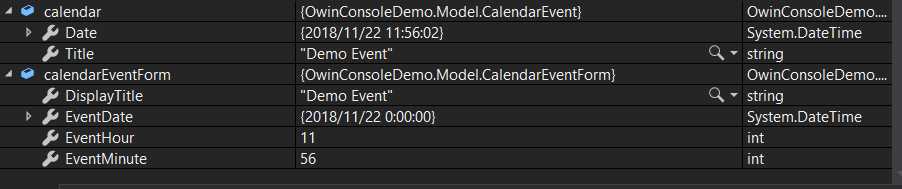
那么最后呢,如果是反向的映射,一定回缺少属性,那么就你就可以obj.属性进行赋值。
附AutoHelper封装类
|
1
2
3
4
5
6
7
8
9
10
11
12
13
14
15
16
17
18
19
20
21
22
23
24
25
26
27
28
29
30
31
32
33
34
35
36
37
38
39
40
41
42
43
44
45
46
47
48
49
50
51
52
53
54
55
56
57
58
|
/// <summary>
/// AutoMapper扩展帮助类
/// </summary>
public
static
class
AutoMapperHelper
{
/// <summary>
/// 类型映射
/// </summary>
public
static
T MapTo<T>(
this
object
obj)
{
if
(obj ==
null
)
return
default
(T);
Mapper.CreateMap(obj.GetType(),
typeof
(T));
return
Mapper.Map<T>(obj);
}
/// <summary>
/// 集合列表类型映射
/// </summary>
public
static
List<TDestination> MapToList<TDestination>(
this
IEnumerable source)
{
foreach
(
var
first
in
source)
{
var
type = first.GetType();
Mapper.CreateMap(type,
typeof
(TDestination));
break
;
}
return
Mapper.Map<List<TDestination>>(source);
}
/// <summary>
/// 集合列表类型映射
/// </summary>
public
static
List<TDestination> MapToList<TSource, TDestination>(
this
IEnumerable<TSource> source)
{
//IEnumerable<T> 类型需要创建元素的映射
Mapper.CreateMap<TSource, TDestination>();
return
Mapper.Map<List<TDestination>>(source);
}
/// <summary>
/// 类型映射
/// </summary>
public
static
TDestination MapTo<TSource, TDestination>(
this
TSource source, TDestination destination)
where
TSource :
class
where
TDestination :
class
{
if
(source ==
null
)
return
destination;
Mapper.CreateMap<TSource, TDestination>();
return
Mapper.Map(source, destination);
}
/// <summary>
/// DataReader映射
/// </summary>
public
static
IEnumerable<T> DataReaderMapTo<T>(
this
IDataReader reader)
{
Mapper.Reset();
Mapper.CreateMap<IDataReader, IEnumerable<T>>();
return
Mapper.Map<IDataReader, IEnumerable<T>>(reader);
}
}
}
|




最新文章
-

QQ节日祝福自动发送
2026-10-21 -
QQ定时祝福发送方法
2026-10-21 -
QQ纪念日推送设置
2026-10-21 -
QQ日程智能提醒方法
2026-10-21 -
QQ待办事项管理技巧
2026-10-21 -
QQ提醒事项同步开启
2026-10-21 -
QQ语音备忘使用方法
2026-10-21 -
QQ文字备忘快速记录
2026-10-21
热门文章
-

ios微信分享的兼容性问题
2026-07-04 -

微信小程序 - 事件绑定bind和catch 区别
2026-07-04 -

微信浏览器中禁止app下载链接的两种处理方法
2026-07-04 -

7-STM32物联网开发WIFI(ESP8266)+GPRS(Air202)系统方案微信小程序篇(微信配网_申请微信公众号)
2026-07-04 -

从微信中跳到外部浏览器
2026-07-04 -

9-STM32物联网开发WIFI(ESP8266)+GPRS(Air202)系统方案微信小程序篇(微信配网配置_开发者基本配置_2)
2026-07-04 -

【php】PHP制作QQ微信支付宝三合一收款码
2026-07-04 -
小程序-微信聊天功能开发详解
2026-07-04