mailgun php 邮件发送 实例

步骤如下:
- 通过 composer 获取代码库
- 获取 API Key 以及 domain
- 编写代码发送邮件
1. 首先通过 composer 获取依赖代码库,参考官网给的命令
https://documentation.mailgun.com/en/latest/libraries.html#php
composer require mailgun/mailgun-php php-http/guzzle6-adapter php-http/message
运行完成后在当前目录下生成 composer.json、composer.lock、vendor文件夹

2. 进入 mailgun 管理后台,获取 API Key 以及 domain
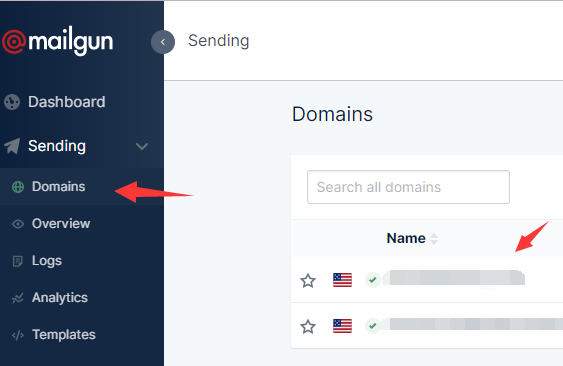 获取 domain
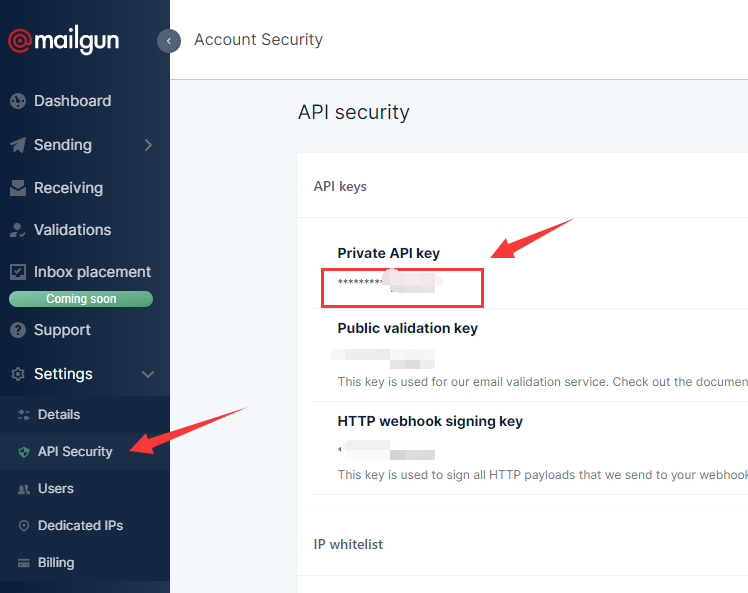 获取 API Key
3. 使用HTML和文本部分发送消息。此示例还将两个文件附加到邮件中:
# Include the Autoloader (see "Libraries" for install instructions)
require ‘vendor/autoload.php‘;
use Mailgun\Mailgun;

# Instantiate the client.
$mgClient = new Mailgun(‘YOUR_API_KEY‘);
$domain = "YOUR_DOMAIN_NAME";

# Make the call to the client.
$result = $mgClient->sendMessage($domain, array(
    ‘from‘    => ‘Excited User <YOU@YOUR_DOMAIN_NAME>‘,
    ‘to‘      => ‘foo@example.com‘,
    ‘cc‘      => ‘baz@example.com‘,
    ‘bcc‘     => ‘bar@example.com‘,
    ‘subject‘ => ‘Hello‘,
    ‘text‘    => ‘Testing some Mailgun awesomness!‘,
    ‘html‘    => ‘<html>HTML version of the body</html>‘
), array(
    ‘attachment‘ => array(‘/path/to/file.txt‘, ‘/path/to/file.txt‘)
));
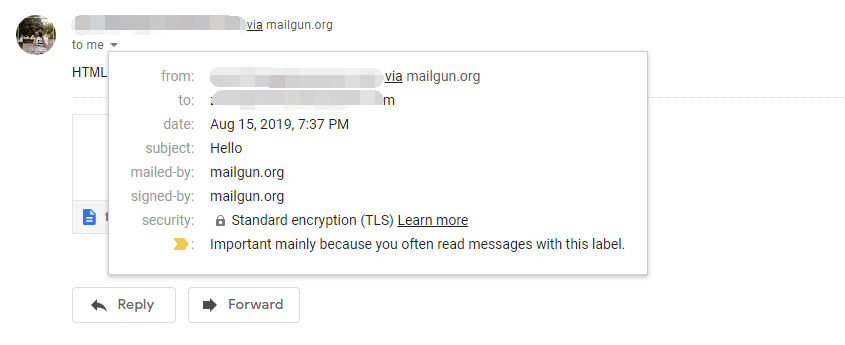
发送成功后如下:
上一篇
数据库事务的四种隔离模式



最新文章
-

怎样彻底拉黑删除微信好友
2026-10-13 -

怎样将电脑Word文档发送到微信
2026-10-13 -

怎样在手机上编辑word文档插图
2026-10-13 -

怎样在word文档中制作表格发到微信上就没表格了呢
2026-10-13 -

怎样加回拉黑删除的微信好友
2026-10-13 -

怎样判断微信好友是拉黑还是删除
2026-10-13 -

怎把拉黑的微信好友找回来
2026-10-13 -

怎么验证微信好友把我删除与拉黑
2026-10-13
热门文章
-

微信小程序 - 事件绑定bind和catch 区别
2026-07-04 -

【php】PHP制作QQ微信支付宝三合一收款码
2026-07-04 -

ios微信分享的兼容性问题
2026-07-04 -

9-STM32物联网开发WIFI(ESP8266)+GPRS(Air202)系统方案微信小程序篇(微信配网配置_开发者基本配置_2)
2026-07-04 -
APP与小程序的优劣分析
2026-07-04 -

10-STM32物联网开发WIFI(ESP8266)+GPRS(Air202)系统方案微信小程序篇(微信配网配置_Airkiss步骤_1)
2026-07-04 -

微信浏览器中禁止app下载链接的两种处理方法
2026-07-04 -

7-STM32物联网开发WIFI(ESP8266)+GPRS(Air202)系统方案微信小程序篇(微信配网_申请微信公众号)
2026-07-04