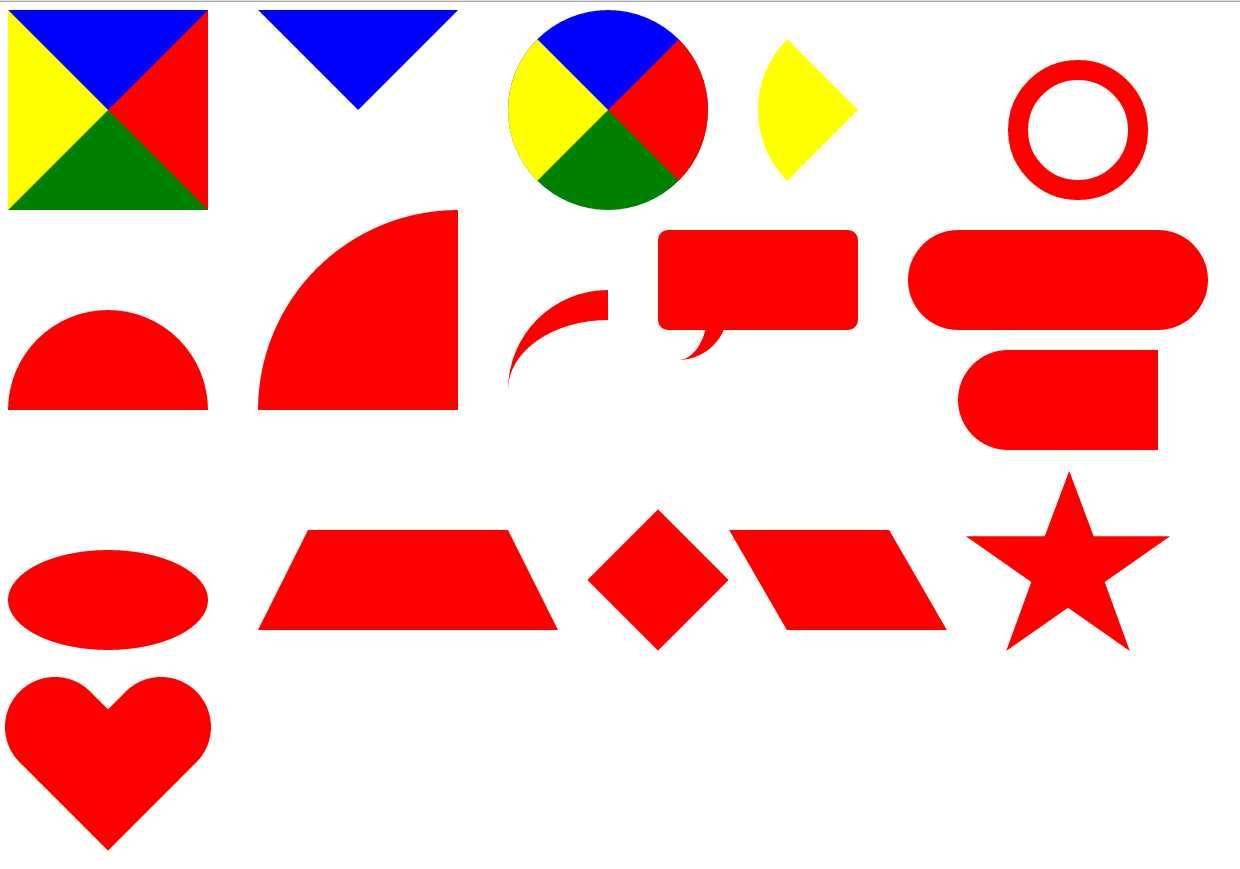

原理是利用边框实现,好处是不用加载图片,节省流量;坏处就是会有很长一段css样式
基本:1.设置width,height为0 ,然后设置一个border-width
利用border可以画很多有趣的图
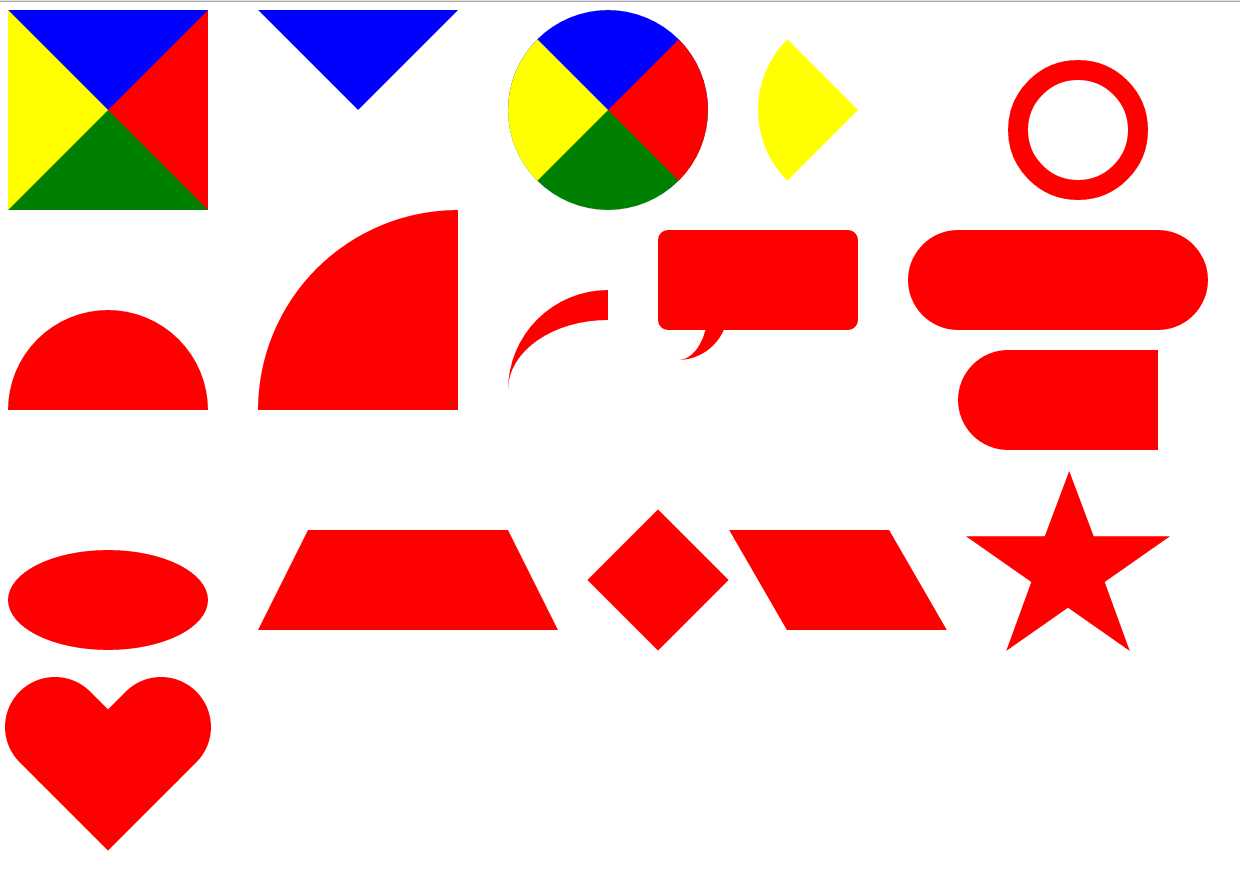
1.正方形
| 1 2 3 4 5 6 7 | #square{ width:0px; height:0px; border-width: 100px; border-style: solid; border-color: blue red green yellow; } |
2.三角形:设置其他边颜色为透明值transparent
| 1 2 3 4 5 6 7 | #triangle{ width : 0px ; height : 0px ; border-width : 100px ; border-style : solid ; border-color : blue transparent transparent transparent ; } |
3.圆形:设置圆角属性border-radius
| 1 2 3 4 5 6 7 8 | # circle { width : 0px ; height : 0px ; border-width : 100px ; border-style : solid ; border-color : blue red green yellow; border-radius: 100px ; } |
4.扇形:同理设置透明色
| 1 2 3 4 5 6 7 8 | #fan{ width : 0px ; height : 0px ; border-width : 100px ; border-style : solid ; border-color : transparent transparent transparent yellow; border-radius: 100px ; } |
5.同心圆:在圆的基础上添加width/height值
| 1 2 3 4 5 6 | #circle- circle { width : 200px ; height : 200px ; border : 50px solid red ; border-radius: 200px ; } |
5.半圆:利用border-radius分别设置左上角,右上角,右下角,左下角的值
| 1 2 3 4 5 6 7 8 | #circle-half{ width : 200px ; height : 100px ; background-color : red ; /*border-color: red;*/ /*border-style: solid;*/ border-radius: 100px 100px 0 0 ; } |
6.四分之一圆:同半圆原理
| 1 2 3 4 5 6 | #circle-double-half{ width : 200px ; height : 200px ; background-color : red ; border-radius: 200px 0 0 0 ; } |
7.小尾巴 :主要是在半圆的基础上添加某一侧的Border,border-top,border-right,border-left,border-bottom,大家阔以动手试一试
| 1 2 3 4 5 6 7 8 | #tail{ width : 100px ; height : 100px ; border-radius: 100px 0 0 0 ; border-top : 30px solid red ; /*border-radius: 0 100px 0 0; border-top: 30px solid red;*/ } |
8.提示框:用到了:after伪类去实现小尾巴的功能
| 1 2 3 4 5 6 7 8 9 10 11 12 13 14 15 16 17 | #pop{ margin-top : 20px ; width : 400px ; height : 200px ; border-radius: 20px ; background-color : red ; position : relative ; } #pop:after{ content : "" ; height : 100px ; width : 100px ; border-radius: 0 0 200px 0 ; border-right : 50px solid red ; position : absolute ; top : 180px ; } |
9.椭圆:这里用到border-radius: 100px / 50px,其中”/”前面的表示水平半径(其值为width/2),后面的表示垂直半径(其值为height/2).
| 1 2 3 4 5 6 7 | #ellipse{ margin-top : 20px ; width : 200px ; height : 100px ; border-radius: 100px / 50px ; background-color : red ; } |
10.梯形:主要是理解Border属性,也就是第一幅图,梯形就比较容易画了
| 1 2 3 4 5 6 7 8 | #trapezium { height : 0 ; width : 200px ; border-bottom : 100px solid red ; border-left : 50px solid transparent ; border-right : 50px solid transparent ; } |
11.菱形:主要是用到旋转transform,不过要考虑到浏览器内核不同,要实现兼容,我这里就省略了
| 1 2 3 4 5 6 | #diamond { width : 100px ; height : 100px ; background-color : red ; transform:rotate( -45 deg); } |
12.平行四边形:也是主要用到transform,但菱形用的是skew,倾斜
| 1 2 3 4 5 6 | #parallelogram { width : 160px ; height : 100px ; background-color : red ; transform:skew( 30 deg); } |
13.五角星:主要是画三个三角形,通过旋转,然后拼接成一个五角星,各种画法自己去体会…..(可以通过不同的三角形去拼接,但原理是一样的)
| 1 2 3 4 5 6 7 8 9 10 11 12 13 14 15 16 17 18 19 20 21 22 23 24 25 26 27 28 29 30 31 32 33 | #star{ width : 0 ; height : 0 ; color : red ; position : relative ; border-left : 100px solid transparent ; border-right : 100px solid transparent ; border-bottom : 70px solid red ; transform:rotate( 35 deg); } #star:before{ content : ‘‘ ; width : 0 ; height : 0 ; position : absolute ; border-bottom : 80px solid red ; border-left : 30px solid transparent ; border-right : 30px solid transparent ; top : -50px ; left : -60px ; transform:rotate( -35 deg); } #star:after{ content : "" ; width : 0px ; height : 0px ; position : absolute ; border-top : 70px solid red ; border-left : 100px solid transparent ; border-right : 100px solid transparent ; left : -100px ; transform:rotate( 110 deg); } |
14:爱心:用菱形和胶囊拼接一个爱心形
| 1 2 3 4 5 6 7 8 9 10 11 12 13 14 15 16 17 18 19 20 21 22 23 24 25 26 27 | #love{ position : relative ; width : 100px ; height : 100px ; background-color : red ; transform:rotate( 45 deg); } #love:before{ position : absolute ; left : -75px ; content : "" ; width : 80px ; height : 100px ; background : red ; border-radius: 50px 0 0 50px ; } #love:after{ position : absolute ; left : 10px ; top : -85px ; content : "" ; width : 80px ; height : 100px ; background : red ; border-radius: 0 50px 50px 0 ; transform:rotate( -90 deg); } |