Ajax--向服务器传递get请求参数

请求参数传递
传统网站表单提交
<form method="get" action="http://www.example.com">
<input type="text" name="username"/>
<input type="password" name="password"/>
</form>
Ajax的GET请求方式
xhr.open(‘get‘,‘http://www.example.com?name=zhangshan&age=20‘);
a.html
 1 <!DOCTYPE html>
 2 <html lang="en">
 3 <head>
 4     <meta charset="utf-8">
 5     <title>Document</title>
 6 </head>
 7 <body>
 8     <p>
 9         <input type="text" id="username" >
10     </p>
11     <p>
12         <input type="text" id="age">
13     </p>
14     <p>
15         <input type="button" value="提交" id=‘btn‘>
16     </p>
17     <script type="text/javascript">
18         //获取按钮元素
19         var btn=document.getElementById(‘btn‘); 20         //获取姓名文本框
21         var username=document.getElementById(‘username‘); 22         //获取年龄文本框
23         var age=document.getElementById(‘age‘); 24         //为按钮添加点击事件
25  btn.onclick=function(){ 26             //创建ajax对象
27             var xhr=new XMLHttpRequest(); 28             //获取用户在文本框中输入的值
29             var nameValue=username.value; 30             var ageValue=age.value; 31
32             //alert(nameValue)
33             //alert(ageValue)
34
35             //拼接请求参数
36             var params=‘username=‘+nameValue+‘&age=‘+ageValue; 37
38             //配置Ajax对象
39  xhr.open(‘get‘,‘http://localhost:3000/get?‘+params); 40             //发送请求
41  xhr.send(); 42             //获取服务器端响应的数据
43  xhr.onload=function(){ 44  console.log(xhr.responseText) 45  } 46  } 47     </script>
48 </body>
49 </html>
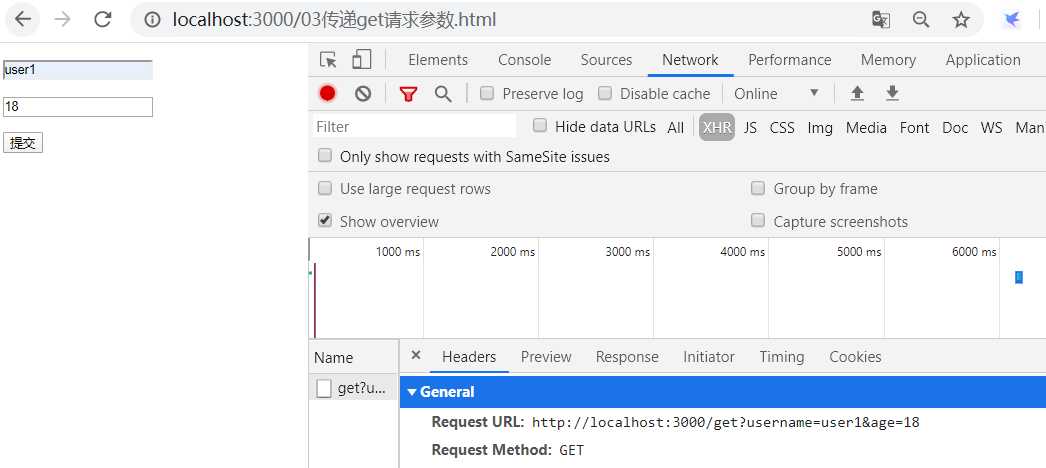
运行截图:
app.js
 1 //引入express框架
 2 const express=require(‘express‘)  3
 4 //引入路径处理模块
 5 const path=require(‘path‘)  6
 7 //创建web服务器
 8 const app=express();  9
10 //静态资源访问服务器功能
11 app.use(express.static(path.join(__dirname,‘public‘))) 12
13 //对应03传递get请求参数.html
14 app.get(‘/get‘,(req,res)=>{ 15  res.send(req.query); 16 }) 17
18 //监听端口
19 app.listen(3000); 20
21 //控制台提示输出
22 console.log(‘服务器启动成功3‘)




最新文章
-

QQ日程提醒设置方法
2026-10-24 -
QQ秒传功能使用技巧
2026-10-24 -
QQ远程协助使用方法
2026-10-24 -
QQ屏幕共享开启方法
2026-10-24 -
QQ多端登录同步设置
2026-10-24 -
QQ电脑手机消息同步
2026-10-24 -
QQ退出登录数据保护
2026-10-24 -
QQ自动登录开启方法
2026-10-24
热门文章
-

ios微信分享的兼容性问题
2026-07-04 -

微信小程序 - 事件绑定bind和catch 区别
2026-07-04 -

7-STM32物联网开发WIFI(ESP8266)+GPRS(Air202)系统方案微信小程序篇(微信配网_申请微信公众号)
2026-07-04 -

微信浏览器中禁止app下载链接的两种处理方法
2026-07-04 -

【php】PHP制作QQ微信支付宝三合一收款码
2026-07-04 -

从微信中跳到外部浏览器
2026-07-04 -

9-STM32物联网开发WIFI(ESP8266)+GPRS(Air202)系统方案微信小程序篇(微信配网配置_开发者基本配置_2)
2026-07-04 -
小程序-微信聊天功能开发详解
2026-07-04