web.py搭建个人网址微信二维码后台开发 -《狗嗨默示录》-

建议在Python2.x版本食用
webapp.py
#!/usr/bin/env python # -*- coding:UTF-8 -*-
import web import qrcode from PIL import Image import datetime urls = ( ‘/‘,‘Index‘
    # ‘/images/logo.png‘,‘Logo‘ #可放于静态文件夹static中
) render = web.template.render(‘templates‘)#模板引擎
class Index: def GET(self):#函数名是当前请求方式
        return render.index() #return open(‘templates/index.html‘,‘rb‘).read()
    def POST(self): #获取前台请求的数据参数
        i = web.input() #获取请求的数据
        return getcode(i) # class Logo:
    # def GET(self):
    # return open(‘images/logo.png‘,‘rb‘).read()
def getcode(info): qr = qrcode.QRCode( version = 1, error_correction =  qrcode.constants.ERROR_CORRECT_Q, #容错比,比例越大可被遮挡部分越多
        box_size = 10, border = 4, )#实例一个qrcode对象
 qr.add_data( ‘‘‘ BEGIN:VCARD\n VERSION:3.0\n URL:%s\n END:VCARD ‘‘‘
        # FN:%s\n
        # ORG:%s\n
        # TITLE:%s\n
        # ADR;WORK:%s\n
        # TEL;WORK:%s\n
        # EMAIL;WORK:%s\n
        # URL:%s\n
        # NOTE:%s\n
        %(info[‘url‘]) # %(info[‘name‘],info[‘company‘],info[‘title‘],info[‘address‘],info[‘mobile‘],info[‘email‘],info[‘url‘],info[‘desc‘])
 ) img = qr.make_image()#创建二维码图片 类型:image
    img.convert("RGBA") img_w,img_h = img.size icon = Image.open(‘static/images/logo1.png‘) icon_w = img_w/4 icon_h = img_h/4 logo = icon.resize((icon_w,icon_h),Image.ANTIALIAS) w = (img_w-icon_w)/2 h = (img_h-icon_h)/2 img.paste(logo,(w,h)) date = datetime.datetime.now().strftime(‘%Y-%m-%d %H`%M`%S‘) # #time.strf(‘%Y-%m-%d %H`%M`%S‘)
    path = ‘static/imgcard/%s.jpg‘%date img.save(path) return path if __name__ == ‘__main__‘: app = web.application(urls,globals()) app.run()
index.html
<!doctype html>
<html>
<head>
    <meta http-equiv="Content-Type" content="text/html; charset=utf-8">
    <title>微信网址二维码--李狗嗨</title>
    <meta name="description" content="">
    <style type="text/css"> *{margin:0;padding:0;} body{font-size:12px;font-family:"Microsoft YaHei UI ";color:#666;}
        /*top start*/ .top{width:100%;height:50px;background:#252525;} .top .t_header{width:1000px;height:50px;margin:0 auto;} .top .t_header .t_logo{margin-top:10px;float:left;} .top .t_header .t_desc{float:right;font-size:22px;color:#fff;line-height:50px;}
        /*end top*/
        /*banner start*/ .banner .b_box{width:1000px;height:460px;margin:0 auto;position:relative;} .banner .b_box .b_info{width:1000px;height:310px;position:absolute;bottom:0px;left:56px;} .banner .b_box .b_info p span{background:#3C9D41;width:100px;height:40px;display:inline-block;float:left;line-height:38px;font-size:14px;color:#FFF;text-align:center;border-radius:3px 0 0 3px;} .banner .b_box .b_info p .b_txt{width:390px;height:40px;border:0;line-height:28px;padding-left:10px;background:#2c2c29;outline:none;color:#fff;} .banner .b_box .b_info .b_login{width:1000px;height:40px;ackground:none;margin-top:25px;} .banner .b_box .b_info .b_login a{width:500px;height:40px;display:block;background:#44b549;text-align:center;line-height:40px;text-decoration:none;font-size:14px;color:#fff;font-weight:bold;border-radius:3px;} .banner .b_box .b_info .b_login a:hover{background:#3C9D41;} .banner .b_box .b_qrcode{width:235px;height:235px;position:absolute;top:130px;right:50px;}
        /*end banner*/
    </style>
    <link type="text/css" rel="stylesheet" href="static/css/animate.css"></link>
</head>
<body>

<!--top start-->
<div class="top">
    <div class="t_header">
        <div class="t_desc">网址生成二维码</div>
    </div>
</div>
<!--end top-->

<!--banner start-->
<div class="banner">
    <div class="b_box">

        <!--b_info start-->
        <div class="b_info">
            <p>
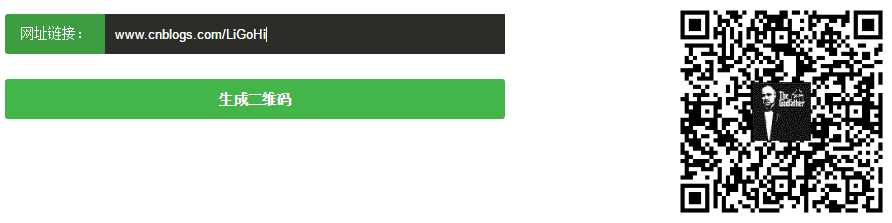
                <span>网址链接:</span>
                <input type="text" class="b_txt" id="url"/>
            </p>

            <p class="b_login">
                <a href="#" id="b_btn">生成二维码</a>
            </p>
        </div>
        <!--end b_info-->
        <!--b_qrcode start-->
        <div class="b_qrcode">

        </div>
        <!--end b_qrcode-->
    </div>
</div>
<!--end banner-->

<script type="text/javascript" src="static/js/jquery.min.js"></script>
<script type="text/javascript"> jQuery(function(){ jQuery("#b_btn").click(function(){ var num = jQuery(".b_txt"); //console.log(num.length);
            var info = ‘‘; for(i=0;i<num.length;i++){ //console.log(num[i].value);
 info += num[i].id + "=" + num[i].value if (i < num.length-1){ info += "&" } }; //console.log(info);
 jQuery.ajax({ type:"post", url:"/", data:info, success:function(data){ jQuery(".b_qrcode").html("<img id=‘qrcodeImg‘ alt=‘二维码‘ width=‘235‘ height=‘235‘ class=‘animated rollIn‘/>"); jQuery("#qrcodeImg").attr("src",data); } }); }); }); </script>

</body>
</html>
最新文章
-

QQ消息漫游开启技巧
2026-10-23 -
QQ桌面图标整理方法
2026-10-23 -
QQ新消息提示灯设置
2026-10-23 -
QQ未读消息角标管理
2026-10-23 -
QQ红点提醒关闭方法
2026-10-23 -
QQ消息横幅预览设置
2026-10-23 -
QQ消息快捷操作面板
2026-10-23 -
QQ右键菜单自定义
2026-10-23
热门文章
-

ios微信分享的兼容性问题
2026-07-04 -

微信小程序 - 事件绑定bind和catch 区别
2026-07-04 -

7-STM32物联网开发WIFI(ESP8266)+GPRS(Air202)系统方案微信小程序篇(微信配网_申请微信公众号)
2026-07-04 -

微信浏览器中禁止app下载链接的两种处理方法
2026-07-04 -

【php】PHP制作QQ微信支付宝三合一收款码
2026-07-04 -

从微信中跳到外部浏览器
2026-07-04 -

9-STM32物联网开发WIFI(ESP8266)+GPRS(Air202)系统方案微信小程序篇(微信配网配置_开发者基本配置_2)
2026-07-04 -
小程序-微信聊天功能开发详解
2026-07-04