

1. 思路
怎么用CSS3画一个带阴影的三角形呢 ? 有童鞋说, 这还不简单吗 网上有很多解决方案, 但其实大多都是实现不太完美的, 存在一些问题
假设我们做一个向下的三角形箭头 常见的方法大致有两种
- 通过边框控制, border-left和border-right设为透明, border-top设为预定的颜色即可
- 通过 transform 旋转盒子
方法一可以画三角形, 但是画阴影是很难做到的(如果做到的朋友, 欢迎给我留言)
2. 设计
2.1 边框法

html结构
?
| 1 2 3 | < body > < div class = "box" ></ div > </ body > |
?
| 1 2 3 4 5 6 7 8 9 10 11 12 13 14 15 16 | .box { position : relative ; width : 200px ; height : 100px ; background : #ff8605 ; box-shadow: 2px 2px 2px rgba( 0 , 0 , 0 , . 2 ); } .box::after { content : ‘‘ ; position : absolute ; bottom : -9px ; left : 45px ; border-left : 10px solid transparent ; border-right : 10px solid transparent ; border-top : 10px solid #ff8605 ; } |
缺点很明显, 我们不能通过box-shadow的方式来设置阴影, 阴影会是一个盒子
但如果不用设阴影, 只是需要边框的话, 我们可以再定义一个伪类元素, 覆盖到三角形的下面即可
?
| 1 2 3 4 5 6 7 8 9 | .box::before { position : absolute ; bottom : -10px ; left : 45px ; content : ‘‘ ; border-left : 10px solid transparent ; border-right : 10px solid transparent ; border-top : 10px solid rgba( 0 , 0 , 0 , . 1 ); } |
如图所示

如果要求不严格似乎也够用了. 但作为一个严峻的前端工程师! 我们还是不能容忍这种实现方法, 下面我们看一看 tranform 方法是如何解决的
2.2 transform方法
这种方法的思路就是使用transform旋转盒子, 一半被上面的容器遮挡, 一半显示出来
?
| 1 2 3 4 5 6 7 8 9 10 11 | .box::before { position : absolute ; bottom : -5px ; left : 45px ; content : ‘‘ ; width : 10px ; height : 10px ; background : #ff8605 ; transform: rotate( 135 deg); box-shadow: 1px -2px 2px rgba( 0 , 0 , 0 , . 2 ); } |
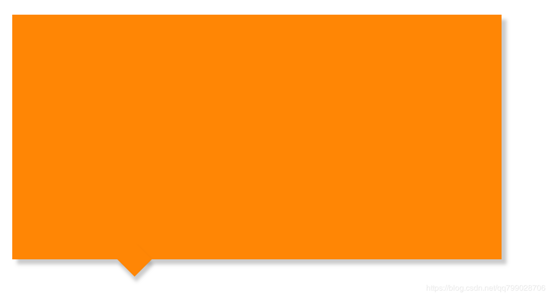
我们似乎实现了我们想要的结果, 但是, 其实是存在一个问题的, 但因为我们的阴影面积不够大, 所以图片上看起来不明显
当我们把 box-shadow 的阴影面积扩大时, 我们发现到问题的所在了
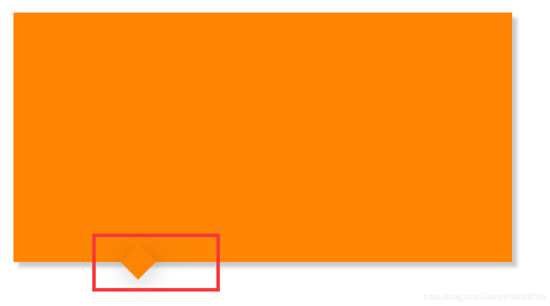
盒子突出来了, 那怎么解决呢
我们再定义一个与容器颜色相同的盒子, 将上半部分盖住就可以啦.
?
| 1 2 3 4 5 6 7 8 9 10 11 12 13 14 15 16 17 18 19 20 21 | /* transform方法 */ .box::before { position : absolute ; bottom : -5px ; left : 45px ; content : ‘‘ ; width : 10px ; height : 10px ; background : #ff8605 ; transform: rotate( 135 deg); box-shadow: 1px -2px 5px rgba( 0 , 0 , 0 , . 2 ); } .box::after { position : absolute ; bottom : 0px ; left : 40px ; content : ‘‘ ; width : 20px ; height : 20px ; background : #ff8605 ; } |
要注意三角形应该用 before 定义, 覆盖的盒子应该用 after 定义, 这样盒子才能覆盖到三角形上面
实现效果:

3. 最终解决方案代码
?
| 1 2 3 4 5 6 7 8 9 10 11 12 13 14 15 16 17 18 19 20 21 22 23 24 25 26 27 28 29 30 31 32 33 34 35 36 37 38 39 40 | <!DOCTYPE html> < html > < head > < meta charset = "utf-8" /> < meta name = "viewport" content = "width=device-width" /> < title >CSS实现带阴影效果的三角形</ title > < style > .box { position: relative; width: 200px; height: 100px; background: #ff8605; box-shadow: 2px 2px 2px rgba(0, 0, 0, .2); } .box::before { position: absolute; bottom: -5px; left: 45px; content: ‘‘; width: 10px; height: 10px; background: #ff8605; transform: rotate(135deg); box-shadow: 1px -2px 5px rgba(0, 0, 0, .2); } .box::after { position: absolute; bottom: 0px; left: 40px; content: ‘‘; width: 20px; height: 20px; background: #ff8605; } </ style > </ head > < body > < div class = "box" ></ div > </ body > </ html > |