
在网上看了很多方法,整合了一下比较适合现在使用的。刚刚开始弄flutter,很多东西都不懂,以前也没有做过移动开发,很是懵逼
pubspec.yaml中添加需要的包
#http
http: ^0.12.0+1

//dio 我在后面没有使用到,但是很多例子有用这个东西,我老是在使用的时候报奇奇怪怪的错,真的愁人
# Dart Http请求库
dio: ^2.1.0

flutter packages get  一下

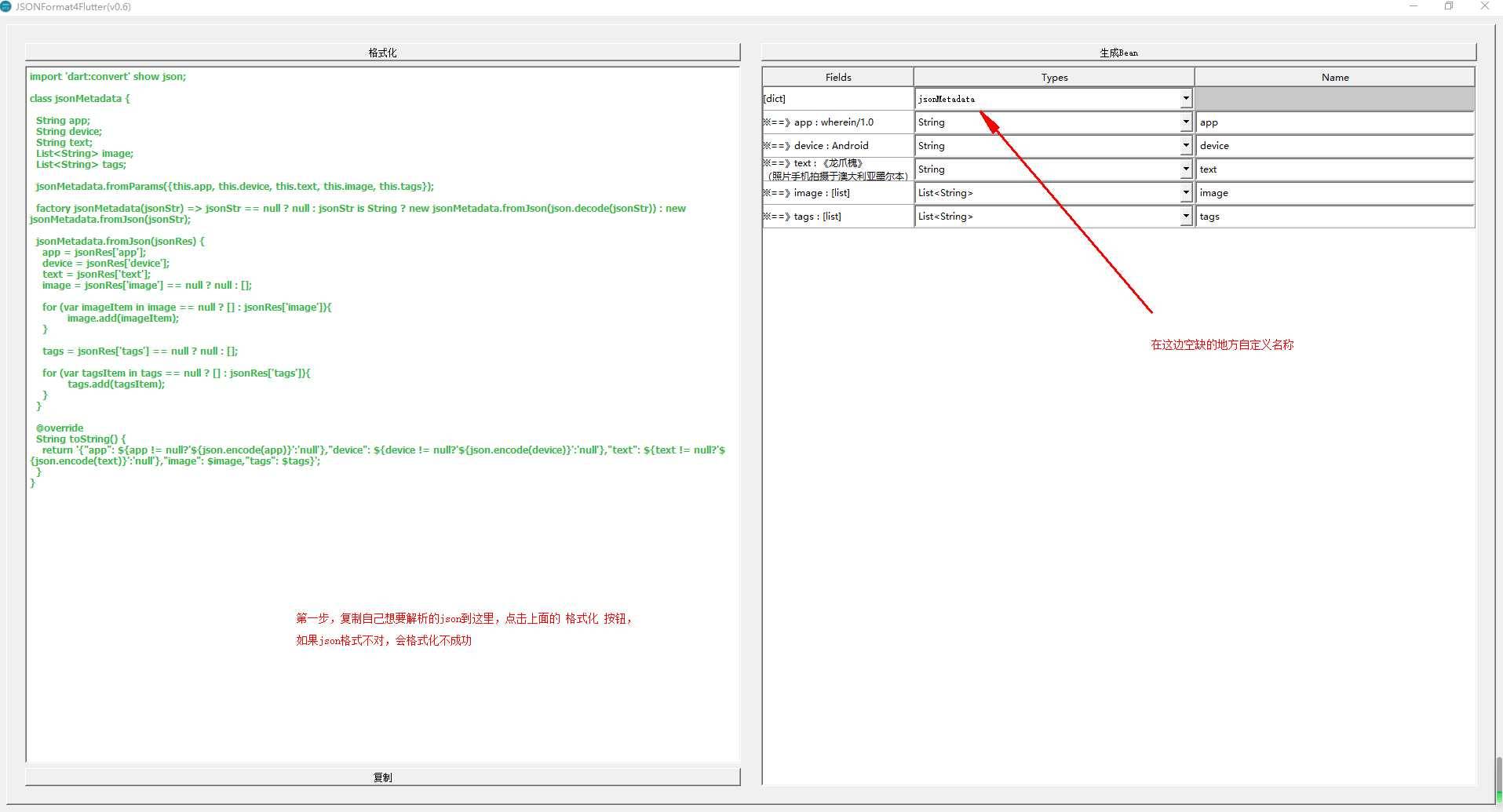
使用了json生成工具,JSONFormat4Flutter 在这里可以下载到。使用方法,在github上面也可以看到详细内容。

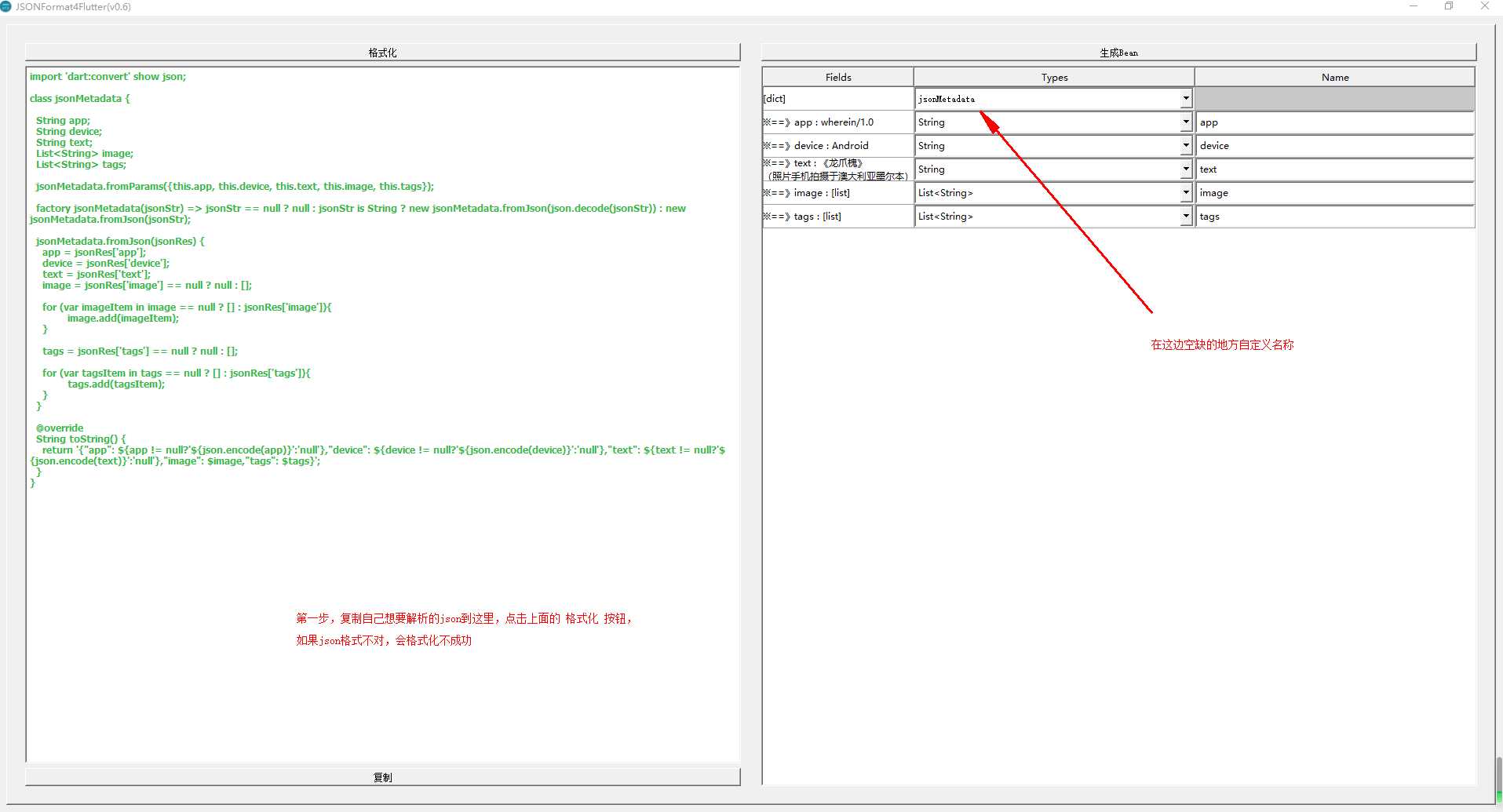
将json复制到框里,点击格式化,在右边的标红部分填写自定义名称(查看顶层类是否有名字),点击 生成Bean 按钮,在左边会生成对应的解析json的类,复制到自己的代码中即可。
如:
import ‘dart:convert‘ show json;
import ‘package:http/http.dart‘ as http;

class personData_list {
  List<personData> list;

  personData_list.fromParams({this.list});

  factory personData_list(jsonStr) => jsonStr == null
      ? null
      : jsonStr is String
          ? new personData_list.fromJson(json.decode(jsonStr))
          : new personData_list.fromJson(jsonStr);

  personData_list.fromJson(jsonRes) {
    list = jsonRes == null ? null : [];

    for (var listItem in list == null ? [] : jsonRes[‘list‘]) {
      list.add(listItem == null ? null : new personData.fromJson(listItem));
    }
  }

  @override
  String toString() {
    return ‘{"json_list": $list}‘;
  }
}

//个人帖子以及其他详细信息
class personData {
  int comment_count;
  int curation_rewards;
  int pending_claimed_accounts;
  int post_bandwidth;
  int post_count;
  int posting_rewards;
  int savings_withdraw_requests;
  int voting_power;
  int witnesses_voted_for;
  bool can_vote;
  String balance; //steem余额
  String created; //创建账号时间
  String delegated_vesting_shares; //代理出去的sp
  String json_metadata;
  String last_account_update;
  String last_owner_update;
  String last_post;
  String last_root_post;
  String last_vote_time;
  String name; //steem名
  String received_vesting_shares;
  String recovery_account;
  String reward_sbd_balance; //奖励的sbd
  String reward_steem_balance; //奖励的STeem
  String reward_vesting_balance; //奖励的sp
  String reward_vesting_steem;
  String savings_balance;
  String savings_sbd_balance;
  String savings_sbd_seconds;
  String sbd_balance; //sbd总值
  String vesting_balance;
  String vesting_shares; //sp总值
  String vesting_withdraw_rate;
  votingPower voting_manabar;

  personData.fromParams(
      {this.comment_count,
      this.curation_rewards,
      this.pending_claimed_accounts,
      this.post_bandwidth,
      this.post_count,
      this.posting_rewards,
      this.savings_withdraw_requests,
      this.voting_power,
      this.witnesses_voted_for,
      this.can_vote,
      this.balance,
      this.created,
      this.delegated_vesting_shares,
      this.json_metadata,
      this.last_account_update,
      this.last_owner_update,
      this.last_post,
      this.last_root_post,
      this.last_vote_time,
      this.name,
      this.received_vesting_shares,
      this.recovery_account,
      this.reward_sbd_balance,
      this.reward_steem_balance,
      this.reward_vesting_balance,
      this.reward_vesting_steem,
      this.savings_balance,
      this.savings_sbd_balance,
      this.savings_sbd_seconds,
      this.sbd_balance,
      this.vesting_balance,
      this.vesting_shares,
      this.vesting_withdraw_rate,
      this.voting_manabar});

  personData.fromJson(jsonRes) {
    comment_count = jsonRes[‘comment_count‘];
    curation_rewards = jsonRes[‘curation_rewards‘];
    pending_claimed_accounts = jsonRes[‘pending_claimed_accounts‘];
    post_bandwidth = jsonRes[‘post_bandwidth‘];
    post_count = jsonRes[‘post_count‘];
    posting_rewards = jsonRes[‘posting_rewards‘];
    savings_withdraw_requests = jsonRes[‘savings_withdraw_requests‘];
    voting_power = jsonRes[‘voting_power‘];
    witnesses_voted_for = jsonRes[‘witnesses_voted_for‘];
    can_vote = jsonRes[‘can_vote‘];
    balance = jsonRes[‘balance‘];
    created = jsonRes[‘created‘];
    delegated_vesting_shares = jsonRes[‘delegated_vesting_shares‘];
    json_metadata = jsonRes[‘json_metadata‘];
    last_account_update = jsonRes[‘last_account_update‘];
    last_owner_update = jsonRes[‘last_owner_update‘];
    last_post = jsonRes[‘last_post‘];
    last_root_post = jsonRes[‘last_root_post‘];
    last_vote_time = jsonRes[‘last_vote_time‘];
    name = jsonRes[‘name‘];
    received_vesting_shares = jsonRes[‘received_vesting_shares‘];
    recovery_account = jsonRes[‘recovery_account‘];
    reward_sbd_balance = jsonRes[‘reward_sbd_balance‘];
    reward_steem_balance = jsonRes[‘reward_steem_balance‘];
    reward_vesting_balance = jsonRes[‘reward_vesting_balance‘];
    reward_vesting_steem = jsonRes[‘reward_vesting_steem‘];
    savings_balance = jsonRes[‘savings_balance‘];
    savings_sbd_balance = jsonRes[‘savings_sbd_balance‘];
    savings_sbd_seconds = jsonRes[‘savings_sbd_seconds‘];
    sbd_balance = jsonRes[‘sbd_balance‘];
    vesting_balance = jsonRes[‘vesting_balance‘];
    vesting_shares = jsonRes[‘vesting_shares‘];
    vesting_withdraw_rate = jsonRes[‘vesting_withdraw_rate‘];
    voting_manabar = jsonRes[‘voting_manabar‘] == null
        ? null
        : new votingPower.fromJson(jsonRes[‘voting_manabar‘]);
  }

  @override
  String toString() {
    return ‘{"comment_count": $comment_count,"curation_rewards": $curation_rewards,"pending_claimed_accounts": $pending_claimed_accounts,"post_bandwidth": $post_bandwidth,"post_count": $post_count,"posting_rewards": $posting_rewards,"savings_withdraw_requests": $savings_withdraw_requests,"voting_power": $voting_power,"witnesses_voted_for": $witnesses_voted_for,"can_vote": $can_vote,"balance": ${balance != null ? ‘${json.encode(balance)}‘ : ‘null‘},"created": ${created != null ? ‘${json.encode(created)}‘ : ‘null‘},"delegated_vesting_shares": ${delegated_vesting_shares != null ? ‘${json.encode(delegated_vesting_shares)}‘ : ‘null‘},"json_metadata": ${json_metadata != null ? ‘${json.encode(json_metadata)}‘ : ‘null‘},"last_account_update": ${last_account_update != null ? ‘${json.encode(last_account_update)}‘ : ‘null‘},"last_owner_update": ${last_owner_update != null ? ‘${json.encode(last_owner_update)}‘ : ‘null‘},"last_post": ${last_post != null ? ‘${json.encode(last_post)}‘ : ‘null‘},"last_root_post": ${last_root_post != null ? ‘${json.encode(last_root_post)}‘ : ‘null‘},"last_vote_time": ${last_vote_time != null ? ‘${json.encode(last_vote_time)}‘ : ‘null‘},"name": ${name != null ? ‘${json.encode(name)}‘ : ‘null‘},"received_vesting_shares": ${received_vesting_shares != null ? ‘${json.encode(received_vesting_shares)}‘ : ‘null‘},"recovery_account": ${recovery_account != null ? ‘${json.encode(recovery_account)}‘ : ‘null‘},"reward_sbd_balance": ${reward_sbd_balance != null ? ‘${json.encode(reward_sbd_balance)}‘ : ‘null‘},"reward_steem_balance": ${reward_steem_balance != null ? ‘${json.encode(reward_steem_balance)}‘ : ‘null‘},"reward_vesting_balance": ${reward_vesting_balance != null ? ‘${json.encode(reward_vesting_balance)}‘ : ‘null‘},"reward_vesting_steem": ${reward_vesting_steem != null ? ‘${json.encode(reward_vesting_steem)}‘ : ‘null‘},"savings_balance": ${savings_balance != null ? ‘${json.encode(savings_balance)}‘ : ‘null‘},"savings_sbd_balance": ${savings_sbd_balance != null ? ‘${json.encode(savings_sbd_balance)}‘ : ‘null‘},"savings_sbd_seconds": ${savings_sbd_seconds != null ? ‘${json.encode(savings_sbd_seconds)}‘ : ‘null‘},"sbd_balance": ${sbd_balance != null ? ‘${json.encode(sbd_balance)}‘ : ‘null‘},"vesting_balance": ${vesting_balance != null ? ‘${json.encode(vesting_balance)}‘ : ‘null‘},"vesting_shares": ${vesting_shares != null ? ‘${json.encode(vesting_shares)}‘ : ‘null‘},"vesting_withdraw_rate": ${vesting_withdraw_rate != null ? ‘${json.encode(vesting_withdraw_rate)}‘ : ‘null‘},"voting_manabar": $voting_manabar}‘;
  }
}


class votingPower {
  int last_update_time;
  String current_mana;

  votingPower.fromParams({this.last_update_time, this.current_mana});

  votingPower.fromJson(jsonRes) {
    last_update_time = jsonRes[‘last_update_time‘];
    current_mana = jsonRes[‘current_mana‘];
  }

  @override
  String toString() {
    return ‘{"last_update_time": $last_update_time,"current_mana": ${current_mana != null ? ‘${json.encode(current_mana)}‘ : ‘null‘}}‘;
  }
}
那么接下来就是使用,在对应的界面中,添加一下代码://贴出了主要的代码,后面的使用 就看具体情况啦
在这之前,有大佬告诫过我,flutter 放弃吧,json解析很烦的,还有各种坑等着你,我也没办法,我不是老大说了不算啊,硬着头皮啃吧。
import ‘package:flutter/material.dart‘;
import ‘package:项目名/data/data_index.dart‘;//这个就是上面那个解析json文件的位置
import ‘package:http/http.dart‘ as http;
class PersonPager extends StatefulWidget {
  @override
  State<StatefulWidget> createState() {
    return new PersonPagerState();
  }
}

class PersonPagerState extends State<PersonPager> {
proFile _profile;
void get() async {
    var userList = await fetchAndParseUsers();
    var projson;
    userList.forEach(
      (user) {
        //这里就是将自己需要的字段取出来
        personName = user.name;
        projson = user.json_metadata;//这个东西还需要解析
      },
    );
    _profile = await ParseProfile(projson);//这个就是解析json_metadata的数据
  }

  //获取个人信息
  Future<List<personData>> fetchAndParseUsers() async {
    apiUrl = SteemApi.steemApiUrl + SteemApi.getPerson;//这个是请求的URL
    var res = await http.get(apiUrl + ‘?names[]=["$name"]‘);//这个版本的http 我很难理解 为什么get没有参数这个东西了,post请求是有的,所以我就很懒的 这样拼上去了
    var jsonStr = res.body;//在这之前 用的是Response 发现没有body这个东西,使用它的data 又是各种报错,捶地!!!!!所以我就使用了http
//    print(res.body);
    var parsedUserList = json.decode(jsonStr);
    var userList = <personData>[];
    parsedUserList.forEach((parsedUser) {
      userList.add(new personData.fromJson(parsedUser));
    });
    return userList;
  }

//后面的json_metadata解析使用的方法 放在这后面
}
json_metadata 这个参数,又需要解析,我试着把这个跟上面的数据一起解析,发现不行,因为这里多了一层?不是很清楚,有大佬知道,希望可以解答一下。感觉应该是可以一起解析的,我这里分开解析了

还是用json快速解析工具 得到以下内容:当然啦 这个不是很重要
import ‘dart:convert‘ show json;

class proFileList {
  proFile profile;

  proFileList.fromParams({this.profile});

  factory proFileList(jsonStr) => jsonStr == null
      ? null
      : jsonStr is String
          ? new proFileList.fromJson(json.decode(jsonStr))
          : new proFileList.fromJson(jsonStr);

  proFileList.fromJson(jsonRes) {
    profile = jsonRes[‘profile‘] == null
        ? null
        : new proFile.fromJson(jsonRes[‘profile‘]);
  }

  @override
  String toString() {
    return ‘{"profile": $profile}‘;
  }
}

class proFile {
  String about;
  String cover_image;
  String location;
  String name;
  String profile_image;
  String website;

  proFile.fromParams(
      {this.about,
      this.cover_image,
      this.location,
      this.name,
      this.profile_image,
      this.website});

  proFile.fromJson(jsonRes) {
    about = jsonRes[‘about‘];
    cover_image = jsonRes[‘cover_image‘];
    location = jsonRes[‘location‘];
    name = jsonRes[‘name‘];
    profile_image = jsonRes[‘profile_image‘];
    website = jsonRes[‘website‘];
  }

  @override
  String toString() {
    return ‘{"about": ${about != null ? ‘${json.encode(about)}‘ : ‘null‘},"cover_image": ${cover_image != null ? ‘${json.encode(cover_image)}‘ : ‘null‘},"location": ${location != null ? ‘${json.encode(location)}‘ : ‘null‘},"name": ${name != null ? ‘${json.encode(name)}‘ : ‘null‘},"profile_image": ${profile_image != null ? ‘${json.encode(profile_image)}‘ : ‘null‘},"website": ${website != null ? ‘${json.encode(website)}‘ : ‘null‘}}‘;
  }
}
这个东东就很烦了,上面的那种使用方法就行不通了。
 //解析json_metadata
  Future<proFile> ParseProfile(var jsonStr) async {
    final parsedUserList = json.decode(jsonStr);
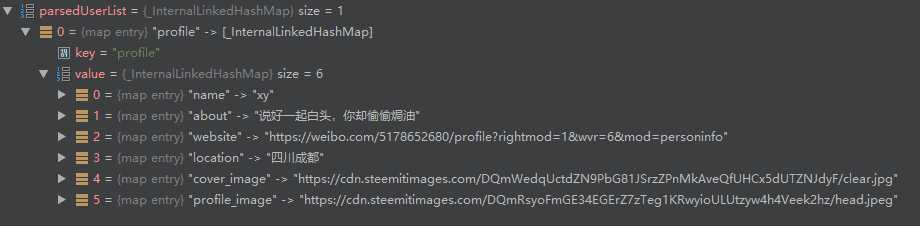
    var list = parsedUserList["profile"];//这里有两层,一开始 没带参数,后面就会是个空值
    proFile pro = new proFile.fromJson(list);
    return pro;
  }
调试的时候发现,是两层
遇到bug,错误 还是不要害怕,能调试就慢慢来解决,反正我头铁
希望上面的东西能帮到你=。=