自定义微信小程序swiper轮播图面板指示点的样式

微信小程序的swiper组件是滑块视图容器,也就是说平常我们看到的轮播图就可以用它来做,不过这个组件有很多样式是固定的,但是,有时候我们的设计稿的面板指示点是需要个性化的,那么如何去修改swiper组件的面板指示点的样式呢?最近在使用swiper的时候也在想这个,最后发现在调试的时候,可以看到他的选择器。如图:
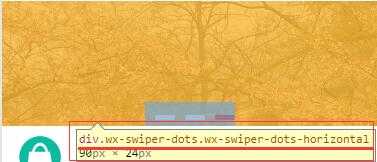
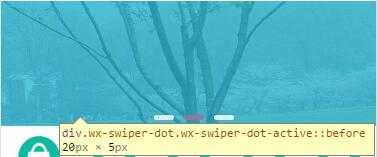

|
1
2
3
4
5
6
7
8
9
|
<
swiper
class="swiper-box" indicator-dots="{{ indicatordots }}" autoplay="{{ autoplay }}">
<
block
wx:for="{{ swiperItem }}">
<
swiper-item
>
<
navigator
url="{{ item.linkUrl }}">
<
image
class="slide-image" src="{{ item.imgUrl }}"></
image
>
</
navigator
>
</
swiper-item
>
</
block
>
</
swiper
>
|
|
1
2
3
4
5
6
7
8
9
10
11
12
13
14
15
16
17
18
19
|
.swiper-box .wx-swiper-dots.wx-swiper-dots-horizontal{
margin-bottom
:
2
rpx;
}
.swiper-box .wx-swiper-dot{
width
:
40
rpx;
display
: inline-flex;
height
:
10
rpx;
margin-left
:
20
rpx;
justify-
content
:space-between;
}
.swiper-box .wx-swiper-dot::before{
content
:
‘‘
;
flex-grow:
1
;
background
: rgba(
255
,
255
,
255
,
0.8
);
border-radius:
8
rpx
}
.swiper-box .wx-swiper-dot-active::before{
background
:rgba(
244
,
0
,
0
,
0.8
);
}
|

虽然可以通过上面的代码修改swiper面板指示点的样式,但是还是有局限性的,不过总算可以修改了,在此简单记录一下。。
.
最新文章
-

QQ节日祝福自动发送
2026-10-21 -
QQ定时祝福发送方法
2026-10-21 -
QQ纪念日推送设置
2026-10-21 -
QQ日程智能提醒方法
2026-10-21 -
QQ待办事项管理技巧
2026-10-21 -
QQ提醒事项同步开启
2026-10-21 -
QQ语音备忘使用方法
2026-10-21 -
QQ文字备忘快速记录
2026-10-21
热门文章
-

ios微信分享的兼容性问题
2026-07-04 -

微信小程序 - 事件绑定bind和catch 区别
2026-07-04 -

微信浏览器中禁止app下载链接的两种处理方法
2026-07-04 -

7-STM32物联网开发WIFI(ESP8266)+GPRS(Air202)系统方案微信小程序篇(微信配网_申请微信公众号)
2026-07-04 -

从微信中跳到外部浏览器
2026-07-04 -

9-STM32物联网开发WIFI(ESP8266)+GPRS(Air202)系统方案微信小程序篇(微信配网配置_开发者基本配置_2)
2026-07-04 -

【php】PHP制作QQ微信支付宝三合一收款码
2026-07-04 -
小程序-微信聊天功能开发详解
2026-07-04