数据库CRUD操作以及MyBatisd的配置使用

• 业务字段设计
• 数据库创建 • CRUD操作 • MyBatis集成 • 注解和XML定义 • ViewObject和DateTool • 首页开发 • 业务字段设计 实体:
实体: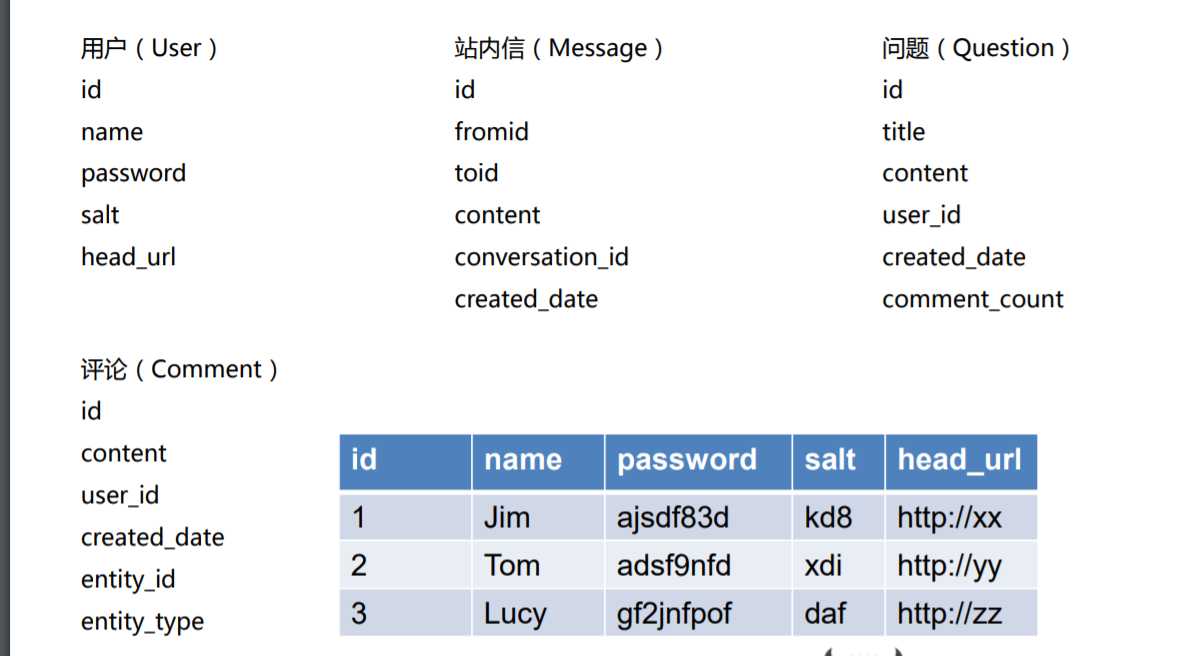
• 数据库创建 GUI版本管理工具创建,然后通过GUI转SQL; • CRUD操作 insert into table_name (列1, 列2,...) VALUES (值1, 值2,....); select 列名1,列名2 from 表名称 where 条件; 条件: between 1 and 2 order by 3 desc UPDATE 表名称 SET 列名称 = 新值 WHERE 列名称 = 某值 • MyBatis集成 1. application.properties增加spring配置数据库链接地址 spring.datasource.url = jdbc:mysql://localhost:3306/wenda?useUnicode=true&characterEncoding=utf8&useSSL=false spring.datasource.username = root spring.datasource.password = qwertyuiop mybatis.config-location = classpath:mybatis-config.xml 同时:在配置的同级别目录下:resources/templates建立粘贴建立官网有:mybatis-config.xml
 <?
xml version
="1.0"
encoding
="UTF-8"
?>
<!DOCTYPE
configuration
PUBLIC
"-//mybatis.org//DTD Config 3.0//EN"
"http://mybatis.org/dtd/mybatis-3-config.dtd"
>
<
configuration
>
<
settings
>
<!-- Globally enables or disables any caches configured in any mapper under this configuration -->
<
setting
name
="cacheEnabled"
value
="true"
/>
<!-- Sets the number of seconds the driver will wait for a response from the database -->
<
setting
name
="defaultStatementTimeout"
value
="3000"
/>
<!-- Enables automatic mapping from classic database column names A_COLUMN to camel case classic Java property names aColumn -->
<
setting
name
="mapUnderscoreToCamelCase"
value
="true"
/>
<!-- Allows JDBC support for generated keys. A compatible driver is required.
This setting forces generated keys to be used if set to true,
as some drivers deny compatibility but still work -->
<
setting
name
="useGeneratedKeys"
value
="true"
/>
</
settings
>
<!-- Continue going here -->
</
configuration
>
2. pom.xml引入mybatis-spring-boot-starter和mysql-connector-java
<dependency>
<groupId>
org.mybatis
</groupId>
<artifactId>
mybatis
</artifactId>
<version>1.1.1
</version>
</dependency>
<
dependency
>
<
groupId
>
mysql
</
groupId
>
<
artifactId
>
mysql-connector-java
</
artifactId
>
<
scope
>
runtime
</
scope
>
</
dependency
>
3. 官网:
http://www.mybatis.org/mybatis3/zh/index.html
DAO层建立modul相关的userDao来通过mybatis访问数据库库: //注解配置;
@Mapper
public interface
UserDAO
{
String
TABLE_NAME
=
"user"
;
String
INSET_FIELDS
=
" name, password, salt, head_url "
;
String
SELECT_FIELDS
=
" id, name, password, salt, head_url"
; //通过抽象,实现crud的复用;
@Insert
(
{
"insert into "
,
TABLE_NAME
,
"("
,
INSET_FIELDS
,
") values (#{name},#{password},#{salt},#{headUrl})"
}
)
int
addUser
(
User
user
)
;
@Select
(
{
"select "
,
SELECT_FIELDS
,
" from "
,
TABLE_NAME
,
" where id=#{id}"
}
)
User
selectById
(
int
id
)
;
@Select
(
{
"select "
,
SELECT_FIELDS
,
" from "
,
TABLE_NAME
,
" where name=#{name}"
}
)
User
selectByName
(
String
name
)
;
@Update
(
{
"update "
,
TABLE_NAME
,
" set password=#{password} where id=#{id}"
}
)
void
updatePassword
(
User
user
)
;
@Delete
(
{
"delete from "
,
TABLE_NAME
,
" where id=#{id}"
}
)
void
deleteById
(
int
id
)
;
} //xml配置,在相应的resources下建立DAO相应目录的的xml;
<mapper namespace="com.nowcoder.dao.QuestionDAO"> <sql id="table">question</sql> <sql id="selectFields">id,title, content,comment_count,created_date,user_id </sql> <select id="selectByUserIdAndOffset" resultType="com.nowcoder.model.Question"> SELECT <include refid="selectFields"/> FROM <include refid="table"/>
<if test="userId != 0"> WHERE user_id = #{userId} </if> ORDER BY id DESC LIMIT #{offset},#{limit} </select> </mapper>
• 注解和XML定义
• ViewObject和DateTool
• 首页开发
<?
xml version
="1.0"
encoding
="UTF-8"
?>
<!DOCTYPE
configuration
PUBLIC
"-//mybatis.org//DTD Config 3.0//EN"
"http://mybatis.org/dtd/mybatis-3-config.dtd"
>
<
configuration
>
<
settings
>
<!-- Globally enables or disables any caches configured in any mapper under this configuration -->
<
setting
name
="cacheEnabled"
value
="true"
/>
<!-- Sets the number of seconds the driver will wait for a response from the database -->
<
setting
name
="defaultStatementTimeout"
value
="3000"
/>
<!-- Enables automatic mapping from classic database column names A_COLUMN to camel case classic Java property names aColumn -->
<
setting
name
="mapUnderscoreToCamelCase"
value
="true"
/>
<!-- Allows JDBC support for generated keys. A compatible driver is required.
This setting forces generated keys to be used if set to true,
as some drivers deny compatibility but still work -->
<
setting
name
="useGeneratedKeys"
value
="true"
/>
</
settings
>
<!-- Continue going here -->
</
configuration
>
2. pom.xml引入mybatis-spring-boot-starter和mysql-connector-java
<dependency>
<groupId>
org.mybatis
</groupId>
<artifactId>
mybatis
</artifactId>
<version>1.1.1
</version>
</dependency>
<
dependency
>
<
groupId
>
mysql
</
groupId
>
<
artifactId
>
mysql-connector-java
</
artifactId
>
<
scope
>
runtime
</
scope
>
</
dependency
>
3. 官网:
http://www.mybatis.org/mybatis3/zh/index.html
DAO层建立modul相关的userDao来通过mybatis访问数据库库: //注解配置;
@Mapper
public interface
UserDAO
{
String
TABLE_NAME
=
"user"
;
String
INSET_FIELDS
=
" name, password, salt, head_url "
;
String
SELECT_FIELDS
=
" id, name, password, salt, head_url"
; //通过抽象,实现crud的复用;
@Insert
(
{
"insert into "
,
TABLE_NAME
,
"("
,
INSET_FIELDS
,
") values (#{name},#{password},#{salt},#{headUrl})"
}
)
int
addUser
(
User
user
)
;
@Select
(
{
"select "
,
SELECT_FIELDS
,
" from "
,
TABLE_NAME
,
" where id=#{id}"
}
)
User
selectById
(
int
id
)
;
@Select
(
{
"select "
,
SELECT_FIELDS
,
" from "
,
TABLE_NAME
,
" where name=#{name}"
}
)
User
selectByName
(
String
name
)
;
@Update
(
{
"update "
,
TABLE_NAME
,
" set password=#{password} where id=#{id}"
}
)
void
updatePassword
(
User
user
)
;
@Delete
(
{
"delete from "
,
TABLE_NAME
,
" where id=#{id}"
}
)
void
deleteById
(
int
id
)
;
} //xml配置,在相应的resources下建立DAO相应目录的的xml;
<mapper namespace="com.nowcoder.dao.QuestionDAO"> <sql id="table">question</sql> <sql id="selectFields">id,title, content,comment_count,created_date,user_id </sql> <select id="selectByUserIdAndOffset" resultType="com.nowcoder.model.Question"> SELECT <include refid="selectFields"/> FROM <include refid="table"/>
<if test="userId != 0"> WHERE user_id = #{userId} </if> ORDER BY id DESC LIMIT #{offset},#{limit} </select> </mapper>
• 注解和XML定义
• ViewObject和DateTool
• 首页开发 
最新文章
-

QQ支付人脸支付设置
2026-10-31 -
QQ支付短信验证设置,给账户资金加上动态安全锁
2026-10-31 -
QQ支付安全锁开启
2026-10-31 -
QQ会员开通方法
2026-10-31 -
QQ会员续费方式汇总
2026-10-31 -
QQ会员特权完整介绍
2026-10-31 -
QQ黄钻会员特权使用
2026-10-31 -
QQ超级会员加速方法
2026-10-31
热门文章
-

ios微信分享的兼容性问题
2026-07-04 -

微信浏览器中禁止app下载链接的两种处理方法
2026-07-04 -

微信小程序 - 事件绑定bind和catch 区别
2026-07-04 -

7-STM32物联网开发WIFI(ESP8266)+GPRS(Air202)系统方案微信小程序篇(微信配网_申请微信公众号)
2026-07-04 -

【php】PHP制作QQ微信支付宝三合一收款码
2026-07-04 -

从微信中跳到外部浏览器
2026-07-04 -

10-STM32物联网开发WIFI(ESP8266)+GPRS(Air202)系统方案微信小程序篇(微信配网配置_Airkiss步骤_1)
2026-07-04 -

9-STM32物联网开发WIFI(ESP8266)+GPRS(Air202)系统方案微信小程序篇(微信配网配置_开发者基本配置_2)
2026-07-04