CentOS7 安装mysql8.0(YUM方式)

1.下载mysql源安装包
shell> wget http://dev.mysql.com/get/mysql80-community-release-el7-1.noarch.rpm 2.安装mysql源 shell> yum localinstall mysql80-community-release-el7-1.noarch.rpm 3.检查mysql源是否安装成功 shell> yum repolist enabled | grep "mysql.*-community.*" 4.修改 vim /etc/yum.repos.d/mysql-community.repo源 ,改变默认安装的mysql版本。比如要安装5.6版本,将5.7源的enabled=1改成enabled=0。然后再将5.6源的enabled=0改成enabled=1即可。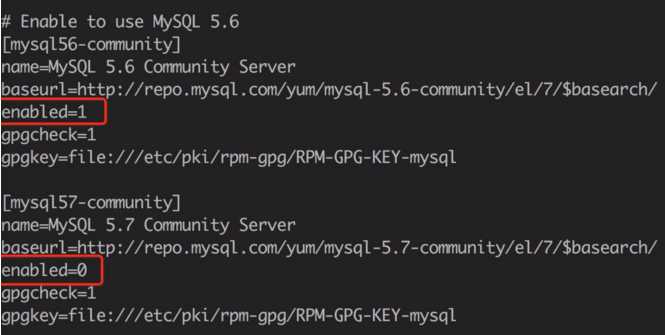
5.安装MySQL shell> yum install mysql-community-server 6.启动MySQL服务 shell> systemctl start mysqld 7.开机启动 shell> systemctl enable mysqld shell> systemctl daemon-reload 8.修改root本地登录密码 1)查看mysql密码 shell> grep ‘temporary password‘ /var/log/mysqld.log

下一篇
SQL命令(三)
最新文章
-

QQ钱包交易记录查看
2026-11-01 -
重视QQ钱包资金安全保护,畅享便捷移动支付体验
2026-11-01 -
QQ钱包退款查询方法
2026-11-01 -
QQ红包秒抢技巧,合规前提下提升抢中概率的实用指南
2026-11-01 -
QQ红包提醒设置方法
2026-11-01 -
QQ红包到账通知设置
2026-11-01 -
QQ钱包零钱充值方法
2026-11-01 -
QQ钱包提现操作方法
2026-11-01
热门文章
-

微信浏览器中禁止app下载链接的两种处理方法
2026-07-04 -

微信小程序 - 事件绑定bind和catch 区别
2026-07-04 -

ios微信分享的兼容性问题
2026-07-04 -

7-STM32物联网开发WIFI(ESP8266)+GPRS(Air202)系统方案微信小程序篇(微信配网_申请微信公众号)
2026-07-04 -

【php】PHP制作QQ微信支付宝三合一收款码
2026-07-04 -

从微信中跳到外部浏览器
2026-07-04 -

10-STM32物联网开发WIFI(ESP8266)+GPRS(Air202)系统方案微信小程序篇(微信配网配置_Airkiss步骤_1)
2026-07-04 -

9-STM32物联网开发WIFI(ESP8266)+GPRS(Air202)系统方案微信小程序篇(微信配网配置_开发者基本配置_2)
2026-07-04