
【环境介绍】
系统环境:Red Hat Enterprise Linux 7 + 5.7.18 + MHA version 0.57
MHA架构中从库之间的负责均衡可选择mysql_route&keepalived+lvs&haproxy+keepalived&proxy中间件来实现,这里简单使用haproxy来实现
备库:192.168.142.112 192.168.142.113 这里设置192.168.142.113为haproxy配置主机
【搭建步骤:软件部署】
系统软件安装:
在一个从库或者在另一台主机上安装即可:直接使用系统自带的haproxy安装,yum install haproxy
mysql数据库用户创建: 用于haproxy检测数据库状态,注意不要设置该用户的密码: mysql> create user haproxy_check@‘192.168.142.%‘;
Query OK, 0 rows affected (0.13 sec) mysql> grant usage on *.* to haproxy_check@‘192.168.142.%‘;
Query OK, 0 rows affected (0.01 sec) 设置haproxy配置文件: cat >haproxy.cfg
#———————————————————————
# Example configuration for a possible web application. See the
# full configuration options online.
#
# http://haproxy.1wt.eu/download/1.4/doc/configuration.txt
#
#——————————————————————— #———————————————————————
# Global settings
#———————————————————————
global
# to have these messages end up in /var/log/haproxy.log you will
# need to:
#
# 1) configure syslog to accept network log events. This is done
# by adding the ‘-r‘ option to the SYSLOGD_OPTIONS in
# /etc/sysconfig/syslog
#
# 2) configure local2 events to go to the /var/log/haproxy.log
# file. A line like the following can be added to
# /etc/sysconfig/syslog
#
# local2.* /var/log/haproxy.log
log 127.0.0.1 local0 notice
chroot /var/lib/haproxy
pidfile /var/run/haproxy.pid
maxconn 4000
user haproxy
group haproxy #———————————————————————
# common defaults that all the ‘listen‘ and ‘backend‘ sections will
# use if not designated in their block
#———————————————————————
defaults
log global
retries 3
option dontlognull
option redispatch
maxconn 2000
timeout connect 3000
timeout server 5000
timeout client 5000 #———————————————————————
# round robin balancing between the various backends
#———————————————————————
listen mysql-mha
bind 192.168.142.113:4040
mode tcp
option mysql-check user haproxy_check
balance roundrobin
server mysql_mha2 192.168.142.112:33061 weight 1 check
server mysql_mha3 192.168.142.113:33061 weight 1 check #———————————————————————
# static backend for serving up images, stylesheets and such
#———————————————————————
listen stats *:8888
mode http
option httpclose
balance roundrobin
stats uri /
stats realm Haproxy\ Statistics
stats auth myadmin:myadmin 检查配置文件是否有问题 haproxy -f /etc/haproxy/haproxy.cfg -c 输出:Configuration file is valid为正常 设置日志路径配置: cat /etc/rsyslog.d/49-haproxy.conf
# Create an additional socket in haproxy‘s chroot in order to allow logging via
# /dev/log to chroot‘ed HAProxy processes
$AddUnixListenSocket /var/lib/haproxy/dev/log
$ModLoad imudp
$UDPServerRun 514
local3.* /var/log/haproxy.log
# Send HAProxy messages to a dedicated logfile
if $programname startswith ‘haproxy‘ then /var/log/haproxy.log
&~ 设置完成之后,重新系统日志进程 service rsyslog restart
【启动haproxy进程】 启动haproxy进程 service haproxy start 查看进程状态及日志信息 service haproxy status
Redirecting to /bin/systemctl status haproxy.service
haproxy.service – HAProxy Load Balancer
Loaded: loaded (/usr/lib/systemd/system/haproxy.service; disabled)
Active: active (running) since 一 2018-06-11 15:53:09 CST; 35s ago
Main PID: 10512 (haproxy-systemd)
CGroup: /system.slice/haproxy.service
├─10512 /usr/sbin/haproxy-systemd-wrapper -f /etc/haproxy/haproxy.cfg -p /run/haproxy.pid
├─10513 /usr/sbin/haproxy -f /etc/haproxy/haproxy.cfg -p /run/haproxy.pid -Ds
└─10514 /usr/sbin/haproxy -f /etc/haproxy/haproxy.cfg -p /run/haproxy.pid -Ds 6月 11 15:53:09 mysqldb2 systemd[1]: Starting HAProxy Load Balancer…
6月 11 15:53:09 mysqldb2 systemd[1]: Started HAProxy Load Balancer. tail -f /var/log/haproxy.log Jun 11 15:53:09 localhost haproxy[10513]: Proxy mysql-mha started.
Jun 11 15:53:09 localhost haproxy[10513]: Proxy stats started. ps -ef |grep haproxy
root 10512 1 0 15:53 ? 00:00:00 /usr/sbin/haproxy-systemd-wrapper -f /etc/haproxy/haproxy.cfg -p /run/haproxy.pid
haproxy 10513 10512 0 15:53 ? 00:00:00 /usr/sbin/haproxy -f /etc/haproxy/haproxy.cfg -p /run/haproxy.pid -Ds
haproxy 10514 10513 0 15:53 ? 00:00:00 /usr/sbin/haproxy -f /etc/haproxy/haproxy.cfg -p /run/haproxy.pid -Ds
root 10609 62609 0 15:53 pts/0 00:00:00 tail -f /var/log/haproxy.log
root 10809 62956 0 15:54 pts/5 00:00:00 grep –color=auto haproxy
netstat -nltp|grep haproxy
tcp 0 0 192.168.142.113:4040 0.0.0.0:* LISTEN 10513/haproxy
tcp 0 0 0.0.0.0:8888 0.0.0.0:* LISTEN 10513/haproxy
【负载均衡测试】 通过192.168.142.113 4040端口访问数据库,每次执行都访问不同的数据库即可 mysql -ubackup -pbackup -h192.168.142.113 -P4040 -e “select @@hostname”;
mysql: [Warning] Using a password on the command line interface can be insecure.
+————+
| @@hostname |
+————+
| mysqldb1 |
+————+
mysql -ubackup -pbackup -h192.168.142.113 -P4040 -e “select @@hostname”;
mysql: [Warning] Using a password on the command line interface can be insecure.
+————+
| @@hostname |
+————+
| mysqldb2 |
+————+
mysql -ubackup -pbackup -h192.168.142.113 -P4040 -e “select @@hostname”;
mysql: [Warning] Using a password on the command line interface can be insecure.
+————+
| @@hostname |
+————+
| mysqldb1 |
+————+
mysql -ubackup -pbackup -h192.168.142.113 -P4040 -e “select @@hostname”;
mysql: [Warning] Using a password on the command line interface can be insecure.
+————+
| @@hostname |
+————+
| mysqldb2 |
+————+
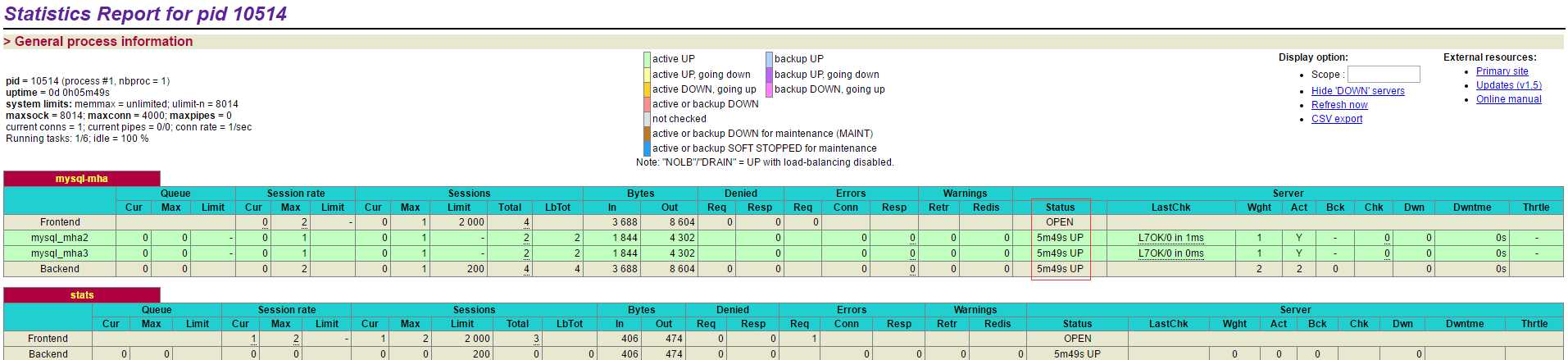
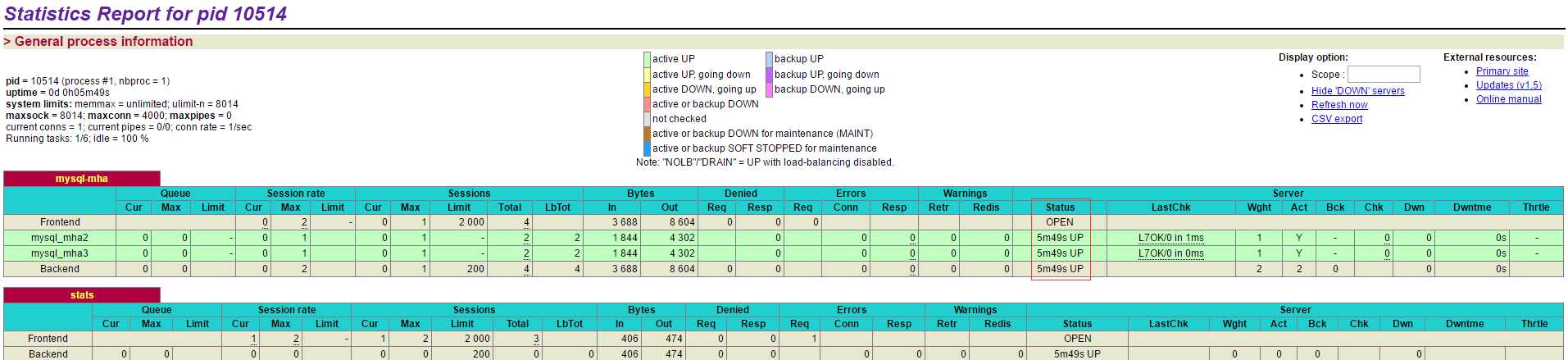
【进程web监控】 访问:http://192.168.142.113:8888/haproxyadmin?stats 用户密码为配置文件中的:myadmin/myadmin