星云链智能合约开发(七):Dapp开发

安装neb.js
neb.js提供javascript开发的API接口
- 创建一个neb文件夹,在终端命令行中进入该文件夹,克隆neb.js
git clone https://github.com/nebulasio/neb.js.git - 会新建一个neb.js文件夹,进入该文件夹,安装所有依赖
npm install - 安装gulp
npm install gulp - 打包生成neb.js等文件
gulp - 执行成功会生成/dist文件夹,文件夹中会生成我们要使用js文件。
- neb.js:Used in browser side. Including outside dependency.
- neb-light.js:Used in Repl console. Not including outside dependency.
- nebulas.js: Fully functional in the browser. Users can create an address, sign a transaction, and deploy/call a smart contract.
安装nebPay
NebPay SDK 为不同平台的交易提供了统一的支付接口,开发者在Dapp页面中使用NebPay API可以通过浏览器插件钱包、手机app钱包等实现交易支付和合约调用。
github地址:https://github.com/nebulasio/nebPay
安装方法同上。会生成nebPay.js文件
开发Dapp
要实现的功能非常简单:
- 调用合约中的save方法发布信息
- 调用合约中的read方法读取信息
建立项目
将前面生成的nebulas.js和nebPay.js放在libs文件夹下,我的目录结构如下:
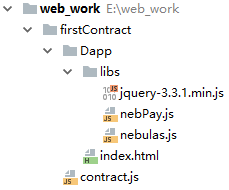
index.html源码
<!DOCTYPE html>
<html lang="en">
<head>
    <meta charset="UTF-8">
    <title>星云链Dapp</title>
</head>
<body>
    <div>
        <h1>发布信息</h1>
        <div>标题:</div>
        <div><input type="text" id="title" style="width:370px"/></div>
        <div>内容:</div>
        <div><textarea cols="50" rows="10" id="content">



最新文章
-

QQ消息漫游开启技巧
2026-10-23 -
QQ桌面图标整理方法
2026-10-23 -
QQ新消息提示灯设置
2026-10-23 -
QQ未读消息角标管理
2026-10-23 -
QQ红点提醒关闭方法
2026-10-23 -
QQ消息横幅预览设置
2026-10-23 -
QQ消息快捷操作面板
2026-10-23 -
QQ右键菜单自定义
2026-10-23
热门文章
-

ios微信分享的兼容性问题
2026-07-04 -

微信小程序 - 事件绑定bind和catch 区别
2026-07-04 -

7-STM32物联网开发WIFI(ESP8266)+GPRS(Air202)系统方案微信小程序篇(微信配网_申请微信公众号)
2026-07-04 -

微信浏览器中禁止app下载链接的两种处理方法
2026-07-04 -

【php】PHP制作QQ微信支付宝三合一收款码
2026-07-04 -

从微信中跳到外部浏览器
2026-07-04 -

9-STM32物联网开发WIFI(ESP8266)+GPRS(Air202)系统方案微信小程序篇(微信配网配置_开发者基本配置_2)
2026-07-04 -
小程序-微信聊天功能开发详解
2026-07-04