ios ideviceintaller安装

1.安装brew
打开终端输入:
/usr/bin/ruby -e "$(curl -fsSL https://raw.githubusercontent.com/Homebrew/install/master/install)" 添加环境变量:
sudo vi /etc/profile,修改如
BREW_HOME="/usr/local/bin" #添加BREW_HOME
PATH=".$PATH:$JAVA_HOME/bin:$BREW_HOME" #追加BREW_HOME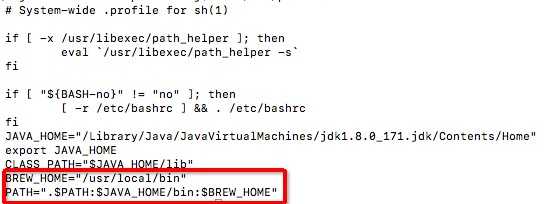
2.安装node
brew install node
node -v #查看node版本
npm -v #查看npm版本
3.开始安装ideviceinstaller环境
brew install carthage
npm i -g ios-deploy
brew install libimobiledevice --HEAD
brew install ideviceinstaller
#使用brew安装时,如果出现update home brew 直接control C退出更新
4.ideviceinstaller使用
-u, --udid UDID 根据设备的udid选择设备Target specific device by its 40-digit device UDID.
-l, --list-apps 列出安装的应用List apps, possible options:
-o list_user - list user apps only (this is the default)
-o list_system - list system apps only
-o list_all - list all types of apps
-o xml - print full output as xml plist
-i, --install ARCHIVE 安装ipa包 Install app from package file specified by ARCHIVE.
ARCHIVE can also be a .ipcc file for carrier bundles.
-U, --uninstall APPID 卸载应用Uninstall app specified by APPID.
-g, --upgrade ARCHIVE Upgrade app from package file specified by ARCHIVE.
-L, --list-archives List archived applications, possible options:
-o xml - print full output as xml plist
-a, --archive APPID Archive app specified by APPID, possible options:
-o uninstall - uninstall the package after making an archive
-o app_only - archive application data only
-o docs_only - archive documents (user data) only
-o copy=PATH - copy the app archive to directory PATH when done
-o remove - only valid when copy=PATH is used: remove after copy
-r, --restore APPID Restore archived app specified by APPID
-R, --remove-archive APPID Remove app archive specified by APPID
-o, --options Pass additional options to the specified command.
-h, --help prints usage information
-d, --debug enable communication debugging
FAQ:
1.运行itools时,执行ideviceinstaller命令,出现“Could not start com.apple.mobile.installation_proxy!”,如

解决方法:退出itools即可




最新文章
-

QQ日程提醒设置方法
2026-10-24 -
QQ秒传功能使用技巧
2026-10-24 -
QQ远程协助使用方法
2026-10-24 -
QQ屏幕共享开启方法
2026-10-24 -
QQ多端登录同步设置
2026-10-24 -
QQ电脑手机消息同步
2026-10-24 -
QQ退出登录数据保护
2026-10-24 -
QQ自动登录开启方法
2026-10-24
热门文章
-

ios微信分享的兼容性问题
2026-07-04 -

微信小程序 - 事件绑定bind和catch 区别
2026-07-04 -

7-STM32物联网开发WIFI(ESP8266)+GPRS(Air202)系统方案微信小程序篇(微信配网_申请微信公众号)
2026-07-04 -

微信浏览器中禁止app下载链接的两种处理方法
2026-07-04 -

【php】PHP制作QQ微信支付宝三合一收款码
2026-07-04 -

从微信中跳到外部浏览器
2026-07-04 -

9-STM32物联网开发WIFI(ESP8266)+GPRS(Air202)系统方案微信小程序篇(微信配网配置_开发者基本配置_2)
2026-07-04 -

小程序-微信聊天功能开发详解
2026-07-04